.svg)
Shopify Local Pickup & Delivery for Bookstores: The Complete Guide
Last updated on
October 30, 2026
.png)
Ask any book lover where they’d rather buy books, and many will name their neighbourhood bookshop: the cosy space, the friendly staff, the simple joy of browsing. So why do so many still buy from Amazon? Because a reader who needs the next book in a series now will choose same-day delivery over a trip to the bookshop that may or may not have it in stock.
If you run an independent bookshop on Shopify, you need more than just an online store with fully stocked shelves. To compete with giants like Amazon, you need in-store pickup and local delivery. A reader orders on their lunch break, collects at your counter by 5 PM. A pickup visit is a chance for an upsell, be it a book from the staff pick, a new release, a bookmark, or a tote. For readers who can’t make it in, local delivery brings the books right to their door the same day.
In this guide, you’ll learn how pickup and delivery on Shopify help bring in more sales, what Shopify’s native settings can and can’t do, and how a scheduling app helps handle the release day rush and preorders.
Why in-store pickup and local delivery matter for independent bookstores on Shopify
Most bookshops, when setting up an online store, focus only on shipping. It lets you reach more customers across the country, but it overlooks the people who are more likely to buy from you: your neighborhood reading community. For local readers, waiting for days to get a book and paying extra for shipping makes little sense when the shop is just ten minutes away. Offering in-store pickup and local delivery is the best way to reach these customers faster and cheaper.
In-store pickup (popularly known as click and collect or buy online pickup in store among retailers) lets your customers buy a book on your Shopify website and collect it in person from your physical bookshop. Local delivery, on the other hand, is where you bring orders to the reader’s doorstep within your neighbourhood or a short drive from the shop. Both skip shipping entirely, so the book moves from your shelf to the reader in hours, not days.
Why do readers choose pickup over shipping?
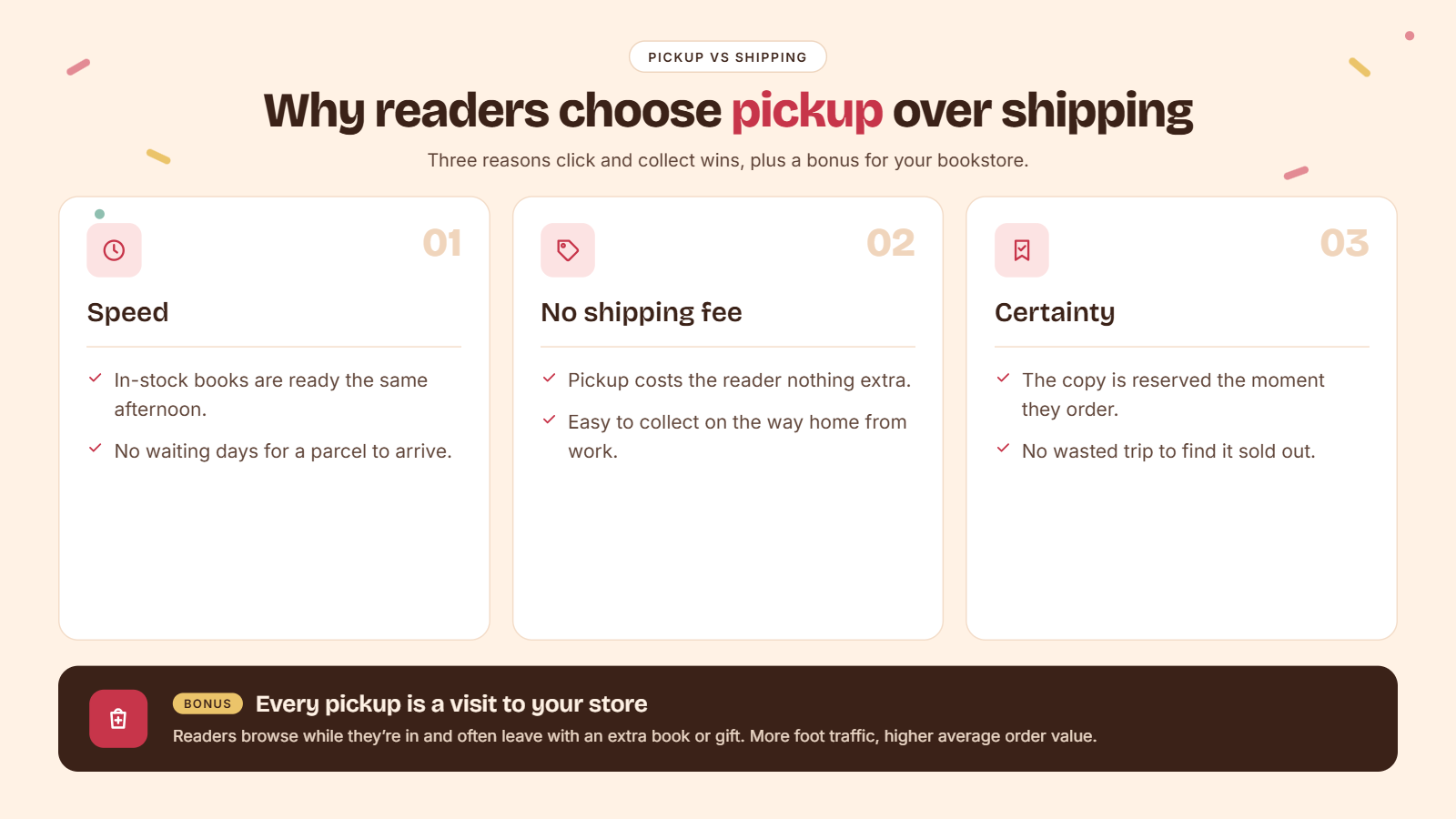
Readers choose pickup over shipping for three obvious reasons.
- Speed. A book available in-store can be in their hands the same afternoon.
- No shipping fee. Customers would rather pop in on their way home from work to collect their order than pay extra for delivery or shipping.
- Certainty. Ordering online first means the book is reserved and waiting. No wasted trip to find it sold out.
And then there is the added bonus no one talks about. A bookstore visit is a chance to bring in more foot traffic, and they might just pick up a few more items in store while they are there, which increases your average order value.
How does local fulfilment help indie bookshops compete with Amazon?
As an independent bookshop, you cannot outdo global retailers on warehouse capacity or discounts. But you can compete on the ground you already own.
- Same-day delivery for in-stock titles if your staffing allows it, and free delivery within the neighbourhood. These are options customers pay extra for in the name of a premium subscription.
- A human on the other end. A bookseller who can hold a signed copy for their regular customer, or source the rare books from inventory across the country.
- Community loyalty. Bookstores are third spaces people find themselves relaxing. The community you grow around your bookstore gives readers a reason to choose you over a faceless corporate retailer.
Can a Shopify bookstore offer store pickup and local delivery without an app?
Yes. Shopify offers native store pickup and local delivery options within its settings at no added cost. For a single bookshop with steady yet predictable orders, these options work well.
With Shopify's native settings, you can:
- Offer store pickup with an expected pickup timeline, such as “usually ready in 1hr” or “usually ready in 2 - 4 days”
- Send a pickup notification to the customer when their order is ready for pickup.
- Offer local delivery to defined delivery zones based on ZIP codes and radius distance.
- Set a delivery fee based on delivery zones and a minimum order value for local delivery.
How to set up local delivery on Shopify without an app
To set up local delivery on Shopify,
1. Open your Shopify admin and go to Settings.
2. Navigate to the Shipping and delivery option.
3. Under Additional delivery methods, click on Local delivery.
4. Next, click on your location and turn on the Location status toggle.
5. Under Delivery zones, choose your preferred configuration between ZIP codes and delivery radius.
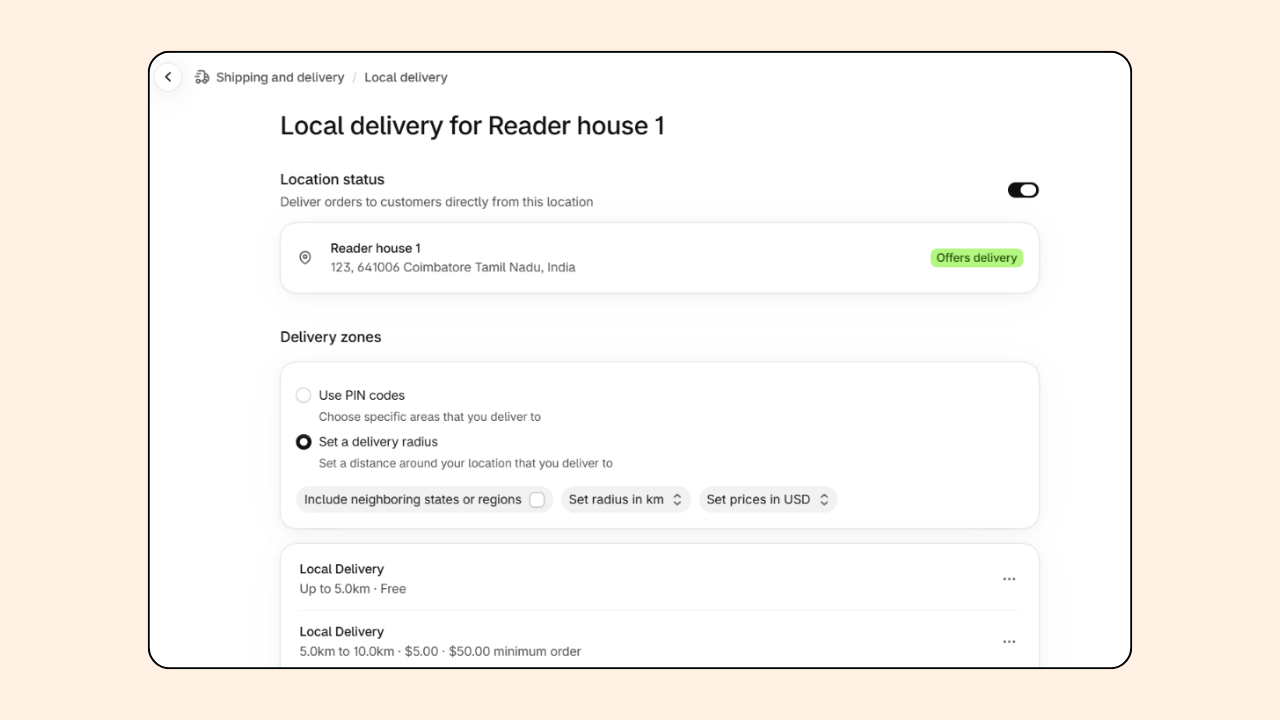
6. Click on Add zone to create new zones.
7. Under each zone, enter the zone name, set ZIP code or radius distance, minimum order value, delivery fee, and delivery information.
8. Press Save to complete the setup.
How to set up store pickup on Shopify without an app
To set up store pickup on Shopify,
1. Open your Shopify admin and go to Settings.
2. Navigate to the Shipping and delivery option.
3. Under Additional delivery methods, click on Pickup in store.
4. Next, click on your location and turn on the Location status toggle.
5. Choose an expected pickup date from the options given, configure store transfer if applicable, and add a pickup notification message.
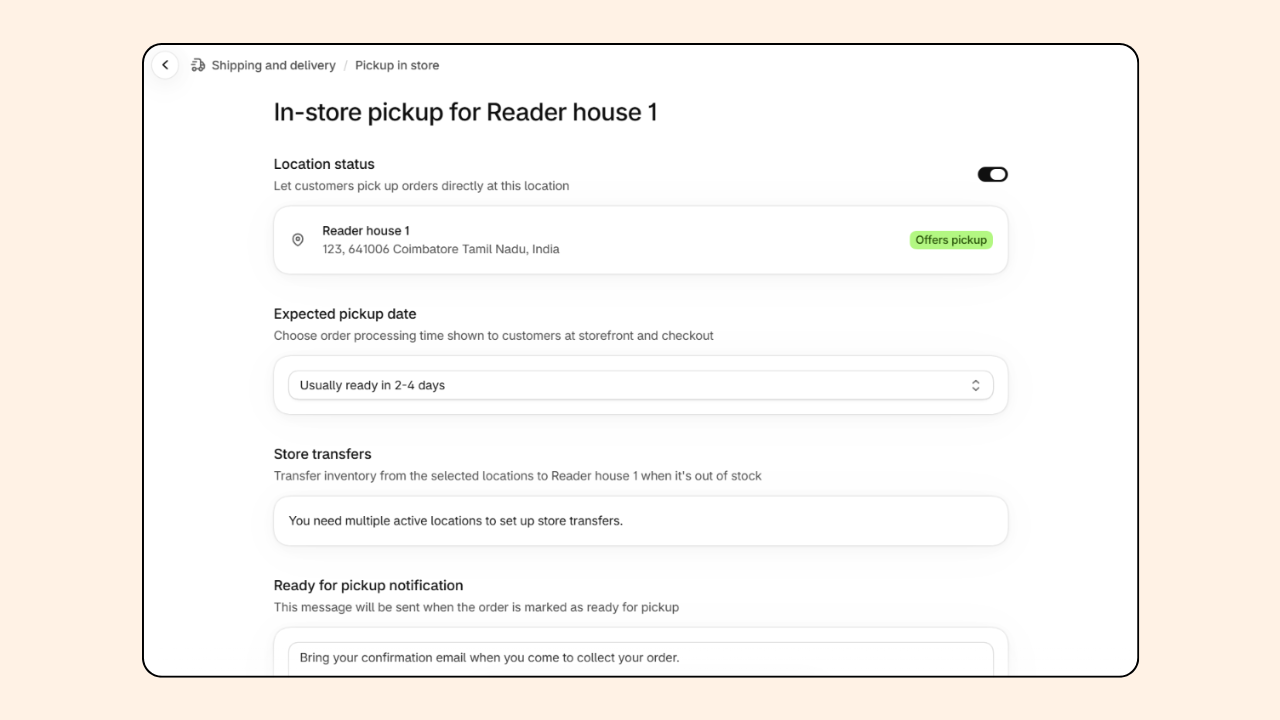
6. Press Save to complete the setup.
When does a bookstore need a pickup and delivery scheduling app?
If your store runs smoothly without demanding manual scheduling or order management, Shopify’s native settings should be sufficient. But the moment you outgrow the basics, you’ll need a scheduling app to keep your order flow manageable. Here are a few signs to look out for:
- Customers keep calling or emailing, “When can I pick up my order?”
- You operate from more than one location, each with its own working hours.
- Need to restrict pickup and delivery hours during author events and book club nights.
- Block out dates and times when you are closed or on a break.
- Offer customized bookish gifting services that take time to pack and arrange.
- Special orders and preorders need a different lead time compared to your in-stock products.
- Pickup and delivery scheduling differ based on the day of the week and staff availability
These are the signs that your store needs more than a basic pickup and local delivery option. This is exactly the gap Pickeasy was built to fill. Pickeasy adds a date and time slot picker for pickup and delivery, plus cut-off times, slot limits, blackout days, delivery zones, and rates.
Shopify native settings vs. Pickeasy: what’s the difference?
Shopify handles the essentials of pickup and delivery, while Pickeasy adds more control over when orders are collected and delivered with advanced scheduling features.
How does a pickup and delivery app help manage bookstore orders?
Here is everything Pickeasy can do for your bookstore with its advanced scheduling and order management functionality.
Date and time slot picker
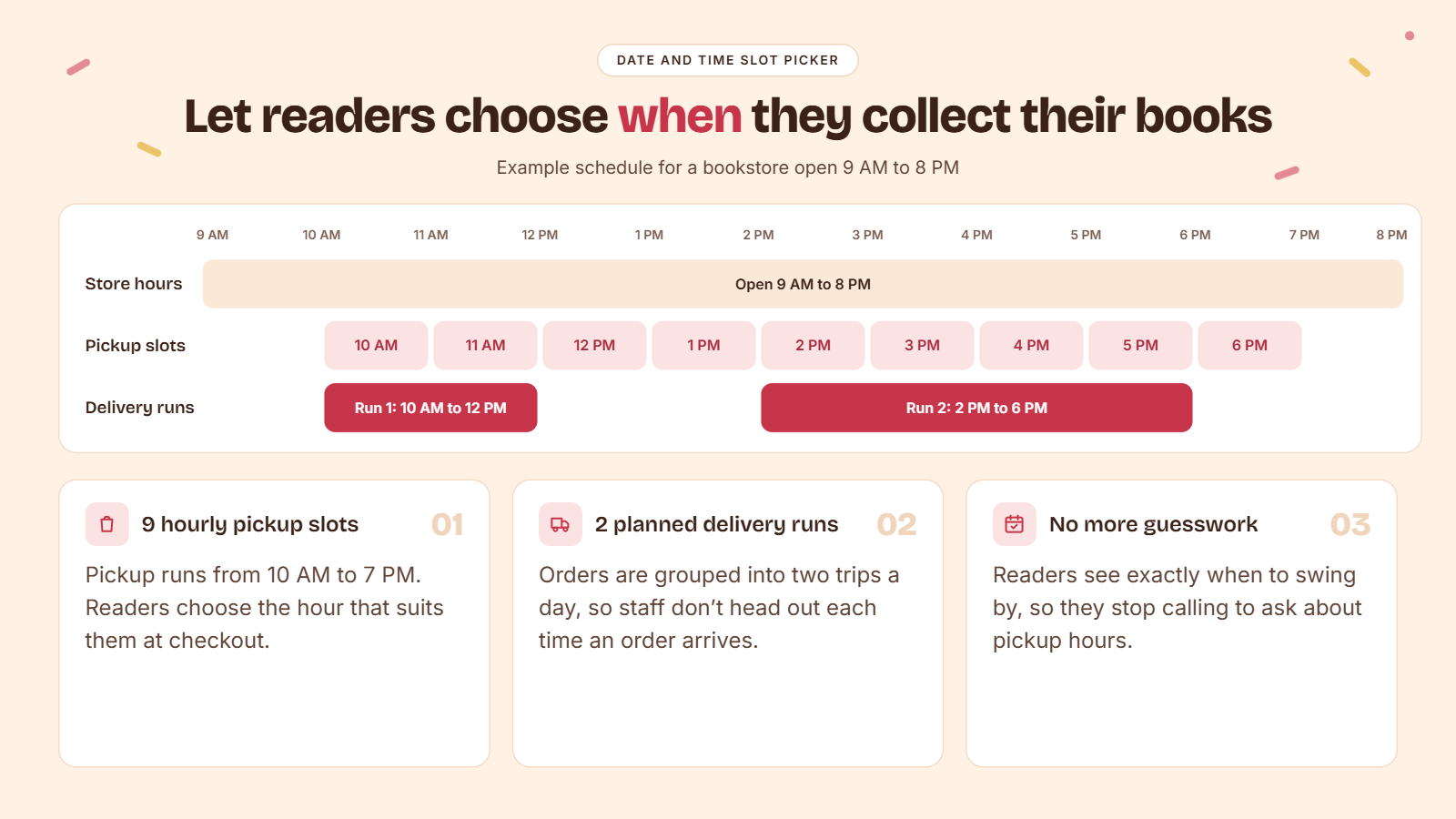
With a date and time slot picker, your customers can choose exactly when they can swing by the store to pick up their book instead of wondering about your opening hours or pickup hours.
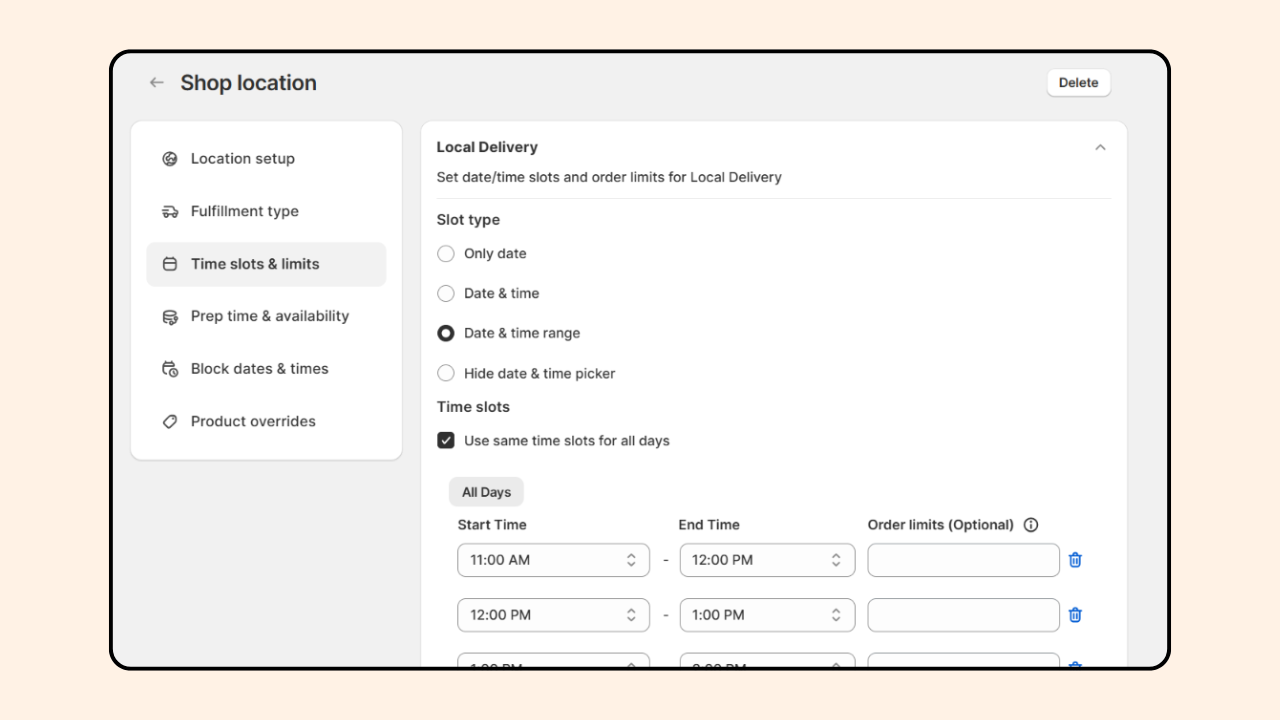
With Pickeasy, you can create different time slots for pickup and delivery. Here is a practical working example for a bookshop that opens at 9 AM and closes at 8 PM.
- Pickup slots: Multiple hourly slots throughout your opening hours. Pickup opens at 10 AM and closes at 7 PM. Customers can choose the slot that works for them.
- Delivery slots: Two planned runs a day, 10 AM to 12 PM and 2 PM to 6 PM. Instead of heading out every time an order comes through, your team makes just two planned deliveries each day.
Preparation time
You might wonder, “Why would a bookstore need preparation time? I just pull the book off the shelf and hand it over.” Fair point, and you wouldn’t be the first person to think so.
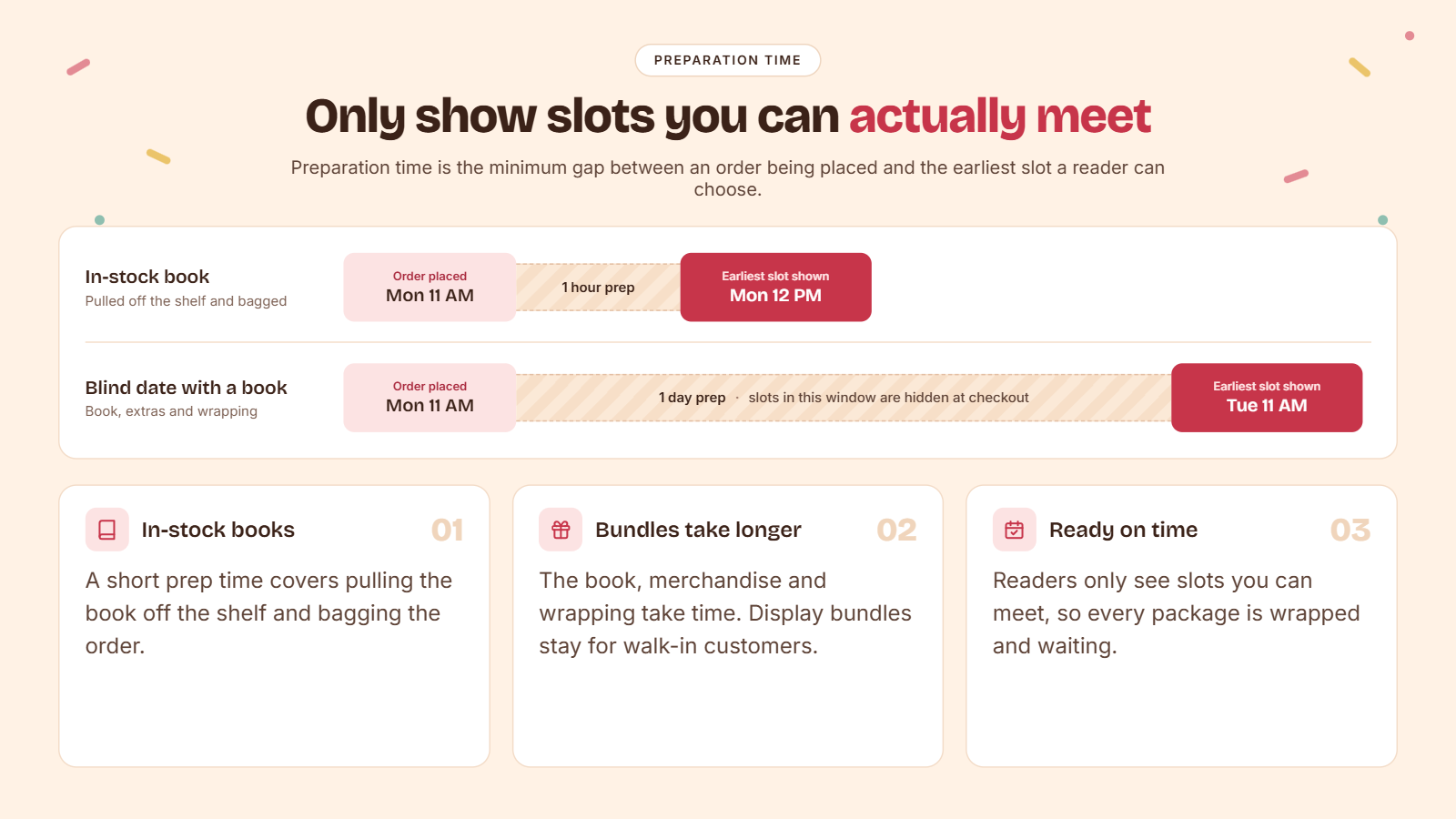
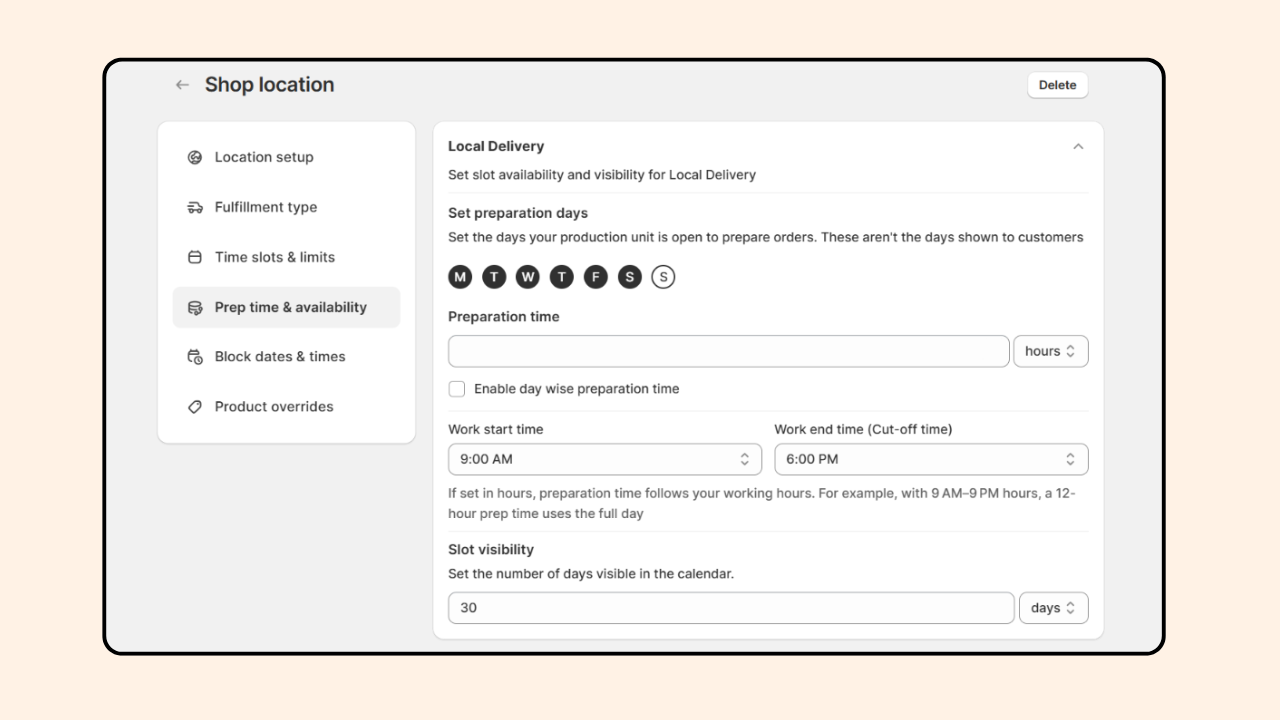
Preparation time is the minimum time gap needed between the order being placed and the earliest available slot.
Say you offer a book bundle service or a blind date with a book service; you need time to assemble everything: the book, the merchandise, and most importantly, the packing. It takes time to get these packages ready. And you can’t just grab a ready-made bundle from your display because that’s there for your walk-in customers.
Setting a preparation time means readers only see slots you can actually meet, so every package is ready and wrapped properly by the time it's ready for pickup or delivery.
Block out date and time
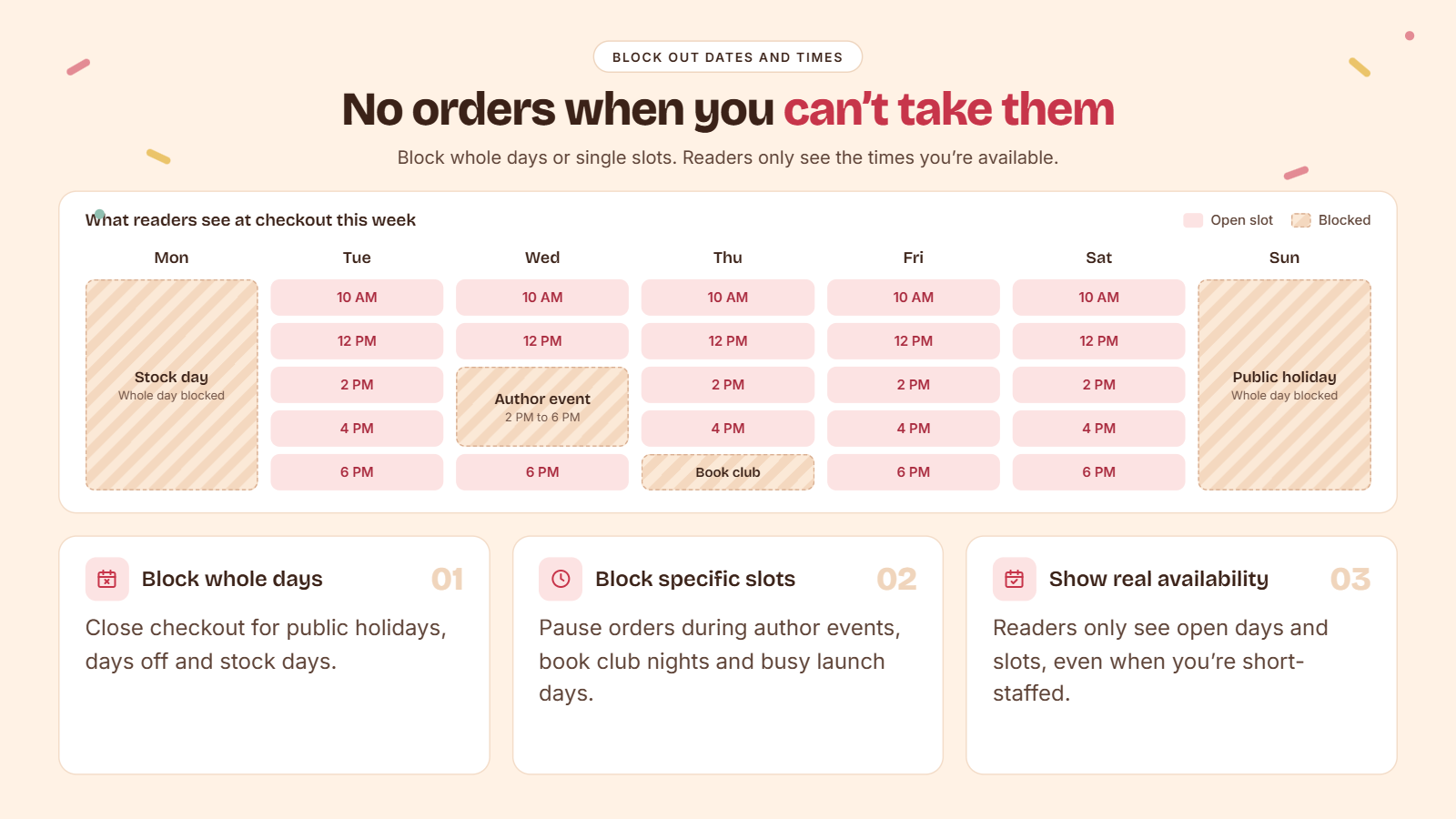
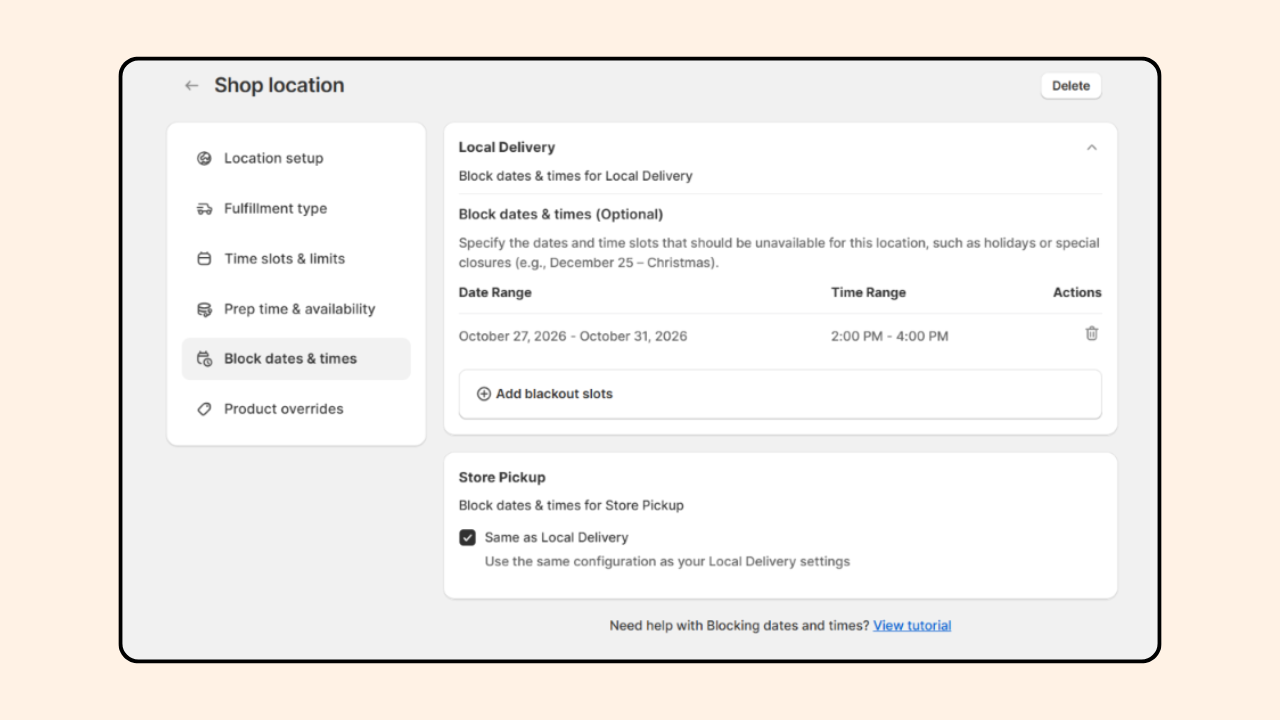
The block out feature ensures you don’t get a pickup or delivery order on days you are closed or unavailable. This includes, public holidays, days off, stock days, author events, book club night, launch days when the shop floor is already full, and your counters are busy. This also helps when you are short staffed.
With Pickeasy, you can block out entire days as well as specific time slots based on how your business operates. Your customers are shown only the days and time slots when you are available.
Order limit
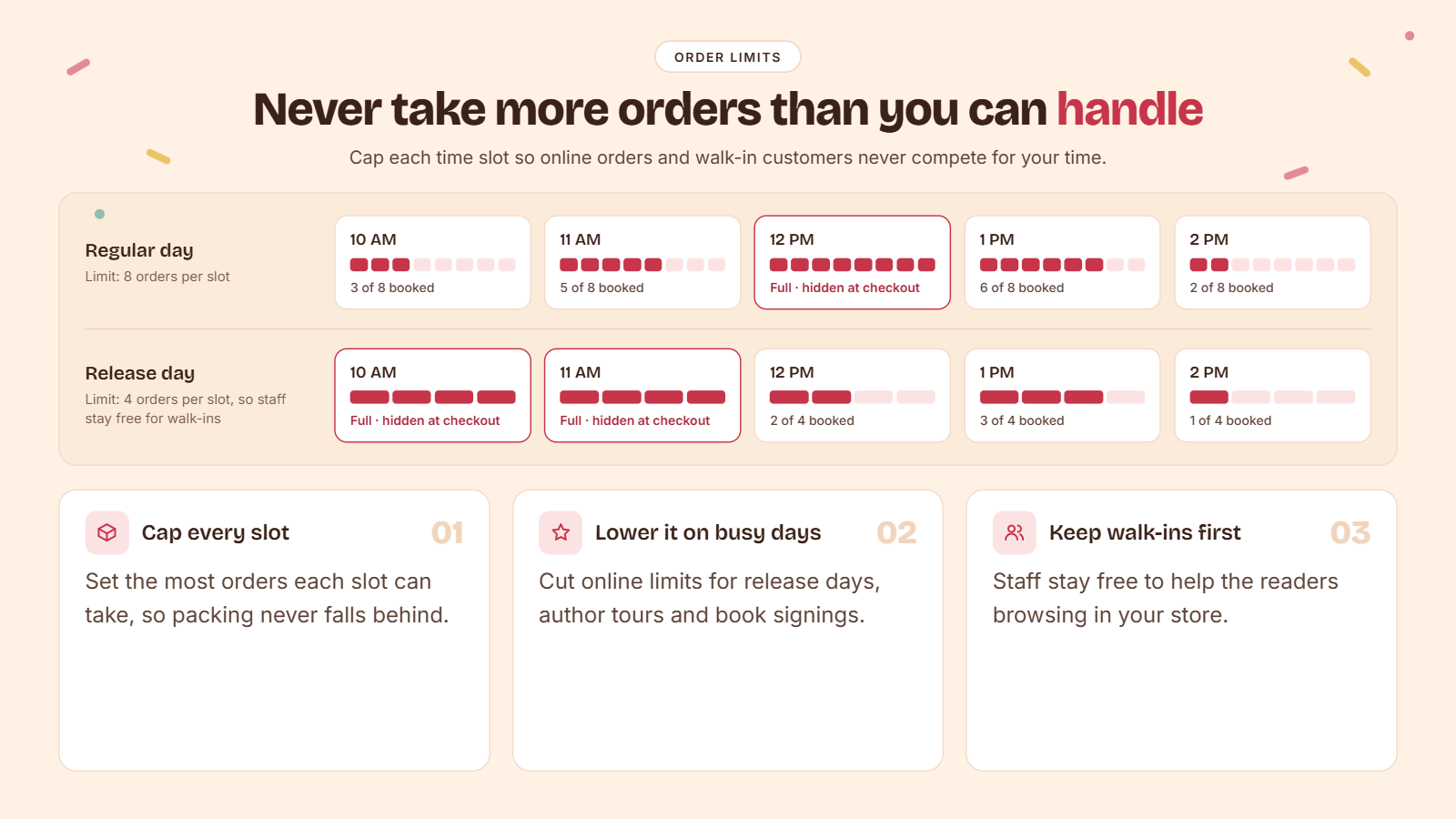
Adding an order limit ensures you do not get more orders than you can manage within a single time slot. You need to manage your walk-in customers while you ensure all online orders are packed and ready for dispatch.
Neither should affect the other. On days when you are expecting more walk-in customers, such as release days, author tours, or book signing events, limit your online pickup and delivery orders to be present and available for the customers who need your assistance in-store.
How to set up store pickup and local delivery for your Shopify bookstore using an app
Step 1: Install the Pickeasy app on your Shopify store.
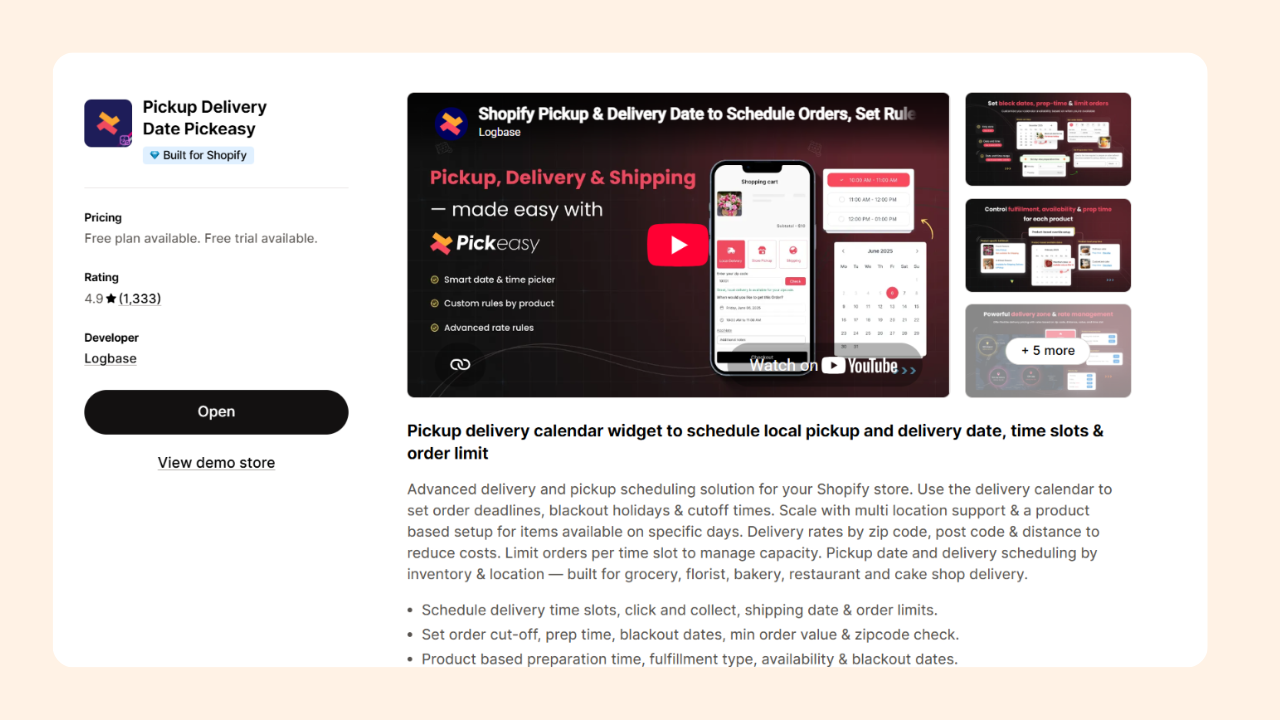
Step 2: Complete the onboarding process and click on the Locations tab from the side panel.
Step 3: Choose Delivery & Pickup, add an existing location or create one, and complete the Location setup.
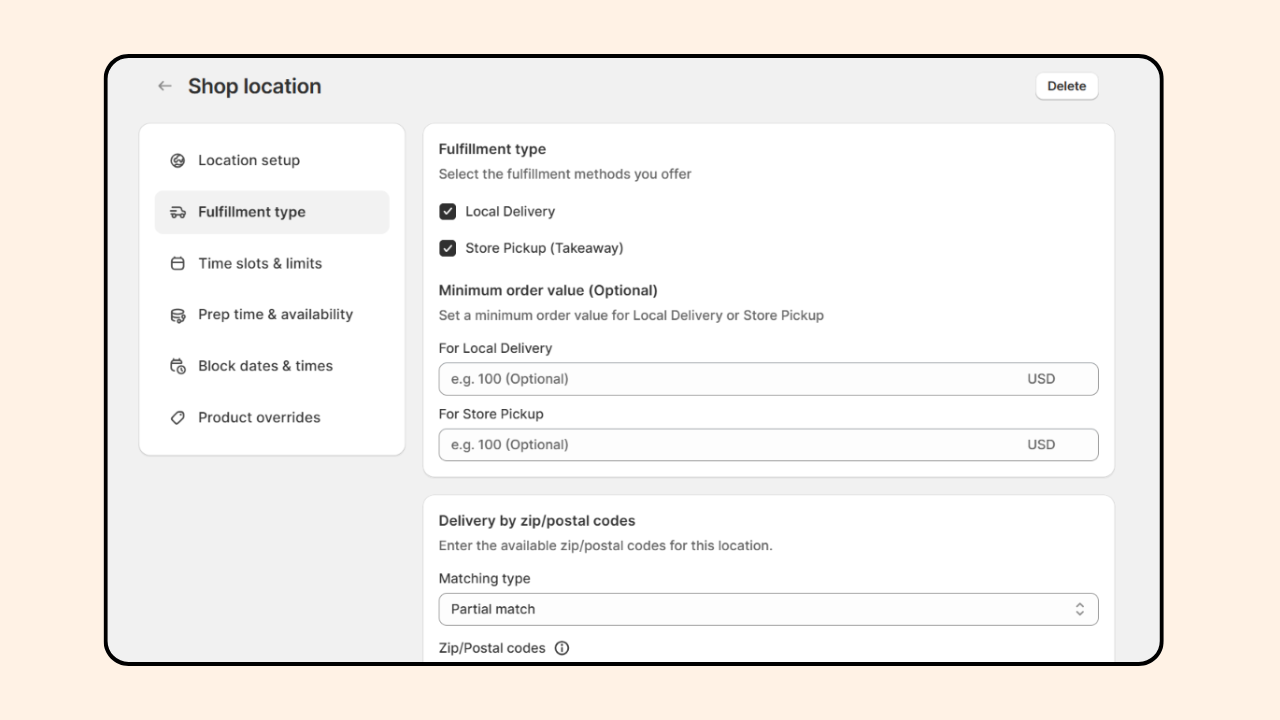
Step 4: Under Fulfillment type, choose Local delivery and Store pickup and configure delivery by ZIP codes or distance.
Step 5: Under the Time slots & limits section, choose a slot type and create time slots.
Step 6: Under the Prep time & availability section, set your preparation days and time.
Step 7: Under the Block out dates & time section, create block-out slots if applicable.
Step 8: Under the Product overrides section, create overrides if applicable.
Step 9: Save your progress and complete the setup.
Note: Under each section, you can create different setups for local delivery and store pickup. If you wish to have them follow the same setup, click on ‘Same as local delivery’ under Store pickup in each section.
How to handle book pre-orders and release-day pickup and delivery
Release days for a bookstore are nothing less than an opening night for a theater. The excitement and rush are real because readers who preordered want their copies as soon as it's out. Here is how you can create a scheduling system that will help handle pre-order pickups and delivery on release days.
Note: Pickeasy doesn’t take preorders on its own. You can set up preorder products separately on Shopify using a preorder app like Dibs - Preorders & Backorders to sell products that are not yet available in stock. What Pickeasy does is let your customers choose when to collect their book or get their order delivered.
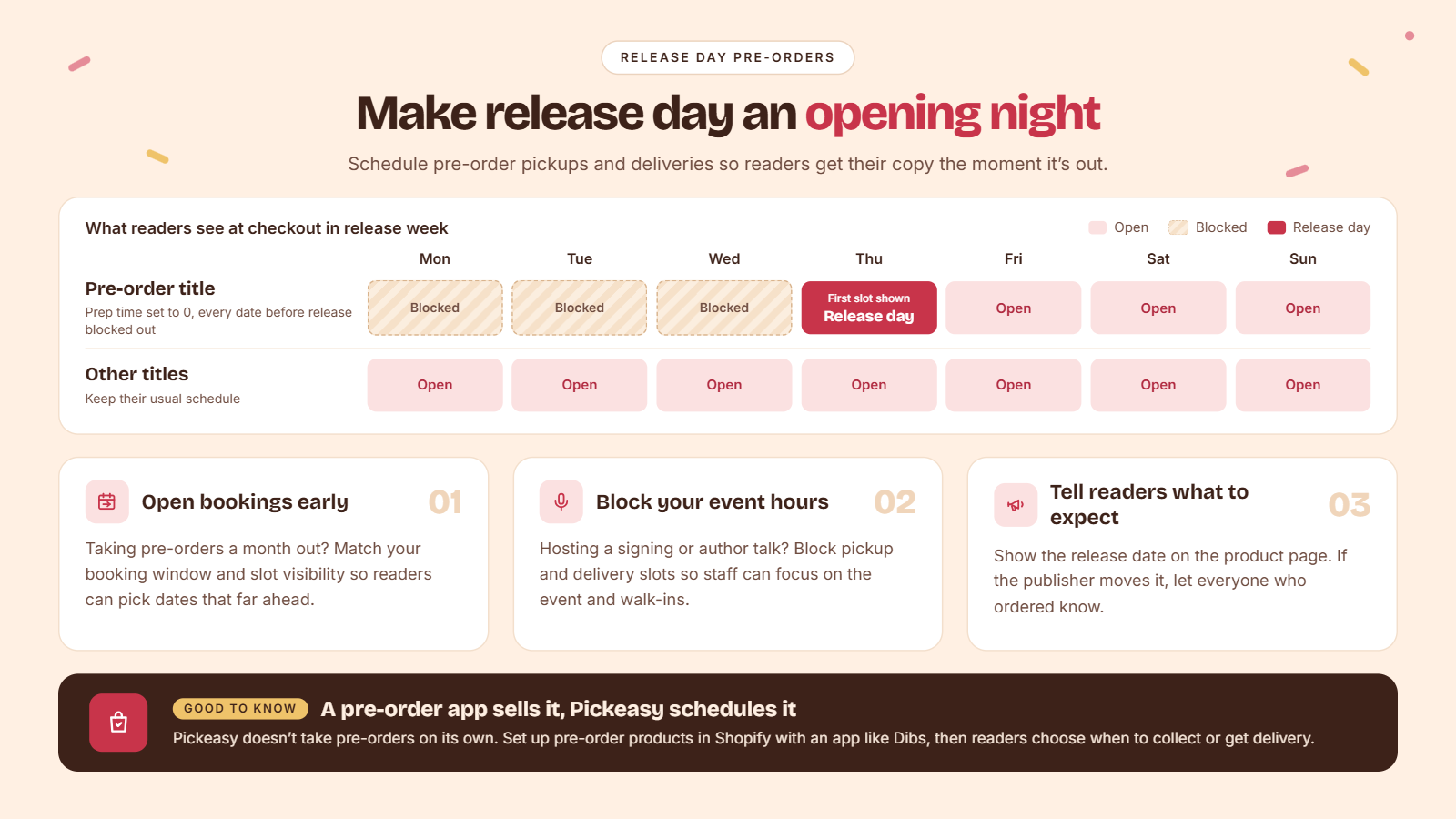
Make release day the earliest available slot: Create a product override for the specific preorder title under preparation time override and add no preparation time for the book. Then create a blockout date & time override for the same title. Block out all dates until the release date for the particular title.
Now, the calendar shows only the dates from the day of release for the customers, whether they preorder a month out in advance or the night before the release. Your other titles and products keep their usual schedule.
Make sure customers can book ahead of time: If you are taking in preorders a month in advance, then your booking window should match the time frame. Adjust the slot visibility accordingly so customers can choose the dates that far out.
Block out your event time: If you are having an author event, a talk, or a book signing, block pickup and delivery slots for those hours so your staff can focus on the event and the walk-in customers. Adjust it based on your staff availability.
Tell readers what to expect. Mention the release date on the product page so customers are aware of it. If the publisher changes the launch date, communicate the same to your customers who have already ordered.
Wrapping up
Not every bookshop on Shopify needs a pickup and delivery scheduling app. If your online orders are fewer in number and your team is able to manage it without any trouble, then Shopify’s native settings will serve you well. But if you look at the signs mentioned in this blog and find yourself in these situations, then consider a delivery and pickup app for your store.
Do your customers keep calling regarding their order? Do you only deliver on certain days? Do you need more time to fulfill book bundles, special orders, and pre-orders? Do book tours, author events, and book club nights turn your counter into a queue?
These are the signs that you have outgrown the basics and need more advanced scheduling and order management features. An app like Pickeasy helps you run your online bookstore the way that works for you.
Frequently asked questions
1. Can I offer pickup at more than one bookstore location?
Yes. Shopify's built-in feature supports pickup and delivery from multiple locations. Pickeasy lets each location have its own days and time slots, order limits, and opening hours. Customers choose their branch before picking a time.
2. What's the difference between local delivery and shipping on Shopify?
Local delivery is when you or a local courier delivers orders to nearby customers, within a set radius or list of postcodes, at the earliest (often the same day or the next). Shipping, on the other hand, is when you send orders across the country and continent. Shipping takes time and costs more than local delivery.
3. How long should a bookstore hold an unclaimed pickup order?
Choose a hold period that works for your business. State your pickup and hold time policy clearly on your website. Try sending a reminder email for unclaimed orders. After the hold period, return the book to the shelf and refund the order or issue a store credit.
.avif)
.webp)
.webp)
.webp)
.svg)
.svg)
.svg)


.svg)