.svg)
How to Sell Pastries Online With Shopify: A Complete Guide for Home Bakers & Bakeries
Last updated on
October 27, 2026
.png)
Quick Overview:
- Sort out the basics of starting a food business by registering your store.
- Set up your Shopify store with clear product pages, photos, and allergen details.
- Offer pickup and delivery for fresh cakes, and shipping for cookies.
- Add a scheduling app like Pickeasy so customers can choose a date and time slot, and you can set a prep time, order limit, and cut-off times.
- Grow your business through brand awareness and visibility.
Selling pastries and baked goods online with Shopify is the smartest way to scale your business, whether you are a home baker, a small pastry shop, or a growing bakery chain. Instead of managing your orders through Instagram DMs, WhatsApp messages, phone calls, and spreadsheets, you can bring everything into one place with Shopify.
In this guide, I’ll show you how to sell your pastries and baked goods on Shopify, from licensing and store setup to choosing between pickup, local delivery, and shipping, along with real store examples and practical ways to get more orders and scale your business.
Why Shopify works for selling pastries online
Shopify gives you your own branded store and manages payment, inventory, and order fulfillment all in one place. Customers can browse your products, place orders, and pay online without you manually managing enquiries and orders. Add a delivery and pickup scheduling app to the equation, and you are all set.
What Shopify gives you out of the box
- A mobile-friendly storefront where customers can browse your pastries, cakes, and other baked products.
- Product pages to showcase your products, sizes, flavors, and pricing.
- Online payments and order management so customers can place an order and pay.
- Basic local pickup and local delivery settings for order fulfillment.
- Shopify POS, so counter sales and online orders share the same inventory.
- An in-built Shopify app store to add specialized advanced functionalities when the native feature falls short.
What Shopify does not give you by default
What it does not give you by default is a proper date and time slot picker built around how a kitchen works. But a reliable delivery and pickup scheduling app like Pickeasy will cover that with no trouble.
What to sort out before you start selling pastries on Shopify
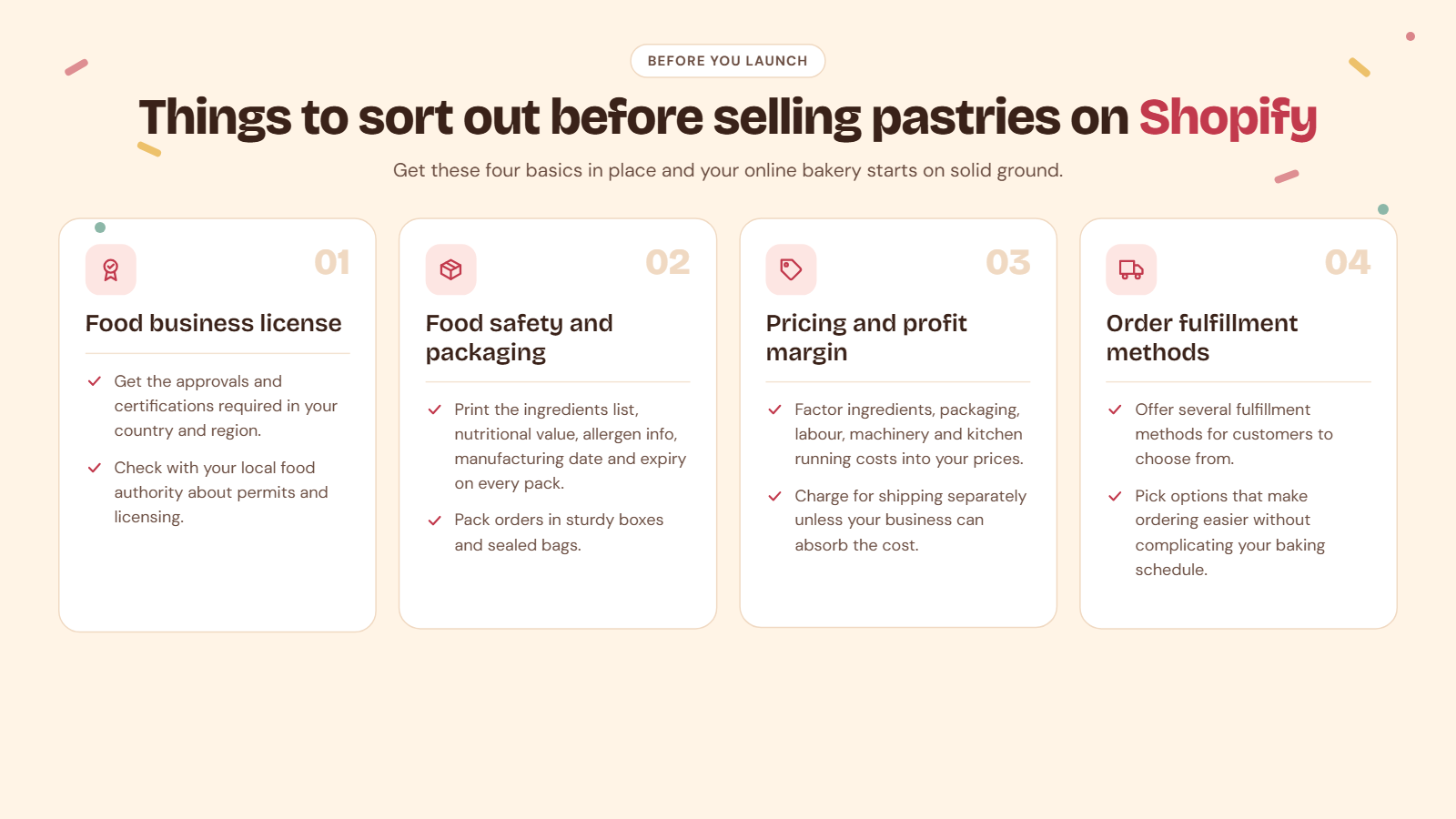
Before you start selling, ensure you cover your basics, including food licensing, packaging, pricing, and order fulfillment.
Get your food business license
Each country has its own standard food licensing and safety rules. Based on your country and region, get necessary approvals and certifications before you start your business. Check with your local food authority regarding permits and licensing.
Focus on your safety label and packaging
For packed goods such as cookies and cupcakes that are not sold fresh out of the oven, a proper ingredients list, nutritional value, allergen data, along with manufacturing date, expiry, and other key factors need to be added on top as printed labels. Know what’s mandatory in your region before you finalize your packaging and packed goods.
Get reliable and practical packaging materials. Use sturdy boxes with inserts for cakes, and sealed bags for cookies. Good packaging reduces damaged-order complaints and refunds.
Price your products to protect your margin
Ensure you protect your profit margin while pricing your products. Your pricing should include ingredient costs, packaging, labour, machinery, and the added cost of running the kitchen. Decide whether to offer dynamic delivery pricing, a standard fee or offer free shipping. Offering free shipping when your margin is already set low will eat into your profits. Unless your business can bear the difference, charge your customers separately for shipping and delivery.
Finalize on fulfillment methods
As a pastry shop that sells multiple products with varied shelf life, offer multiple fulfilment methods for your customers to choose from. Not every customer wants their pastries delivered, and not every customer has the time to come and pick them up. Your fulfillment options should make ordering easier for your customers without making your baking schedule harder to manage.
How to set up your Shopify store for pastries
Once you have got your basics sorted, then comes the next big step. Starting your store to be functional and practical.
Step 1: Create your store and retain your brand identity
Step one is obvious. Create your Shopify store and ensure your website and domain name match your offline store as closely as possible. If you previously took orders from an Instagram page, then ensure you retain your brand identity across all platforms.
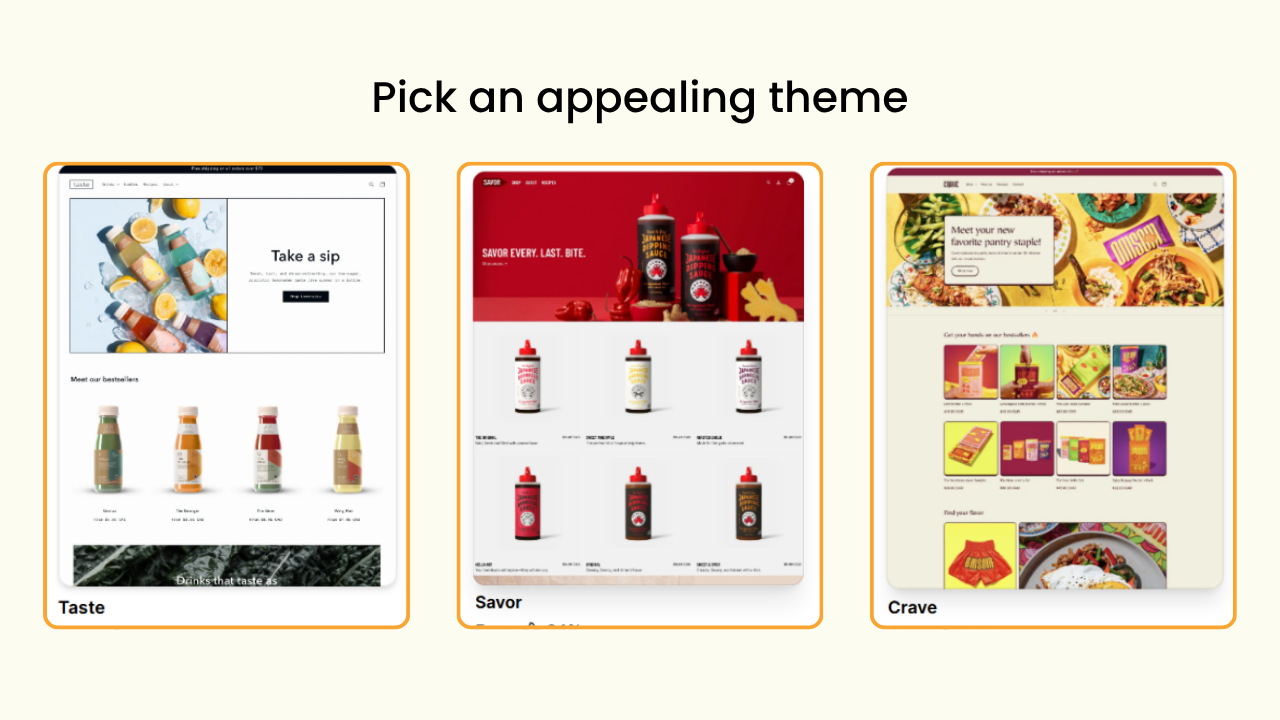
Step 2: Pick a theme that's visually appealing
Choose a theme that makes your catalogue look drool-worthy. Not all themes are built the same, and not everything works for a pastry shop. Start with free themes like Crave, Taste, or Flavour designed specifically for the food industry.
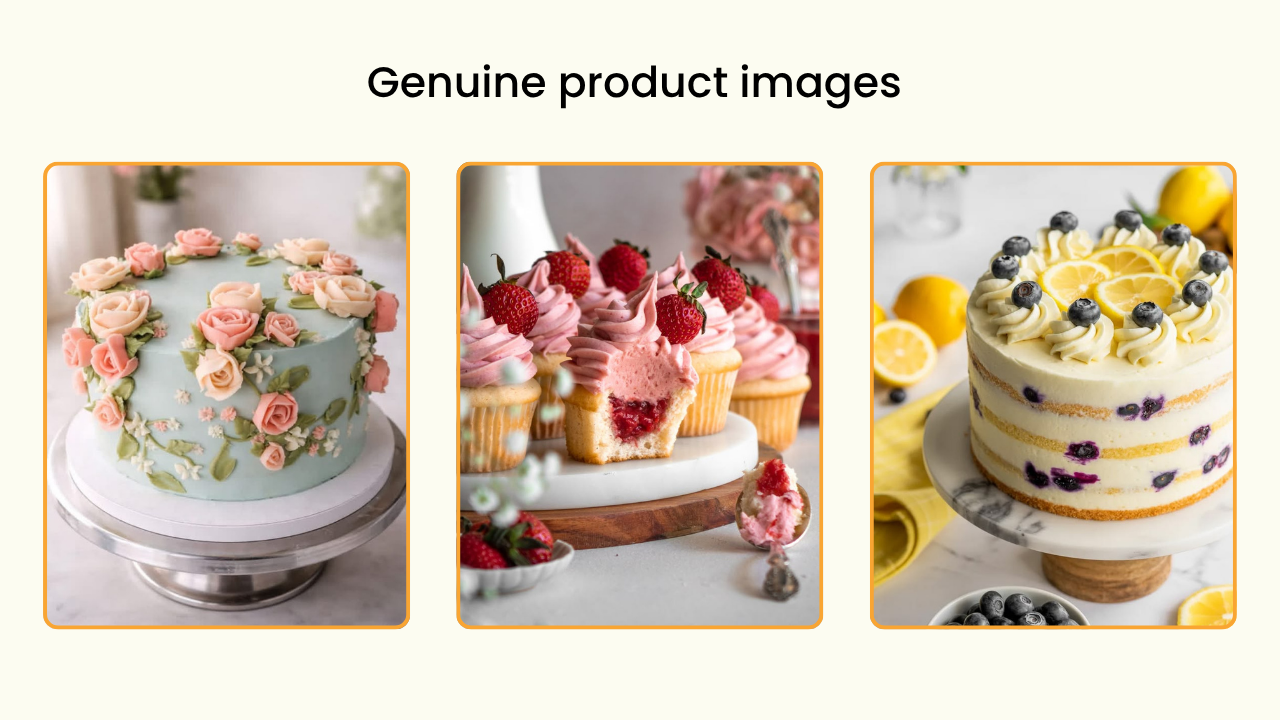
Step 3: Take clear and catchy product photographs
People eat with their eyes first. If what they see on your website doesn’t instantly make them crave it, you are essentially losing sales. Take perfectly designed and positioned quality photographs of your catalogue. Avoid uploading AI-generated images that do not match your actual product.
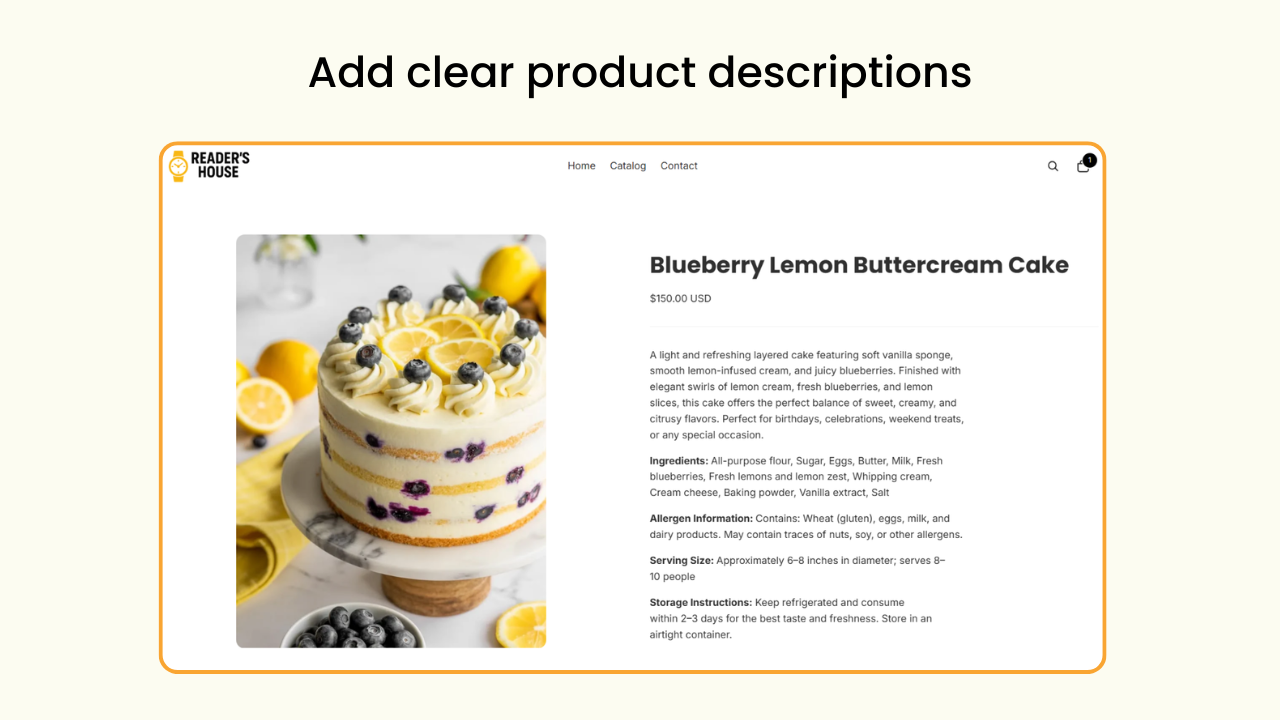
Step 4: Add clear product descriptions
List every product with available variant sizes and flavours right on the product page. Mention the ingredients used, allergen information, storage, and shelf life with 100% transparency. You can use this space to highlight the premium products used, like the highest quality cocoa beans sourced from the farms of Ecuador, or Venezuela reflects the quality of your products.
Step 5: Organize your collection
Group your products based on how your customers shop. Categorize them into daily bakes, festive collections, gift boxes, Christmas specials, Valentine's Day specials, and such.
Pickup vs. local delivery vs. shipping: which is right for pastries?
For most bakeries, store pickup and local delivery should be the main options, while shipping should be reserved for sturdy, shelf-stable items like cookies, brownies, and dry cakes. Fresh pastries rarely survive multi-day courier transit. A fresh croissant on a three-day courier trip is not a happy croissant. A buttercream cake will be a puddle of colourful butter once it leaves the cooler.
Here is a table that gives you a clear and better idea of how exactly you should plan your order fulfillment.
Most bakers offer all three with different rules and products attached to each. For example, pickup is available every day from 10 AM through 6 PM, while delivery is available only within a 10 km radius, and shipping is offered only for cookies and brownies.
Strict rules, flexible slots, and dynamic structuring are crucial while running a pastry shop that offers pickup, delivery, and shipping. And this is exactly where a pickup and delivery scheduling app does all the heavy lifting.
Where Shopify's built-in pickup and delivery falls short for bakeries
Shopify offers native pickup and local delivery options. But they do not let your customers pick a specific delivery or pickup date and time slot, and neither can you customize your preparation time or cutoff time. All it does is offer your customers the choice between pickup and delivery.
For a bakery, that causes four everyday problems:
- Guesswork on delivery and pickup. With no definite date or time to choose from, your customers are left with nothing but guesswork: “When will the order be ready?” “At what time should I come?” “At what time will it be delivered?” You end up having to communicate everything over the phone, taking you right back to where you started - managing orders manually.
- Too many orders on a single day. With holidays and weekends, your orders might double or spike beyond your production capacity. With no native feature to limit these numbers, you will end up with more than what you can fulfill. This leads to cancellations, refunds, and a whole lot of unhappy customers.
- Orders you can’t meet. An online store is basically open 24/7, taking in orders round the clock. But that doesn’t mean customers can order at midnight and expect delivery the next day. Without enough notice or preparation time, last-minute orders can quickly disrupt your schedule.
- Orders on days you’re closed. Your store might be open only on certain days or closed for the holidays. Without proper scheduling, the orders keep coming in even when you are closed. You end up sorting out the mess on your day off.
The fix is a pickup and delivery scheduling app that adds a date and time slot picker to your store. Because the native settings are not built for time-sensitive, fresh goods businesses such as cake shops, bakeries, and florists.
Advantages of using a pickup and delivery scheduling app on Shopify
Pastries and baked goods are perishable inventory. You need your products to reach your customers when they are fresh and ready to serve. A croissant tastes best on the day it is baked, a custom cake needs three days of notice, and you can only bake, pack, and deliver so many orders each day without overbooking.
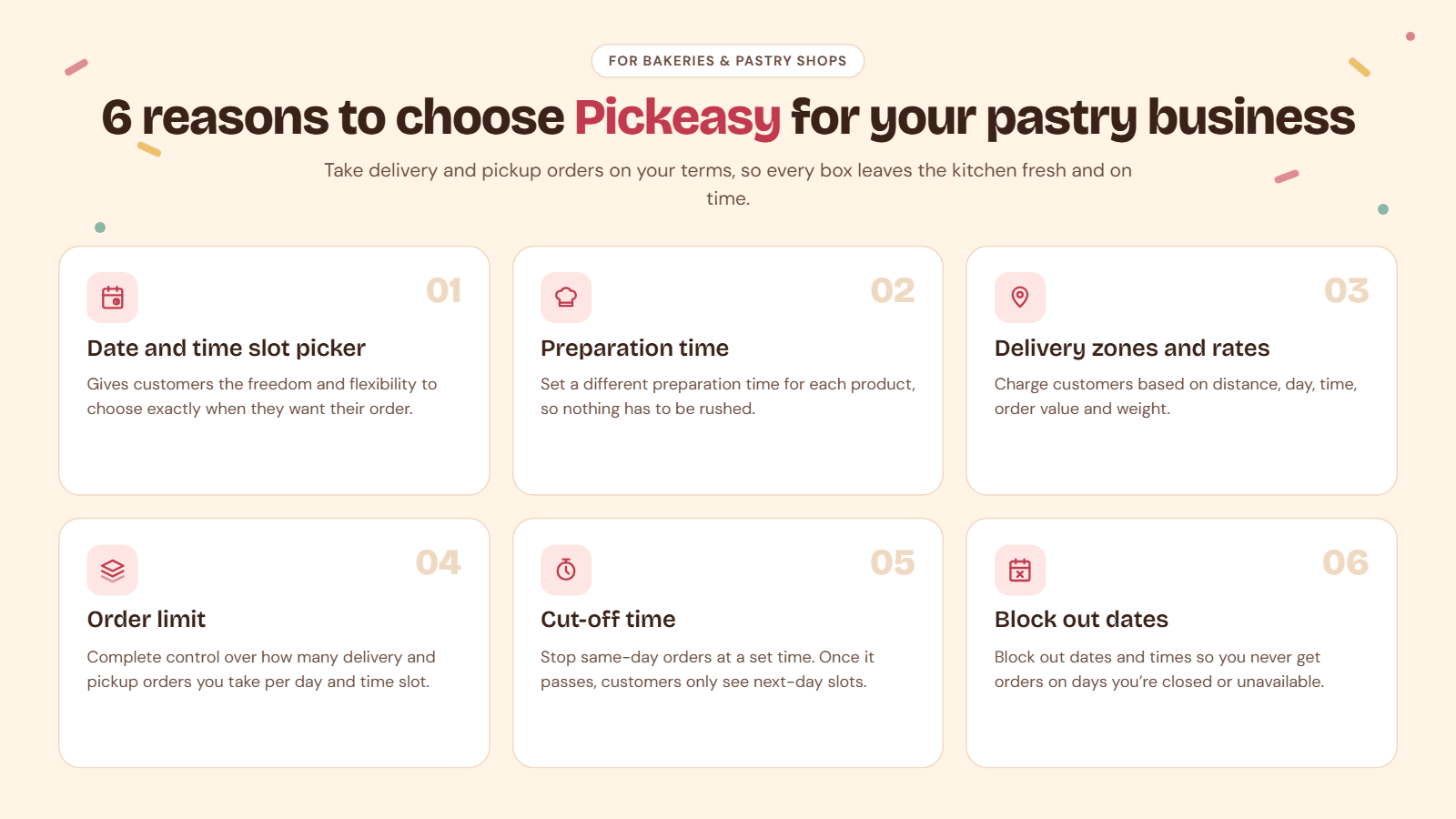
All this can be sorted out with a reliable pickup and delivery scheduling app like Pickeasy. Here is everything it offers directly on top of Shopify’s native settings to make your store a success.
Also read: How to Setup In Store Pickup and Local Delivery on Shopify
Date and time slot picker
A date and time slot picker gives your customers the freedom and flexibility to choose when they want their order, “Tuesday, 10 AM to 11 AM”. No more guessing game, no more back-and-forth messages, no more manual scheduling. You schedule your workflow, they pick the time, and delivery happens on time every time.
Order limit
Order limits give you complete control over how many orders you take and how many your kitchen can handle in a day. For example, say you can only handle 10 deliveries and pickups on a Monday. With an order limit set in place, you can stop an 11th order from being placed. No last-minute surprises, no overbooking, and no scrambling to fulfill more orders than you can handle.
Preparation time
Each product takes different time to make. While a batch of brownies takes 45 minutes in the oven, a two-tier cake needs 45 minutes of bake time and an extra hour to decorate and arrange. With each added tier and customisation request, the time keeps increasing. Setting different preparation times for each product will give you the time and space to prepare them without rushing.
Cut-off time
Offering same-day delivery is a great business tactic. But not when you receive an order 10 mins before you close shop. A cut-off time will ensure that never happens. While your shop continues to take in orders, same-day delivery stops after the cut-off time is reached. Orders placed after that automatically become ineligible for same-day delivery, and customers see only next-day slots.
Delivery zones and rates
Delivery costs can easily eat into your profits if you don't configure them properly. Free delivery will attract more customers, but free delivery for distant orders will blur your profit margin. A party order with a custom cake and cupcakes costs more to deliver than a cookie tin. A weekend peak hour delivery may cost more than a weekday afternoon delivery. With dynamic delivery rates, you can charge your customers based on distance, day of the week, time of day, total order value, and product weight based on your Pickeasy plan.
Block out dates and times
Avoid getting orders on days you are closed or unavailable with blockout dates and times. Say your store is open from Monday through Saturday and closed on all Sundays. You can block out all Sundays so that your customers cannot place an order. Your website is still open, customers can still place an order on Sunday but just not for Sunday.
Real store examples
Here are three pastry shops that sell online with unique delivery and pickup needs made simple by Pickeasy. Go ahead and borrow their idea if you are just starting out on Shopify or struggling to find a schedule that works for you.
Pâtisserie Camille Nollier
Based in Paris, Pâtisserie Camille Nollier offers only pickup on weekends, and orders for the week stop at Wednesday at midnight. Pickeasy helps them maintain their schedule and orders without any manual work.
- Fulfillment type: Store pickup only
- Pickup: Friday, Saturday, and Sunday (one location)
Also read: How a One-Woman Artisan Pastry Shop Keeps Weekend Orders Fresh and Organized with Pickeasy
The schedule gives them enough lead time to keep each week’s order fresh and on schedule. Pickeasy gives them more time to bake by removing manual scheduling and helps keep everything organized in one place.
Eli & Son Custom Bake
Based in Australia, Eli & Son Custom Bake offers delivery and pickup on selected days of the week while their website is open for orders 24/7. Pickeasy helps them create separate schedules for delivery and pickup, set delivery days and time windows, and manage multi-location pickup, each location with its own hours.
- Local delivery: Fridays only, 9 AM to 10 AM
- Pickup: two locations, Thursday to Saturday, 9 AM to 6 PM
A customer browsing at 11 PM on a Monday can still place an order, but the calendar only offers the days and windows the bakery actually works. If they choose delivery, Friday morning is the only option shown. If they choose pickup, they get to choose between Thursday and Saturday.
That one-hour Friday delivery window is a quietly brilliant move if you want every delivery to leave in a single, tidy run instead of zigzagging across town all week.
Bake.a.tier
Based in Canada, Bake.a.tier is open for business 7 days a week and proves you don’t need a complicated setup to sell pastries online. Pickeasy helps them set an adequate lead time and pickup schedule with a date and time slot picker.
- Fulfillment type: Store pickup only
- Pickup window: 2 PM to 5 PM, every day
This works so well if you want mornings for baking and afternoons for handing over boxes. Customers choose the date that suits them, and the fixed window tells them exactly when to get their orders. No delivery logistics, no guesswork about when the order will be ready.
Three stores, three different countries, three different hours and different ways of handing over a cake. But in every case, the website follows the kitchen's schedule, not the other way around. Customers are shown the options that works for you and your store, so every order that comes in is one the team can actually fulfil.
That's the whole point of Pickeasy: you decide how your bakery runs, and your online store simply follows along.
How to get more pastry orders online on Shopify
The quickest wins come from people who already love your bakes. You can get more orders simply by making ordering ahead effortless for them.
Put a QR code by the till
If you own a physical store, print a QR code linking to your online store with a line like "Skip the queue, order ahead for pickup." Your regulars will happily trade waiting in line or hoping you have their favorite pastry available for a guaranteed order waiting for them in your store.
Polish your Google business profile
Keep your Google profile updated, post fresh photos weekly, add your menu online, and ask happy customers for reviews. This is how your store shows up on the internet when someone searches "bakery near me" or "cheesecakes near me” with a craving and a phone.
Use Instagram and TikTok to bring in visibility
Post actively on Instagram, TikTok, and WhatsApp community channels. Keep your audience engaged and informed about the new menus available at your store, when you are open, and everything you need them to know about you.
Open festive preorders early
Launch Christmas, Diwali, Eid, or Valentine's preorders two to three weeks ahead, with limited slots. Post about your preorders on your socials and get the posters up in your physical store to spread the word. Limited slots not only create urgency for customers but also give you a rough number to prepare in advance without overwhelming your team.
Nudge bigger baskets
While walk-in customers get to buy single-piece cookies and cupcakes, offer boxes of 6 and 12 for online orders. Pair cakes with candles, balloons, and cards to create upsell opportunities. Set a free-delivery threshold just above your average order because, let's be honest, one more brownie never hurt anyone.
Common mistakes to avoid while selling pastries on Shopify
While selling pastries online on Shopify, ensure you avoid making these five common mistakes that merchants do.
- No lead time for preparation. Always set product-level preparation time so everything gets enough time to bake, pack, and deliver.
- No limit on orders. Cap order limit per day and per time slot to match your operational capacity.
- Delivering everywhere. Restrict local delivery to postcodes, ZIP codes, and distances you can realistically cover.
- Shipping fresh pastries. Ship only sturdy items with longer shelf life, with the right kind of packaging in place.
- Vague product pages. List your ingredients, allergen information, and serving size on the product page. Your product page should have answers to every question your customers might have.
Wrapping up
Selling pastries online with Shopify comes down to three key ingredients: a menu that keeps them coming back, honest lead time, and a pickup and delivery schedule that matches how your kitchen works. Shopify gives you the space, Pickeasy gives you the schedule, and you bring the magic.
Whether you're a home baker taking weekend preorders or a bakery with multiple outlets, you can have your pickup and delivery schedule sorted with Pickeasy.
Frequently asked questions
1. Can I sell homemade pastries on Shopify?
Yes. You can sell homemade pastries on Shopify. Ensure you follow the food safety rules and regulations that apply to your country and region before you begin. Shopify gives you a complete website that supports pastry shops online.
2. How do I let customers choose a pickup date on Shopify?
Shopify offers native pickup and delivery settings but does not offer a date and time picker by default. You need a scheduling app like Pickeasy to add pickup and delivery slots before checkout. It keeps your scheduling organized and clutter-free in one place.
3. How much notice should I ask for custom cakes?
Most bakers ask for 48 to 72 hours lead time for custom cakes and 1 to 2 weeks for wedding or tiered cakes. Set your preparation according to your business model so customers can place an order accordingly.
.avif)
.webp)
.webp)
.webp)
.svg)
.svg)
.svg)


.svg)