Shopify Frequently Bought Together: When to Use It + Real Store Examples
Last updated on
November 17, 2026
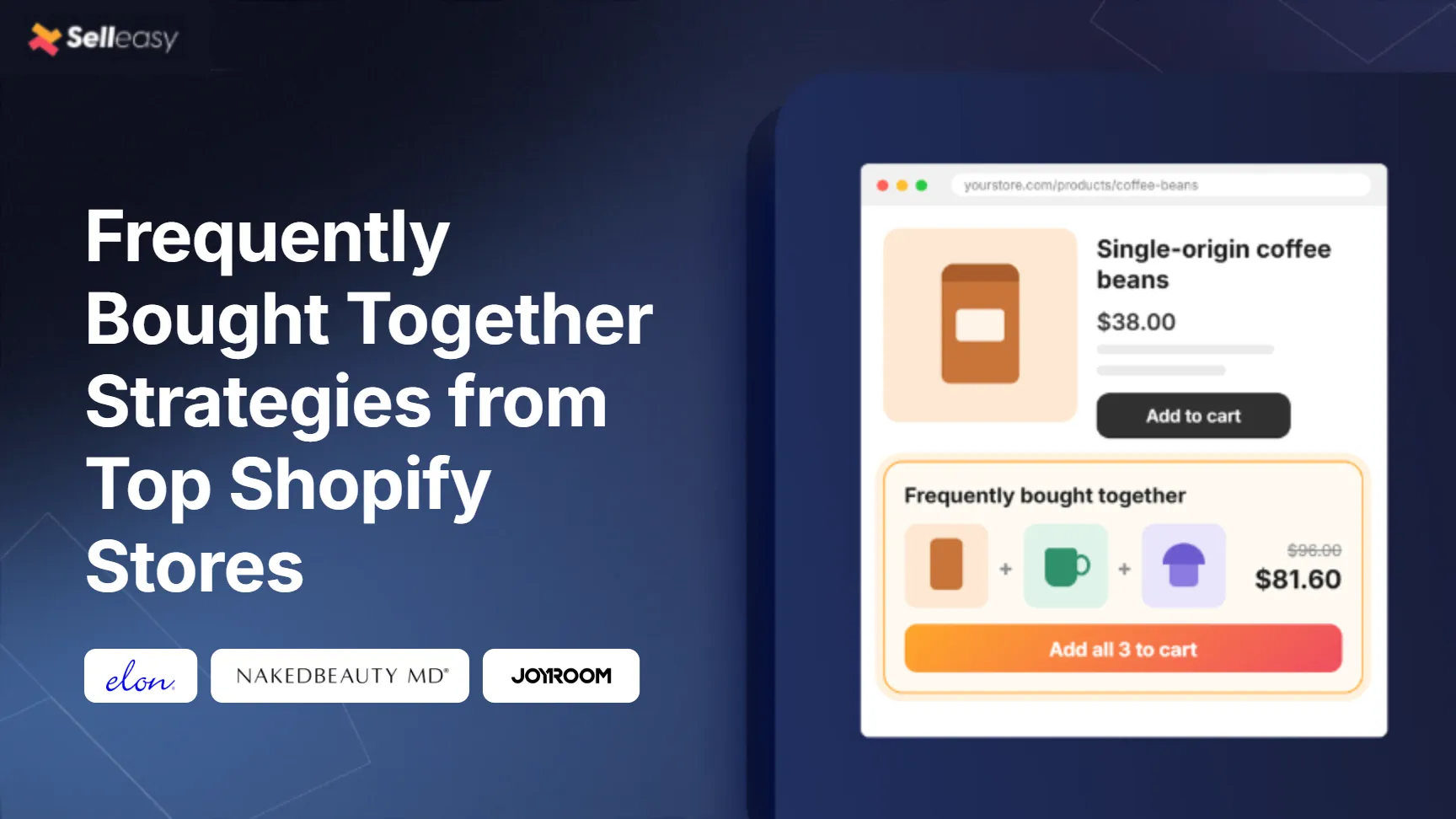
Shoppers rarely need just one thing. Someone buying a phone needs a phone case, and someone buying a T-shirt might want matching shorts. Frequently bought together (FBT) puts these items right next to the main product, so customers can add the full set in one click instead of searching for it.
Frequently Bought Together increases the average order value without feeling like a hard sell. But when it is not done right, it fills your product page with items nobody wants.
This guide covers when frequently bought together works, which layout and discount to use, examples from Shopify stores using Selleasy, and the mistakes to avoid.
When to use frequently bought together on Shopify (and when not to)
Frequently bought together works best when your main product needs, or is clearly improved by, other products you sell.
Use it when:
- The product needs accessories or refills to work or get the most out of it. For example, a phone and a case, a candle and a candle holder, a camera and a memory card, or a printer and ink.
- Customers often buy a set or a complete look. For example, a top, bottoms, and shoes.
- The offer products cost less than the main product. This makes adding them to the cart feel like a small extra purchase.
- You have a wide product catalog. A larger catalog gives you more opportunities to create relevant pairings and help shoppers discover products they might not find while browsing.
- You want to sell slower-moving products. Pair them with best-sellers when the products genuinely complement each other.
Frequently bought together ideas by industry
When frequently bought together doesn’t work
- You sell only one product or your catalog is too small to offer relevant pairings. Without enough complementary products, it’s difficult to create useful recommendations.
- The offer products cost more than the main product. A $75 add-on next to a $25 product can feel like an aggressive upsell rather than a helpful suggestion.
- The shopper is still deciding on the main product. Extra choices can slow down the purchase, especially for high-consideration or made-to-order items.
- The pairing makes sense only to you. Showing an unrelated overstock item alongside a best-seller can reduce shoppers’ trust in your recommendations.
- Your margins are thin, and the bundle needs a large discount to sell. The extra sales may not be worth the profit you give up.
Should you discount a frequently bought together bundle?
A small bundle discount gives shoppers a reason to add everything now, but frequently bought together also works at full price when the pairing is obvious.
In Selleasy, you can:
- Offer a product discount as a percentage or a fixed amount, free shipping, or the cheapest item free.
- Add tiers, for example, 10% off when 2 unique items are added and 15% off for 3.
- Choose how the discount is created: Selleasy discount functions, discounts created dynamically, or a discount code you already have.
- Apply the discount only when the main product is bought with the offer products, which is the default. This stops shoppers from buying offer products alone at the bundle price.
Start with the smallest incentive that works. If the offer products are essentials, try no discount first. Test free shipping or “cheapest item free” before a deeper percentage off. If you already run quantity discounts, see our Shopify volume discount strategies guide for how the two can work together.
Examples from top Shopify stores using Selleasy
The 3 stores below show that frequently bought together works best when the offer products finish what the main product starts.
Elon - Example for Frequently Bought Together (List)
Elon
What you can learn from Elon
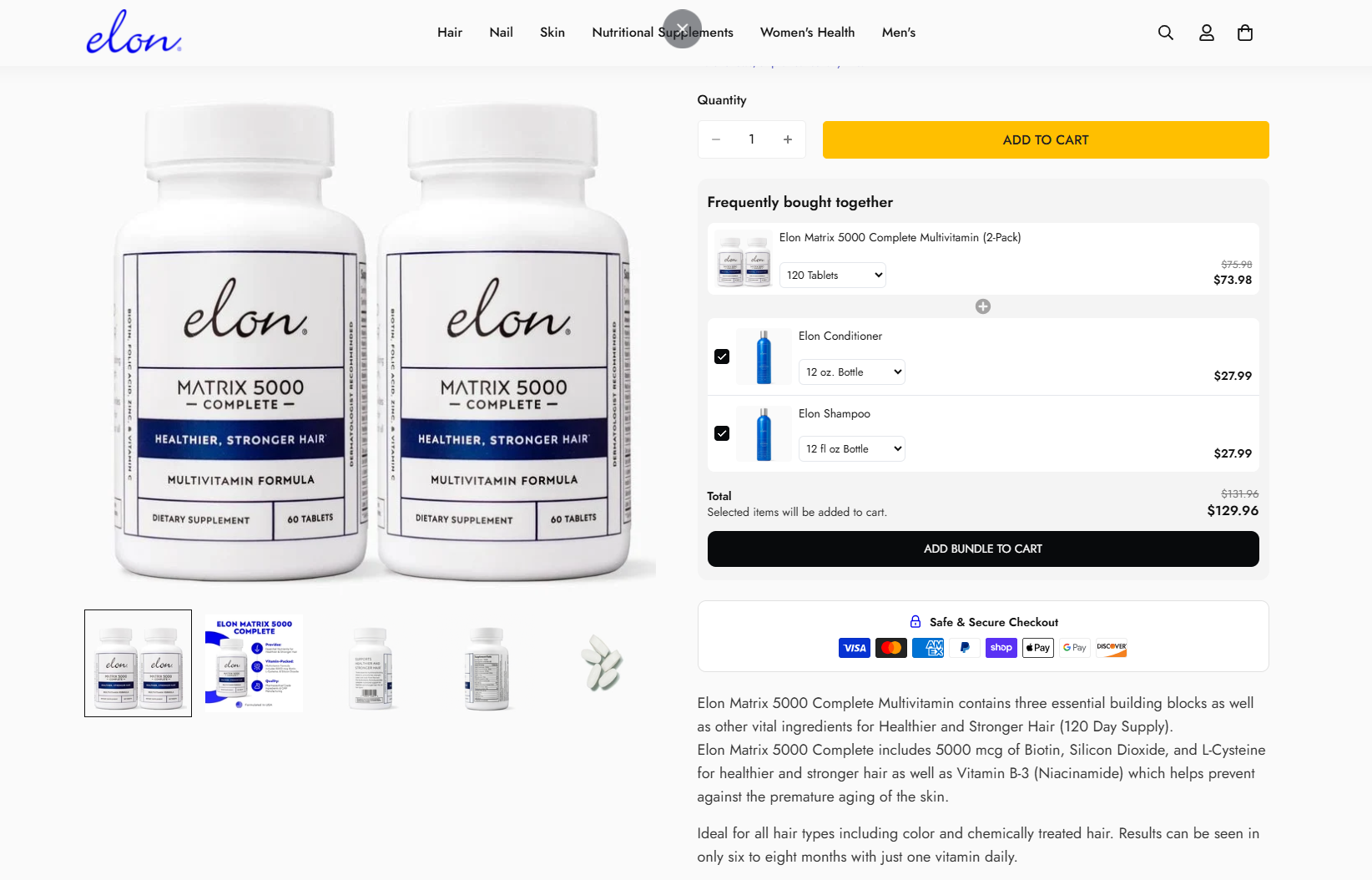
Elon sells hair, nail and skin supplements alongside its own hair care. On the Matrix 5000 multivitamin page, a frequently bought together list pairs the vitamin 2-pack with Elon shampoo and conditioner, so shoppers can buy a complete hair routine in one step.
They make the offer more appealing with a few simple tactics:
- 01Lead with the main product - The 2-pack sits at the top of the list with its own size selector, so shoppers can change their supply without leaving the widget.
- 02Pre-select the add-ons - Conditioner and shampoo are ticked by default, so shoppers only untick what they don't want.
- 03Pair products with one goal - Shampoo and conditioner work alongside the vitamin toward the same result, healthier and stronger hair.
- 04Show one clear total - The bundle total of $129.96 sits next to the original $131.96, above a single “Add bundle to cart” button.
How to apply this to your store
- 01Pair your main product with items that serve the same goal.
- 02Pre-select the add-ons and let shoppers untick what they don't need.
- 03Keep size and variant options inside the widget so shoppers don't leave the page.
- 04Show the bundle total and saving above one add-to-cart button.
NakedBeauty MD- Example for Frequently Bought Together (Amazon)
NakedBeauty MD
What you can learn from NakedBeauty MD
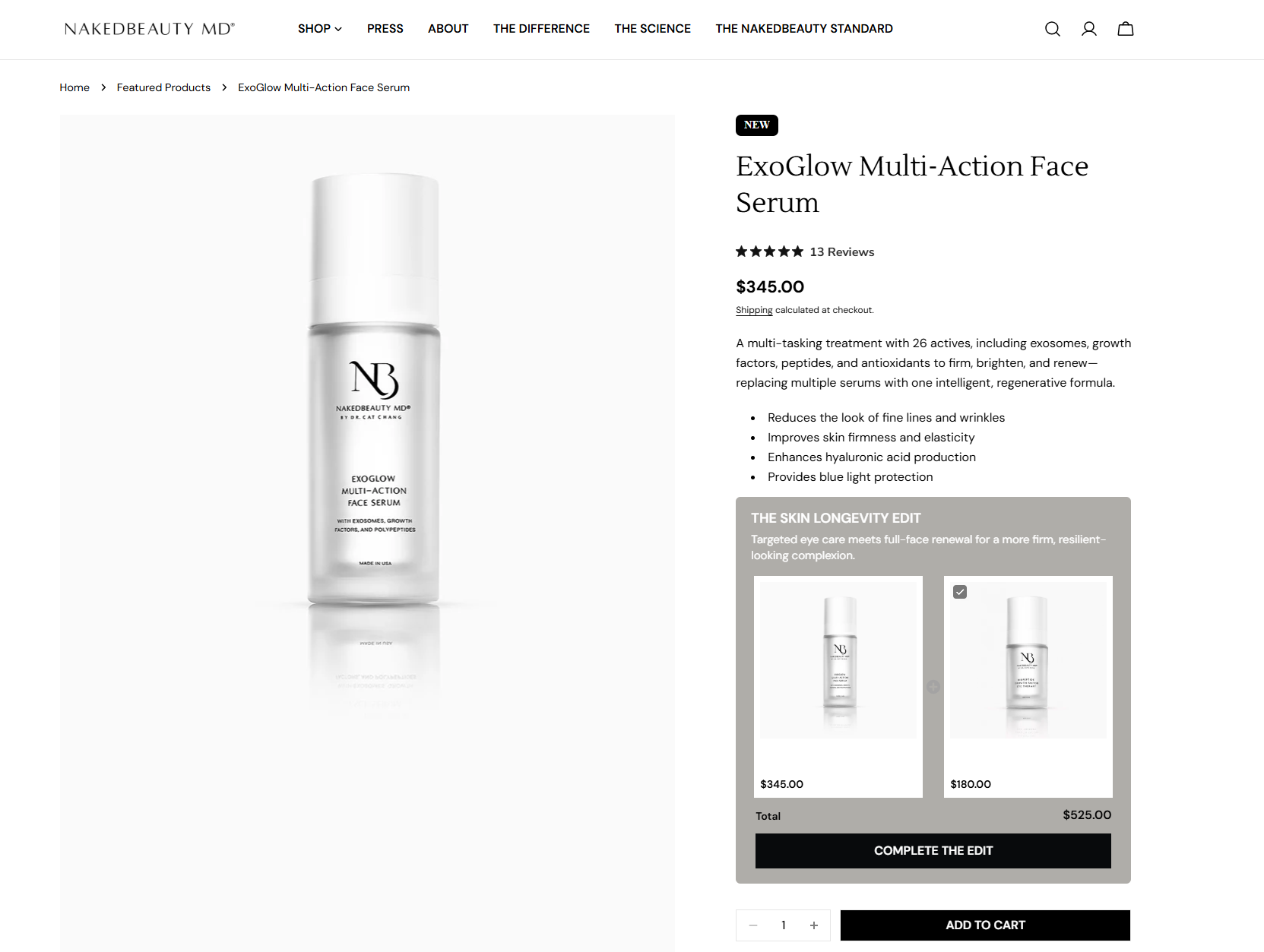
NakedBeauty MD is a clinical skincare brand by Dr. Cat Chang. On the $345 ExoGlow Multi-Action Face Serum page, an Amazon-style frequently bought together widget pairs the serum with an eye treatment from the same range as “The Skin Longevity Edit”.
They make the offer more appealing with a few simple tactics:
- 01Name the bundle - “The Skin Longevity Edit” turns two products into a routine, with one line on the result it delivers.
- 02Show products side by side - The serum and the eye treatment sit next to each other, each with its own image and price.
- 03Pre-select the add-on - The eye treatment is ticked by default, so the total already shows $525.00.
- 04Use a goal-based button - “Complete the edit” ties the click to finishing the routine.
How to apply this to your store
- 01Give your bundle a name and one line on the result it delivers.
- 02Pair products that cover different steps of the same routine.
- 03Pre-select the add-on so shoppers see the full total first.
- 04Write button copy that matches the goal of the bundle.
Joyroom - Example for Frequently Bought Together Classic
JOYROOM
What you can learn from JOYROOM
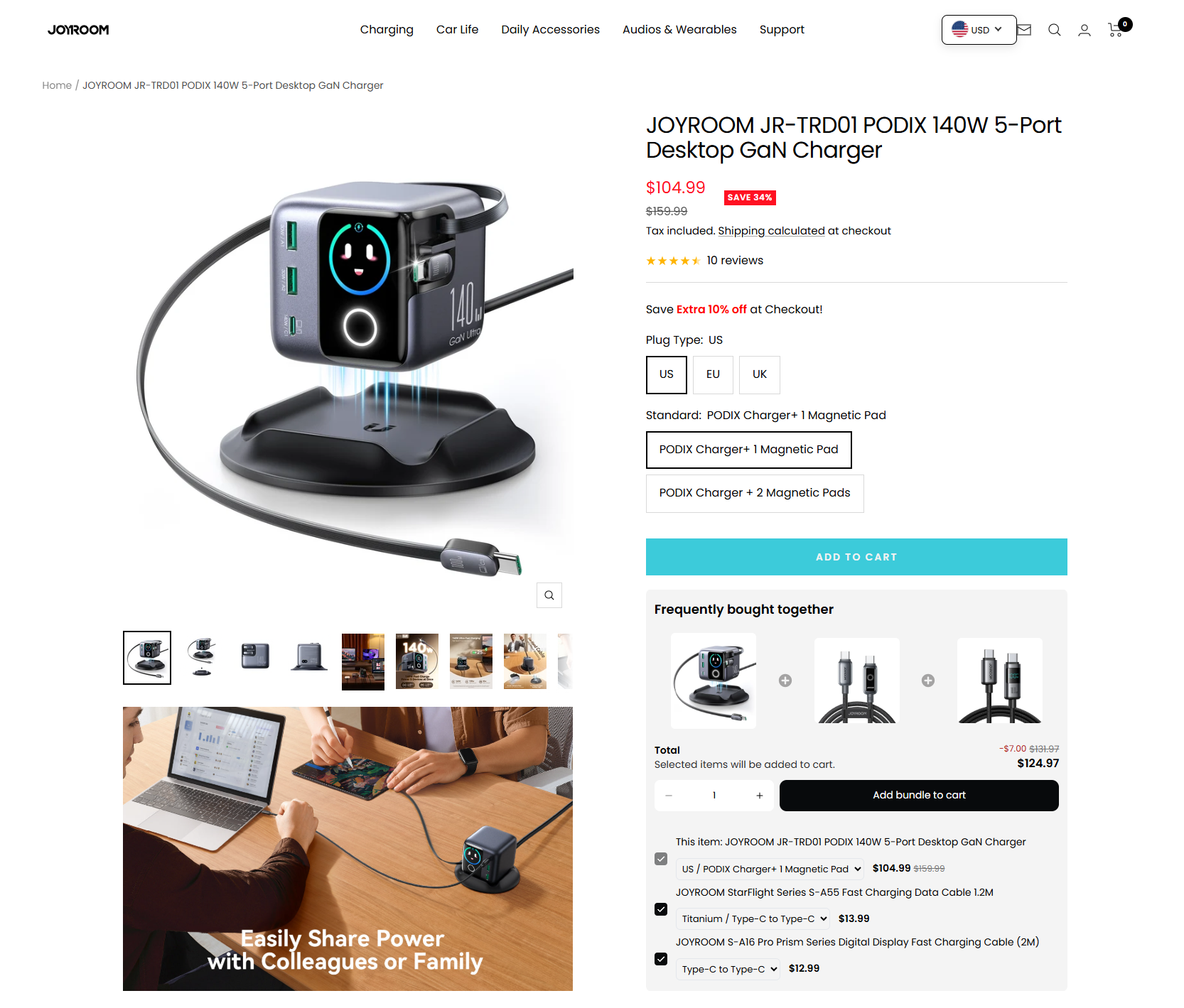
JOYROOM sells chargers, cables, car accessories and audio gear. On the $104.99 PODIX 140W 5-port desktop charger page, a classic frequently bought together widget below Add to Cart pairs the charger with two JOYROOM USB-C cables, so shoppers can pick up the charger and the cables to use with it in one order.
They make the offer more appealing with a few simple tactics:
- 01Recommend what the product needs - Both add-ons are USB-C cables, the accessory a desktop charger is used with.
- 02Keep add-ons low-priced - The cables cost $13.99 and $12.99, a small step up next to a $104.99 charger.
- 03Show the bundle saving - The total drops from $131.97 to $124.97, with the $7.00 saving shown above it.
- 04Keep options in the list - Each item has its own variant selector, so shoppers can change plug type or cable model without leaving the widget.
How to apply this to your store
- 01Recommend accessories that customers need to use the main product.
- 02Choose add-ons that cost much less than the main product.
- 03Offer a small bundle discount and show the saving next to the total.
- 04Place the widget right below Add to Cart so shoppers see it while deciding.
Setup mistakes to avoid
Most setup mistakes come from using one frequently bought together offer for every product and never revisiting it after launch.
Do’s
- Pre-select the offer products so buying the full set is the default. Shoppers can untick what they don’t want.
- Set different offers for different products or collections. Someone buying a laptop shouldn’t see the same offer products as someone buying headphones.
- Check which offers get added to the cart every month, and swap out pairings that don’t.
Don’ts
- Don’t show the same bundle on every product page.
- Don’t pair offer products that don’t fit the exact variant, like a case for a different phone model.
- Don’t set and forget. New products and seasons change what pairs best.
Frequently asked questions
Frequently bought together is easiest to set up with an app, works best with 2–3 relevant offer products, and can run on manual pairings, AI, or both.
What is frequently bought together on Shopify?
Frequently bought together is a product page offer that shows items commonly bought with the product a shopper is viewing, so they can add the whole set to cart at once. It’s the “customers also bought” pattern made popular by Amazon. On Shopify, it’s usually added with an app, because Shopify’s built-in recommendations don’t include a combined bundle offer.
How do I add frequently bought together on Shopify?
The quickest way is with an upsell app. In Selleasy:
- Install Selleasy from the Shopify App Store.
- Create a new offer and choose a frequently bought together layout: List, Amazon, or Classic.
- Choose the products the offer shows on and the offer products to include, either by picking them yourself or by writing simple instructions for Selleasy AI.
- Turn on a bundle discount if you want one, and set its type and tiers.
- Activate the offer and check how it looks on your product page.
Does Shopify have a built-in frequently bought together feature?
Not a complete one. Shopify’s Search & Discovery app lets you set complementary products, and many Online Store 2.0 themes can show them on the product page. Shoppers have to add each item separately, though, and there’s no combined add-to-cart button or bundle discount. For those, you need an app.
Can I add frequently bought together on Shopify without an app?
Yes, with custom theme code, but you’ll need a developer to build the combined add-to-cart and discount logic and to maintain it as your theme and catalog change. An app gets you the same result in minutes and is easier to update.
What is the best frequently bought together app for Shopify?
The best app depends on your catalog size and how much control you want over pairings and discounts. Look for multiple layouts, both manual and AI recommendations, built-in bundle discounts, and support for large catalogs. Apps like Frequently Bought Together by CBB, Selleasy, Essential Upsell and Cross-Sell, and Wiser AI search & upsell app do this job well. Selleasy covers all four, with plans for new stores as well as high-volume, large-catalog stores and Shopify Plus brands.
Should I use AI or manual recommendations?
Use manual pairings for your best-sellers, where you know exactly what goes together, and AI for the rest of your catalog. With Selleasy AI, you write simple instructions, such as “show matching bottoms for every top”, and it picks offers connected to each main product. This saves the most time on large catalogs and in stores that add new products often.
How many products should a frequently bought together offer show?
Two to three offer products is enough for most stores. Beyond that, the offer gets harder to scan, especially on mobile, and the bundle total starts to put shoppers off.
Is frequently bought together the same as a bundle or an upsell?
Frequently bought together is a type of cross-sell: it suggests complementary products alongside the main one. An upsell offers a better or more expensive version of the same product, and a fixed bundle sells set products as a single item. FBT is more flexible than a fixed bundle, because shoppers can untick any add-on they don’t want.
Wrapping up
Frequently bought together works best when every recommended product has a clear reason to be there. The right pairings help shoppers find what they need, make the buying process easier, and increase the value of each order.
Start with your best-selling products. Add two or three relevant items, choose a layout that suits your products, and test whether a small bundle discount makes a difference.
As your catalog grows, managing these recommendations manually can take more time. Selleasy lets you create product pairings manually or use AI recommendations to manage offers across your catalog.
Give your customers more reasons to add to their cart with frequently bought together offers.