.svg)
Made-to-Order on Shopify: The Complete 2026 Guide
Last updated on
June 22, 2026
.webp)
Many Shopify stores spend heavily on stocking products before customers place orders, which increases inventory costs and can leave products unsold. Shopify made-to-order solves this by producing products only after an order is placed.
This approach is becoming more popular as demand for personalised products continues to grow. According to Deloitte, 80% of consumers prefer personalised experiences and spend 50% more with those brands.
By the end of this guide, you’ll be able to set up a smooth made-to-order workflow on Shopify, manage customer expectations clearly, and prevent cancellations and lost sales in your store.
What is Shopify made-to-order?
Made-to-order or Make-to-order (MTO) is a fulfilment model in which a product is manufactured or prepared only after a customer places an order.
Unlike traditional selling, products are not stored in warehouses waiting to be sold. Production starts only when there is customer demand.
This model helps businesses avoid excess inventory and reduce waste. It is mostly used for customised or personalised products because items are made based on customer preferences.
According to research published on ScienceDirect, 62% of people choose brands that offer customised experiences or services.
Because of this growing demand, the make-to-order model is becoming more popular among merchants.
How does Shopify made-to-order work?
Made-to-order works by triggering production only when a confirmed order arrives, replacing the traditional "push" model of making inventory and hoping it sells.
The workflow is simple and repeatable. You are no longer guessing what will sell. Every item you produce has a confirmed buyer and confirmed revenue behind it.
Here is how the typical made-to-order process flows:
.webp)
- Update your product page
Your product page shows detailed information like “Made to Order”, “Ships in 7–10 Days”. This sets honest expectations right from the start. Customers who choose to buy anyway are more patient and less likely to cancel.
- Collect payments upfront
The customer completes checkout and pays in full or a deposit via partial payment. This gives you the money needed to produce the item without using your savings.
- Start production
Once the order is confirmed, you begin manufacturing the item. This is an order-based production process, where the order pulls the work forward.
- Send updates
Automated order confirmation emails, shipping updates, and estimated delivery dates keep the buyer informed. You can use apps to handle this automatically, so no updates are missed.
- Ship the orders
Once the production is complete, you can ship them to your customers. You can also send the tracking link for a smoother delivery experience.
What is the difference between made-to-order and make-to-stock?
Made-to-order (MTO) products are made only after a customer places an order, while Make-to-stock (MTS) products are produced in advance before any order is placed.
Made-to-order (MTO) and make-to-stock (MTS) are two approaches based on your manufacturing process.
.webp)
Why use Shopify made-to-order?
Made-to-order is one of the most capital-efficient ways to run a Shopify store. You get paid before producing anything, which reduces inventory risk, improves cash flow, and lets you offer unlimited customisation.
.webp)
Here’s why shifting from stock-based models to pull-based production helps you:
- Reduce inventory costs
Unlike MTS, you don't have to produce the products before you receive an order and store them in warehouses. This will help you avoid the storage cost entirely.
- Better cash flow
You get paid before making the product, so you don’t need to spend money upfront on inventory, which improves cash flow and reduces financial risk.
- Offer more product variants
Because you are not pre-manufacturing, you can offer unlimited colour, size, or material combinations without the risk of dead stock.
- Reduce returns
Customers who buy custom or made-to-order products usually know exactly what they want. Since they choose or customise the product themselves, they are less likely to return it.
Made-to-order vs Preorder vs Backorder on Shopify
These three terms are often confused, but they describe different inventory and fulfilment situations:
All three share a "Pay now, receive later" structure, but the reasons for the delay are different. To know more about backorders, read through our blog on the Ultimate Guide for Shopify Backorders.
What types of businesses benefit most from made-to-order?
Made-to-order works best for businesses that sell custom, handmade products where personalization adds real value. Some of the industries that commonly use this model include apparel, jewelry, furniture, and the food industry.
Here are the main categories that work well with the made-to-order approach.
Apparel stores
MTO in apparel includes T-shirt printers, embroidery shops, and similar customisation businesses.
According to a survey, the custom T-shirt printing market is growing fast, expected to increase from $5.16 billion in 2024 to $9.82 billion by 2030.
Handmade products
Jewellers, potters, woodworkers, and candle makers often cannot afford to pre-produce large quantities. MTO lets them grow without taking on inventory debt.
Customer interest in customised jewellery has grown significantly. According to market reports, over 41 million customised jewellery pieces were sold in 2023.
Furniture and home decor
Custom furniture sellers who offer size, finish, and fabric choices are using MTO. Shopify makes it easy to bring this model online.
Over 65% of homeowners prefer their furniture to be aesthetic and match their living space. This preference makes furniture and home decor a natural fit for the made-to-order model.
Food industry
Foods that are mostly made-to-order include pizzas, burgers, sandwiches, custom cakes, salads, sushi rolls, and freshly prepared beverages like bubble tea or smoothies.
According to a 2025 survey, 44% of consumers prefer customised designer cakes for birthday parties, highlighting the growing demand for personalised food products.
What are the challenges of Shopify made-to-order?
Made-to-order often face challenges like longer production timelines and managing custom orders efficiently. Clear communication, organized workflows, and well-defined policies help you maintain customer trust and ensure smooth operations.
.webp)
Here are the common challenges in managing made-to-order.
- Longer lead times
Production takes time, and some customers expect fast shipping. If your lead time is not communicated clearly, it may lead to dissatisfaction and loss of trust.
- Order management
Tracking dozens of orders manually can become very difficult. Without the right tools, it becomes much easier for important details and updates to get missed.
- Production issues
A sudden increase in orders, for example, after a viral social media post, can slow down production and even cause order cancellations. Having a production limit or a waitlist can help manage the demand better.
- Refund and cancellation policy
Customers may cancel orders during production, but customised products usually cannot be resold to another buyer. That’s why having a clear cancellation policy mentioned on the product page is essential.
- No proactive communication
If there is silence after checkout, buyers get nervous. Setting up automated emails to confirm the order, share production updates, and notify customers when the item ships can help build trust and keep them informed.
How to set up made-to-order on Shopify: Step-by-Step
You can set up made-to-order on Shopify using Shopify’s native features or a preorder app. Shopify preorder apps make the process easier and more effective to set up and manage.
Here’s how to set up Shopify made-to-order:
Method 1: Using Shopify's native features
Step 1: Mention in the product page that it is an MTO in the title and description. Add a clearly visible note like: "This item is made to order. Production takes 5–7 business days before shipping."
.webp)
Step 2: In the product's inventory section, enable the track quantity to know how many quantities have been sold as made-to-order.
Then, turn on ‘Continue selling when out of stock’, which will allow customers to place an order even when the product is out of stock.
%20(1).webp)
Cons of using this method:
- You will have to manually manage orders and separate them from regular orders, which can become difficult when you have multiple SKUs.
- For any customisations, you have to make them through detailed coding.
Method 2: Using a preorder app for made-to-order
This is an easier and more effective way to set up and manage MTOs. There are multiple preorder apps available on the Shopify app store.
I’ve tried the top apps and found the Dibs- Preorders & Backorders app very useful. I will show this setup using the Dibs app.
Step 1: Download the Dibs app from the Shopify app store.
.webp)
Step 2: Fill in the basic setup with the plan name and plan category.
.webp)
Step 3: Select the products, variants, or collections you want to associate with this plan.
.webp)
Step 4: Set an availability schedule with a start and end date and quantity limits to limit how many units can be ordered.
.webp)
Step 5: Choose the shipping option. Days after checkout will be the most suitable option, where you can set the shipping date based on your production timeline.
Then select the payment methods, whether full payment, partial payment, and/ or book now, pay later options. For partial payments and book-now-pay-later, you can collect the balance payment on the fulfillment date by choosing “On fulfillment” option.
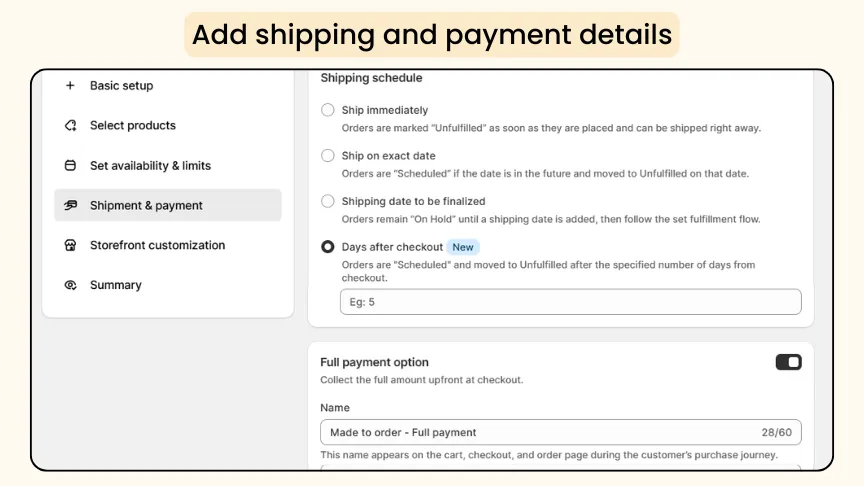
You can also offer discounts, which helps you boost conversions.
For a full, detailed setup, read our blog, How to Set Up Preorder on Shopify.
Real Shopify store examples using made-to-order
The best way to understand made-to-order in practice is to see how real Shopify merchants are running it. Here are stores and setups that genuinely work:
Asphalte
.webp)
Asphalte, a menswear brand, runs entirely on a pre-order and made-to-order basis. Before producing any garment, they survey their community to ask what they want.
Only top-voted designs go into production, and customers pre-order before a stitch is cut. Once the design is finalized, the made-to-order model takes over.
This approach helped them generate €2.4M in retail revenue in just seven months while avoiding excess inventory and reducing production risk.
Kate & Kole
.webp)
Kate & Kole, a jewellery brand, operates on both regular orders and made-to-order, blending scalability with personalisation.
They allow customers to customise details such as material, size, and design, turning each purchase into a more personal experience rather than a simple transaction.
Nearly 30% of their orders are customised jewellery pieces, made possible by their made-to-order approach, which allows for greater flexibility and personalisation.
You’ve seen how real Shopify stores use made-to-order, now let’s look at some common questions people usually have before getting started.
Frequently Asked Questions (FAQs)
1. What is the meaning of made-to-order?
Made-to-order means a product is created or manufactured only after a customer places an order. The store does not hold pre-made stock, which reduces inventory costs and improves cash flow.
2. What is the difference between MTO and MTS?
Made-to-order (MTO) produces items only after an order is placed (pull), whereas made-to-stock (MTS) produces items in advance and stores them, hoping they sell (push).
3. Can you do made-to-order on Shopify?
Yes. Either use Shopify's native settings (enable inventory tracking, turn on "continue selling when out of stock") or install a preorder app like Dibs to automate the full MTO workflow.
4. What are the common mistakes in a made-to-order store?
Not clearly showing lead times, going silent after checkout, having no cancellation policy, and underestimating production time are the common mistakes in handling made-to-order products.
5. Which Shopify apps are best for made-to-order?
Preorder apps like Dibs, Timesact, and Preorder Wolf are popular choices. They handle MTO buttons, collect deposits, and manage fulfilment timelines. See the full comparison in 20 Best Preorder Apps for Shopify.
6. Can I offer partial payments for made-to-order products on Shopify?
Yes. You can offer partial payments for made-to-order products, along with discounts, using third-party preorder apps like Dibs. You can also offer “Book Now, Pay Later” options to improve customer trust and increase conversion rates.
7. How do I communicate lead times to customers in a made-to-order store?
Update your product page with the estimated delivery date and mention the lead time in order confirmation emails. You should also share production and shipping updates regularly so customers know the current status of their order.
8. Can customers cancel or modify a made-to-order?
No, made-to-order products usually cannot be cancelled or modified once production has started. Since the product is customized for a specific customer, it often cannot be resold to someone else.
Start selling made-to-order on Shopify today
Made-to-order is not just a fulfillment model; it is a business strategy that helps Shopify merchants grow without the financial risks of traditional inventory management.
This pull-based production approach ensures that every item produced already has a confirmed buyer, guaranteed revenue, and minimal wasted stock.
Here are the key takeaways:
- MTO means you produce products only after a sale is confirmed, helping reduce waste, risk, and upfront inventory costs.
- Shopify’s native features can support basic MTO workflows, but preorder apps like Dibs – Preorders & Backorders provide better automation, partial payments, and an improved customer experience.
- Common mistakes include unclear delivery timelines, missing cancellation policies, and poor post-purchase communication.

.png)
.avif)
.svg)
.svg)
.svg)


.svg)