.svg)
The Ultimate Guide to Choosing the Best Shopify Scheduling App (2026)
Last updated on
May 15, 2026
.avif)
What is a Shopify Scheduling App?
A Shopify scheduling app is a booking system that allows merchants to accept appointments, rentals, classes, or service bookings directly from their Shopify store. It automates time-slot selection, availability management, payments, reminders, and calendar syncing. It helps merchants eliminate back-and-forth communication and focus on delivering the service.
A Shopify scheduling app is also commonly referred to as:
- Shopify booking app
- Shopify appointment app
- Shopify calendar app
- Shopify rental booking app
- Shopify service booking system
If you sell services instead of physical products, a scheduling app is essential for delivering a frictionless booking experience.
Why Your Shopify Store Needs a Scheduling App
Here is how booking works with traditional contact page booking vs Shopify scheduling app:
In 2026, customers expect:
- Real-time availability
- Instant confirmation
- Zero waiting
- No manual coordination
If they can’t book instantly, they move on.
A Shopify scheduling app removes delay, eliminates friction, and captures revenue while intent is high.
Here’s what a dedicated Shopify Scheduling App solves:
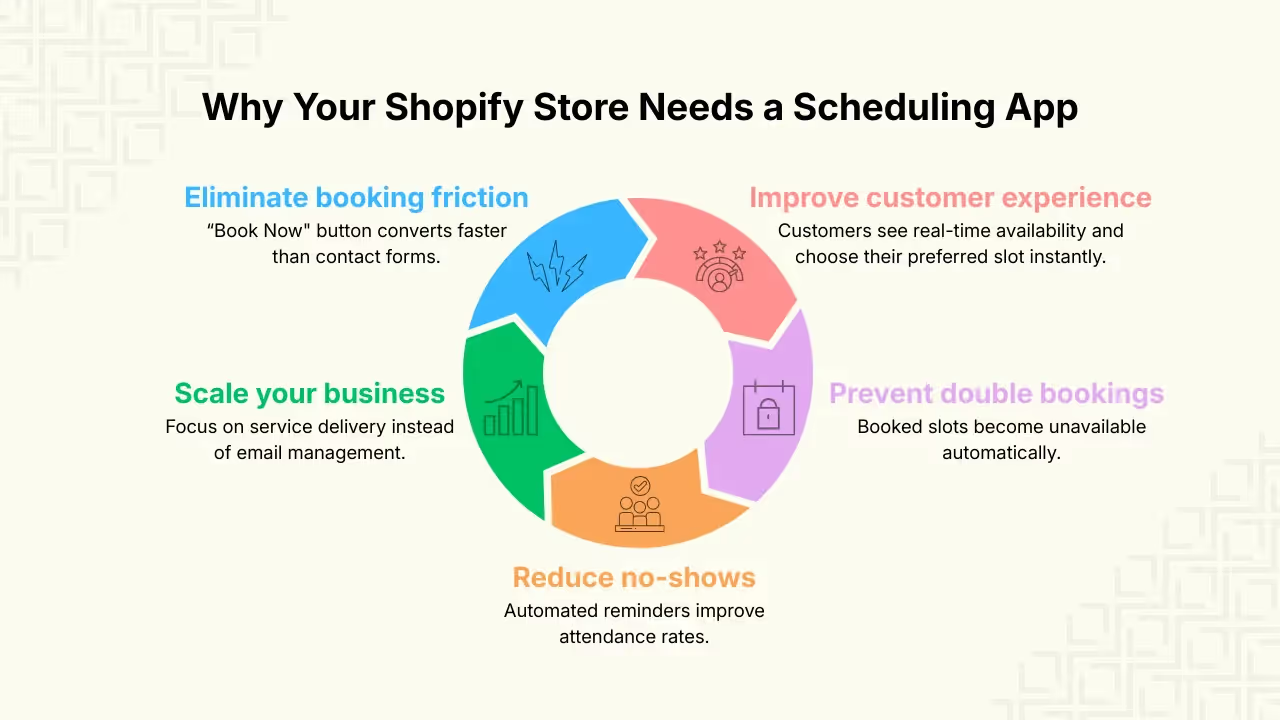
1. Improve customer experience
Customers see real-time availability and choose their preferred slot instantly.
2. Prevent double bookings
Once a time slot is booked, it automatically becomes unavailable.
3. Reduce no-shows
Automated email reminders improve attendance rates.
4. Scale your business
Instead of managing emails, you focus on delivering services.
5. Eliminate booking friction
One “Book Now” button converts faster than a contact form.
Pro-tip: Over 67% of consumers prefer online booking over phone calls.
How a Shopify Scheduling App Works
A scheduling app integrates directly into your Shopify store and:
- Displays a “Book Now” button on your product page
- Lets customers select date & time
- Accept payment (full, partial, or pay later)
- Blocks that time in your calendar
- Send automated confirmations & reminders
Most advanced apps also support:
- Multi-staff management
- Multi-location setup
- Capacity-based bookings
- Rental start & end logic
- Recurring services
- Two-way calendar sync
How to Choose the Best Shopify Scheduling App for Your Business
Not all Shopify scheduling apps are built the same. The right app depends on your business model, team, size, and booking complexity.
Here’s how to evaluate your options:
If you’re a solo service provider
Look for:
- Real-time availability
- Automated reminders
- Google Calendar sync
- Less-complex setup
If you manage a growing team
Prioritize:
- Multi-staff management
- Individual staff calendars
- Fair staff pricing structure
- Capacity control
- Location-based availability
If you run a rental business
Make sure the app supports:
- Multi-day bookings
- Custom start & end date
- Security deposits
- Duration-based pricing logic
If you’re a beauty salon or wellness business
Look for:
- Staff-specific calendars
- Buffer time between appointments
- Recurring service sessions (e.g., monthly facials, hair spa treatments)
- Capacity control (for group sessions)
- Automated reminders to reduce no-shows
If you host events or classes
Look for:
- Capacity limits
- Group booking support
- Date-specific events
- Automated reminders
If you operate multiple locations
Ensure that app allows:
- Separate availability per locations
- Staff assignment per branch
- Location-specific booking rules
If you sell services without products
Some businesses don’t sell physical products at all. Example include:
- Therapy
- Coaching
- Consulting
- B2B product demo
- Freelance services
- “Book a call” scheduling
In this case, your scheduling app should allow:
- Booking without linking to a Shopify product
- Zoom/Google meet integrations
- Free or paid appointments
- Custom booking pages
Choosing a Shopify scheduling app based on your business model, not just pricing. This helps you avoid costly migrations later.
Best Shopify Scheduling Apps in 2026
Here is a quick comparison of some of the best scheduling apps available for Shopify.
Features to Look for in a Shopify Scheduling App
If you’re choosing the best Shopify scheduling app, the right app should support your needs and help you scale your business.
Here are the most important features to evaluate:
Real-Time Availability
Customers should be able to see live slots and book them instantly, without waiting for manual confirmation. This eliminates friction and improves conversion rates.
Flexible Booking Types (Minute-based, Hourly, Full-Day & Multi-Day)
Look for an app that supports:
- Minute-based time slots
- Hourly time slots
- Full-day bookings
- Multi-day bookings
This is especially important for rental businesses and long-duration services.
Rental Support
If you rent out:
- Equipment
- Dresses
- Bikes
- Studio spaces
You need a booking logic that supports duration-based pricing and date ranges.
How to Set Up Shopify Rentals on Your Store
Capacity-Based Booking
For workshops, yoga sessions, or training programs, the app should allow you to:
- Set attendee limits
- Manage group bookings
- Control availability per slot
Multi-Staff & Team Management
Important if:
- You assign bookings to specific team members
- You want separate calendars per staff
- Staff have different availability
Also check whether staff members are included in the subscription plan or charged per user.
Multi-Location Support
If you operate across cities or branches, ensure the app supports:
- Location-based availability
- Separate staff per location
- Independent scheduling rules
Payment Flexibility (Full, Deposit, or Pay Later)
The best Shopify booking apps allow:
- Full payment at booking
- Partial payment and security deposits (for rentals)
- Book now, pay later
- Free appointments
How to Configure Payment & Deposits in Shopify Booking Apps
Two-Way Google Calendar Sync
A strong scheduling system should:
- Push bookings to Google Calendar
- Block slot availability when personal events are added
- Prevent double bookings automatically
Multi-Session & Package Bookings
If you offer:
- Multi-week programs
- Therapy packages
- Coaching bundles
The app should allow multiple sessions under one booking.
Customize Booking Widget
Your scheduling widget should:
- Match your Shopify store theme
- Work natively inside your store
A scheduling solution that combines all of these features provides the flexibility required for services, rentals, events, and growing teams, which is why apps like BookX are designed to support these advanced booking needs within the Shopify ecosystem.
How to Set Up BookX in 3 Simple Steps
Turning your Shopify store from a static product catalog into a revenue-generating service hub takes just a few minutes.
In this video:
Step 1: Install BookX
Download BookX from the Shopify App Store and install it on your store. Once installed, you’ll be prompted to create your first service.
Step 2: Set up your service
Click “Get Started” and choose how you want to set up your service:
- Regular slots (minute-based or hourly)
- Full-day bookings
- Multi-day bookings
- Services without a product
You can set these types of services with or without taking payments during booking.
After selecting your service type, give your service a name and link it to a product (if required).
Next, configure your availability:
- Set your time slots
- Add lead time (minimum advance notice)
- Set capacity limits per slot (if applicable)
Step 3: Enable BookX in your Store
Enable BookX from your Shopify theme editor to display the booking widget on your product or service page.
Click “View in your store” to preview how your service looks in your store.
Now, your customer can start booking instantly through your fully automated Shopify scheduling app.
Pros and Cons of Using BookX
7 Mistakes to Avoid When Choosing a Shopify Scheduling App
Choosing the wrong scheduling app can cost you time, money, and frustrated customers. Here are some common pitfalls merchants make and how to avoid them.
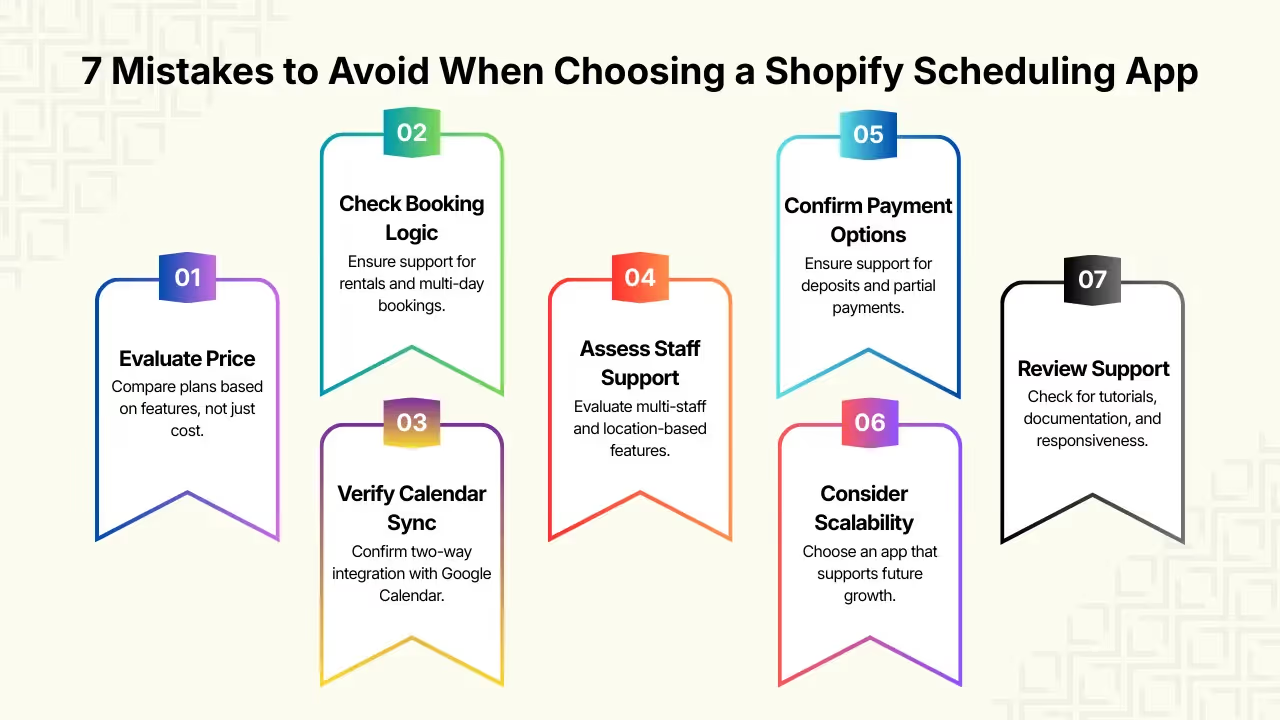
1. Choosing based only on price
Many business owners pick the cheapest plan without thinking about long-term needs.
Why it hurts:
Low-priced plans often lack:
- Calendar sync
- Multi-staff scheduling
- Capacity or rental logic
- Deposit & payment options
What to do instead:
Compare features and business impact. A slightly higher monthly plan can save you headaches and migration costs later.
2. Ignoring rental & multi-day booking logic
Some scheduling apps only handle minute-based or hourly appointments.
Why it hurts:
If your business needs multi-day booking or rental logic, basic appointment apps won’t suffice.
What to do instead:
Verify multi-day and duration-based logic early in your evaluation.
3. Skipping Google Calendar or two-way sync
Calendar integration isn’t just a bonus, it prevents double-booking across personal and business schedules.
Why it hurts:
Without two-way sync:
- Personal calendar events won’t block bookings
- Risk of booking overlaps and confusions
What to do instead:
Check that the scheduling app offers real two-way Google Calendar synchronization.
4. Overlooking staff and location-based support
Many apps charge per user or lock staff calendars behind expensive plans.
Why it hurts:
If you have a team, you should avoid:
- Unnecessarily high per-staff charges
- App that don’t allow staff assignments
- No location-specific availability
What to do instead:
Evaluate multi-staff and multi-location support against your growth plan.
5. Assuming all apps support deposits or partial payments
Accepting partial payments or security deposits is vital for rentals and higher-value services.
Why it hurts:
Without partial payments or security deposits, you may face last-minute cancellations.
What to do instead:
Confirm deposit/partial payment support before installing.
6. Forgetting scalability
An app that works for 1 employee might not work for 10.
Why it hurts:
You may end up migrating apps later which is time consuming and incur revenue losses.
What to do instead:
Choose an app that supports:
- Multi-staff calendars
- Multi-location logic
- Capacity limits
- Integrations (calendar, meeting links, payments)
7. Not reviewing customer support and documentation
A good software requires excellent support, especially for setup.
What it hurts:
A confusing dashboard or poor documentation increases:
- Setup time
- Frustation
- Abandonment
What to do instead:
Check:
- Video tutorial
- Help documentation
- Support responsiveness
FAQs
1. What is the best scheduling app for Shopify?
The best scheduling app depends on your business needs. If you need multi-staff support, multiple locations, or rental booking logic, apps like BookX offer more advanced flexibility.
2. Is there a free Shopify scheduling app?
Yes. Many Shopify booking apps like BookX offer free plans with basic scheduling functionality. However, advanced features such as multi-staff management and calendar integrations may require a paid plan.
3. How do I add appointment booking to my Shopify store?
You can add appointment booking by installing a scheduling app from the Shopify App Store, creating a service, configuring availability, and enabling the booking widget on your product page. No coding is typically required.
4. Can Shopify handle recurring appointments?
Yes. Recurring sessions depend on the scheduling app you use. Some apps allow multi-session or package-based bookings for services like therapy, coaching, or training programs.
5. Can I use a Shopify scheduling app for rentals?
Yes. Some apps support multi-day bookings, custom start and end dates, and security deposits which are essential for rental businesses.
6. Does a Shopify scheduling app sync with Google Calendar?
Most modern scheduling apps offer Google Calendar integration. Advanced apps like BooKX provide two-way sync, meaning personal calendar events automatically block availability in your store.
What’s Next
A Shopify scheduling app isn’t just a feature, it’s operational infrastructure.
If you sell service, rentals, classes, or consultations, automated booking is no longer optional.
BookX is built for merchants who want flexibility, scalability, and seamless Shopify integration.
If you're evaluating Shopify scheduling apps, BookX is one of the more flexible options available.

.svg)
.svg)
.svg)


.svg)