.svg)
How to add appointments with a Shopify booking app in 2026
Last updated on
August 5, 2026
.webp)
To convert any product on your store into a bookable service and create appointments, you need a Shopify booking app. And this is because Shopify doesn’t offer an in-built appointment booking feature.
Whether you're renting out equipment, running workshops, or booking consultations, adding a simple calendar system can help you offer services. This will help customers to select a date and time for the booking.
Also, there’s a practical issue: replacing the ‘Buy Now’ button with the ‘Book Now’ button.
To solve it, you can install an appointment booking app from the Shopify app store to add a calendar-based booking system. This feature will help customers book slots on your calendar based on your availability.
In this blog, we’ll discuss how to add appointments with a Shopify booking app. We have also added the best apps with comparison, use cases, and more.
Does Shopify Have a Built-In Booking System?
Though Shopify was initially designed and built around retail businesses, you can literally run any business on it.
You can use Shopify to sell services (like salons, spa, classes, etc.) in your store and even a mix of both. To add such features, you just need to install a Shopify app to integrate an appointment-booking system.
By doing this, you can allow customers to book your services through appointments. You can also set working hours, manage appointments and blackout days, add team members, etc.
To know more, watch the video below to see how a booking system can be added in a few minutes.
How do I add an appointment booking to Shopify? (Step-by-Step)
To add a calendar-based appointment booking widget, I’m using the BookX app here. The entire setup takes under 4 minutes. Let’s look at the step-by-step process.
1. Install BookX from the Shopify App Store
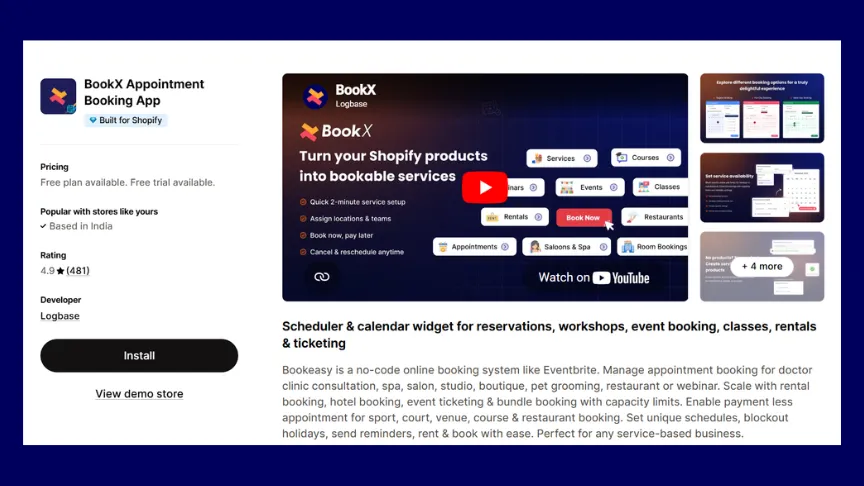
Install ‘BookX’ from the Shopify App Store, and it has a free plan to get started.
2. Add the Service or Product
After the initial setup, select which product or service in your store should display the booking calendar.
For example, here I’m creating and adding a ‘Hair Stylist’ appointment. You can either create a product inside Shopify with the name ‘Hair Stylist’ or even create an appointment without a name within the BookX app.
You can enable this for a single service or across multiple products. BookX automatically adds a calendar widget to the product page
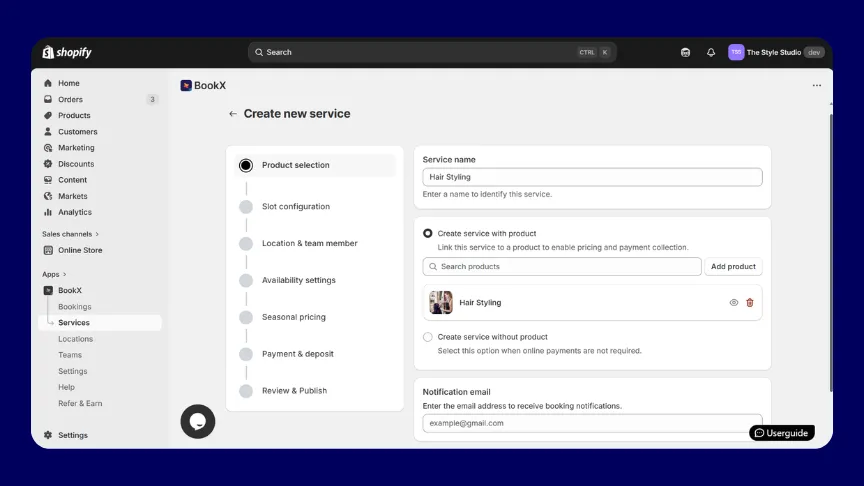
3. Set up Appointment Duration, Intervals & Multi-day Settings
You can then set how long each appointment lasts, how much time to leave between appointments, and how many people can book the same time.
If you run a hotel, offer rentals, or host workshops that lasts more than one day, you can let customers pick a start and end date instead of just one time.

4. Set Your Working Hours and Break Times
Specify the days and hours you're available for bookings and add any breaks (e.g., 1–2 pm). Customers will only see real, available slots on the calendar. The times outside your working hours are automatically blocked.
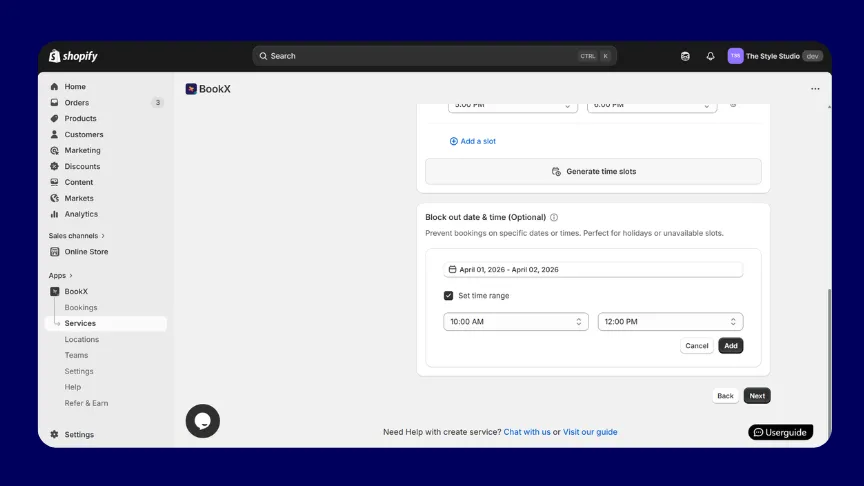
5. Add Blackout Dates for Holidays and Days Off
Block specific dates when you're unavailable, like public holidays, vacation days, and store closures. You can also add custom form fields to collect information from customers at the time of booking (e.g., "Please describe your requirements").
6. Add Team Members and Set Individual Schedules
You can create a profile for each staff member and assign their individual working hours and services. This will help customers choose their preferred persons at the time of booking. This can be done in a salon when customers wish to choose their favourite stylist.
Each staff member's availability is managed independently, so no two bookings clash.
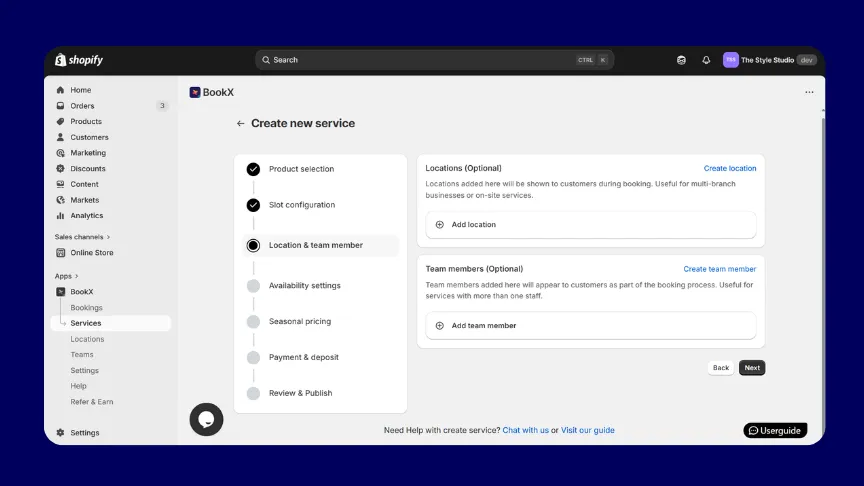
Once these 6 steps are done, your calendar widget goes live on the product page instantly.
How does it look on your store? (Before vs After)
Here’s how a Shopify store looks before adding BookX.
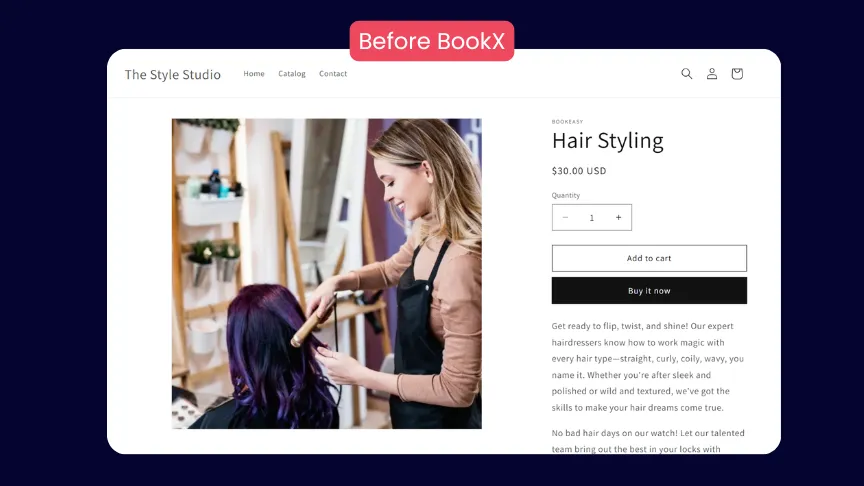
Here’s how the store looks after installing BookX and setting up an appointment. You can see the ‘Book now’ button instead of ‘Buy now’.
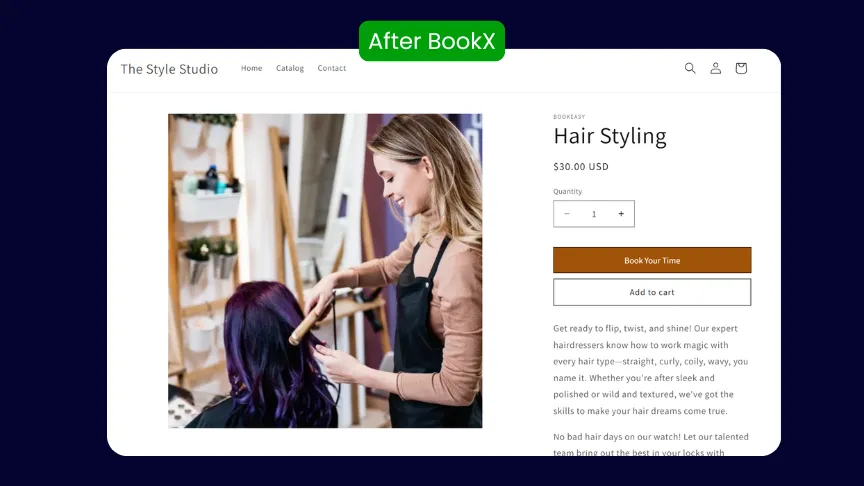
And here’s where customers can book a date and time for your appointments from the calendar.

How to create a service without creating a product on Shopify?
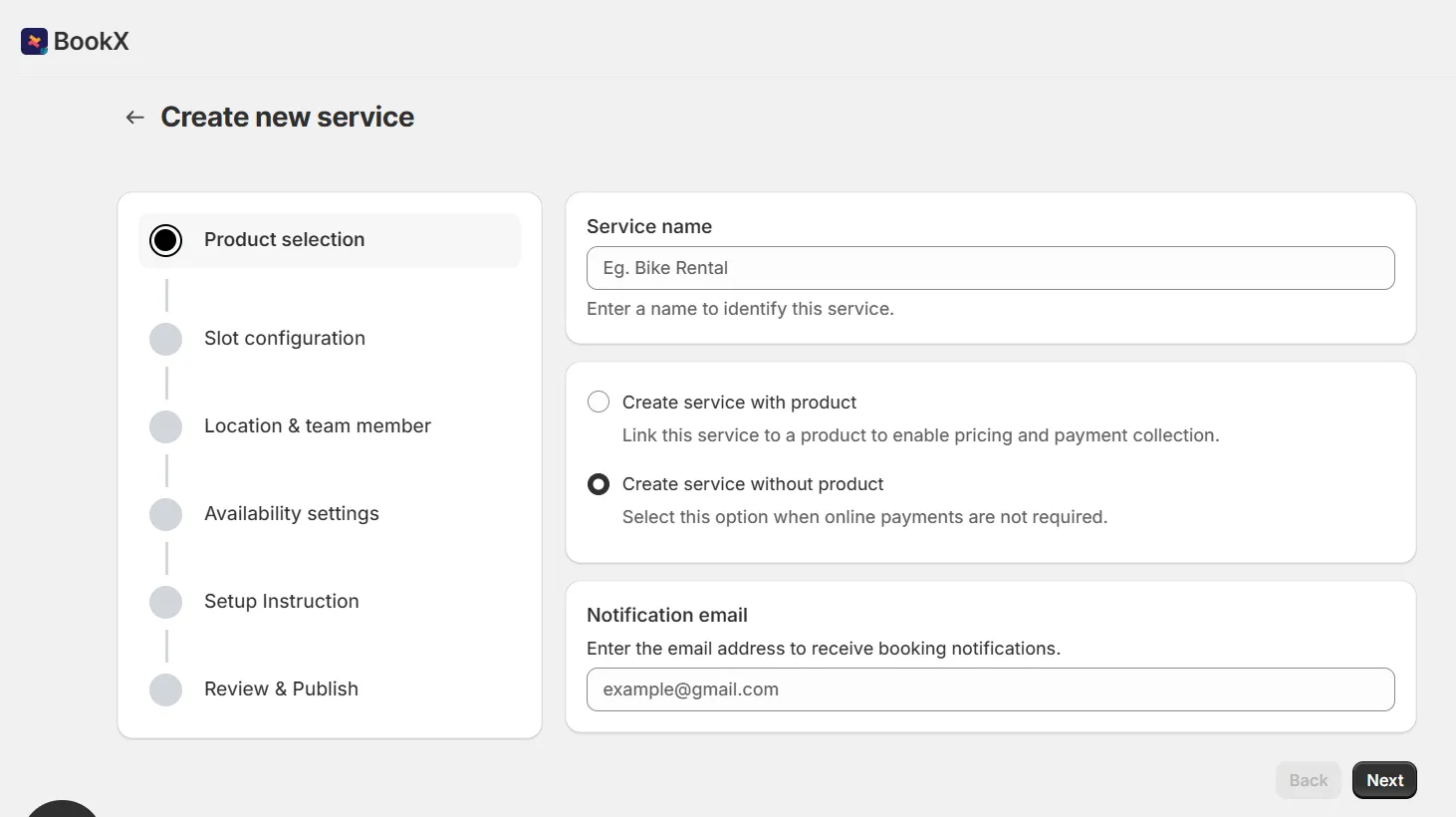
You don't need to create a product in Shopify to accept bookings. With booking apps like BookX, you can simply select the ‘Create service without a product’ feature to create a service.
You can use this feature when you don’t charge payments for the appointments. For example, a hair salon that takes bookings but collects payment when the customer arrives
How to accept partial payments or deposits for bookings on Shopify?
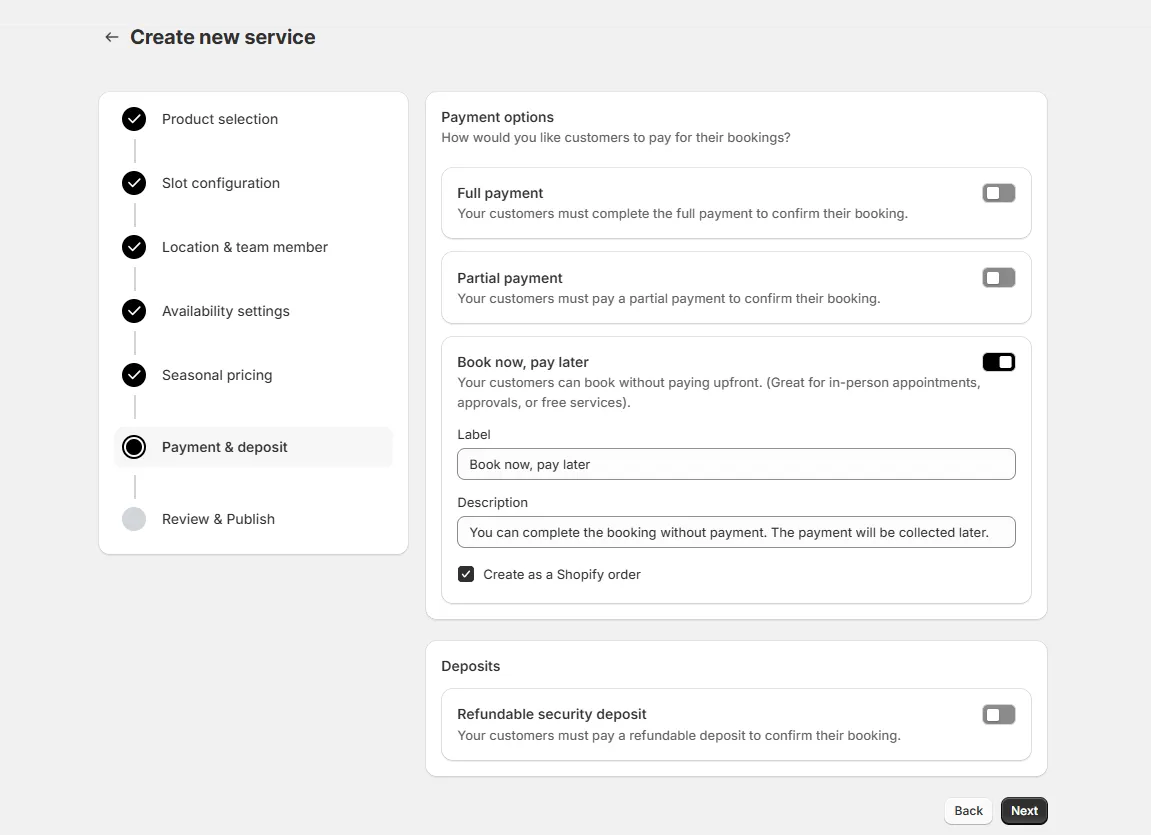
If you don't want to charge the full amount upfront, you can charge a partial payment or a refundable deposit instead. This confirms the booking without asking the customer to pay everything right away, and avoids no-shows since they've already put money down.
Example: a $200 photography session could take a $50 deposit at booking, with the rest collected in person.
To set this up in BookX, turn on deposit or partial payment for that service, then set either a fixed amount (like $50) or a percentage of the total price.
Read more on it here: Shopify Partial Payments & Deposits in Bookings and Rentals
Who Should Use a Shopify Calendar Booking App?
A Shopify scheduling app is useful for any business that runs on services, whether it’s a 30-minute consultation, a full-day rental, or a week-long retreat.
If your customers need to reserve a specific time slot, pick a staff member, or show up at a set time, you need a booking system.
Here are the most common use cases:
1. Salons & Spas
Assign services to individual stylists with independent schedules, and let customers pick who they want. Blackout dates handle holidays and staff days off automatically.
2. Healthcare & Dental
Patients self-schedule online instead of calling in, and automated reminders cut down on missed appointments and last-minute cancellations.
3. Fitness Studios & Personal Trainers
Cap class sizes with slot limits, or let customers book a private session tied to just their trainer's availability, not the whole studio calendar.
4. Consultants & Coaches
Offer free discovery calls with no upfront payment, then move to paid sessions through Shopify's checkout. Custom intake forms mean you walk into the call prepared.
5. Hotels & Rentals
Property managers, boutique hotels, and rental businesses (boats, cars, photography gear, dresses) need a multi-day booking feature so customers pick a check-in and check-out date instead of a single time slot, with capacity controls to prevent double-booking.
Check out the 11 Best Shopify Rental Apps for Shopify
6. Pet Grooming
Staff assignment, session duration controls, and owner reminders work the same way as a salon. Multi-day booking covers overnight boarding stays.
7. Auto Repair & Trade Services.
Auto repair shops, tyre centres, and home service businesses can use booking slots to manage their daily job load. Setting a maximum number of bookings per slot ensures your team isn't stretched across more jobs than they can handle in a day.
8. Courses, Events & Workshops.
Sell tickets to time-limited sessions directly through Shopify. Booking deadlines and capacity limits control room size, and automated Zoom links land in both calendars.
What are the best booking apps for Shopify?
Here are a few Shopify booking apps you can consider:
What to Look for in a Shopify Scheduling App
Here is a list of features that you must look for when choosing a scheduling app in Shopify:
- Google Calendar sync
- Bookings without creating a product
- Payment-less or deposit-only bookings
- Automated reminders & email notifications
- Capacity limits and group bookings
- Multi-day and multi-staff bookings
- Customizable booking widget
- Free plan or free-trial period
- Built for Shopify badge
The next step
Shopify is a great platform where you can run any type of business with it. Just products or services, or even both, Shopify is compatible with everything. The only thing you should do is install an app to add your required features.
Shopify booking apps are now better than before. Apps like BookX offer advanced features like staff scheduling, Google Calendar sync, multi-day appointments, and automated reminders. These are only a few. There are many features that you can use based on your use case.
So, start soon to improve the booking experience for your customers. Try a booking app to add appointments to your service-based business.
Frequently Asked Questions
1. Can you make a booking system on Shopify?
Shopify doesn't include a built-in booking feature, so you'll need to install an app from the Shopify App Store. BookX, for example, adds a calendar-based booking system to your store in minutes, with no coding required.
2. Can you use Shopify to book appointments?
Yes. With a Shopify appointment booking app installed, customers can browse your availability, select a time slot, choose a staff member if needed, and confirm a booking. BookX app ties the booking directly to your product page and integrates with Shopify's checkout for paid appointments.
3. Can you use Calendly on Shopify?
Calendly isn't natively integrated with Shopify, since it doesn't connect to your products, orders, or checkout flow. A dedicated Shopify booking app like BookX is a better fit because bookings are tied directly to your products. The payments go through Shopify's native checkout, and everything is managed from your Shopify dashboard.
4. Is Shopify good for booking services?
Yes. Shopify works well for service businesses when you add a booking app. It handles payments, customer accounts, and your storefront natively. BookX app adds the scheduling layer on top with time slots, staff management, automated reminders, and Google Calendar sync. This gives you everything a service business needs without switching platforms.
5. Can I use Shopify for hotel bookings?
With a booking app, Shopify supports multi-day appointments, which makes it suitable for hotel room bookings, vacation rentals, and similar hospitality use cases. Customers select a check-in and check-out date range on the calendar, and you can set capacity limits per room.
6. Does Shopify have a booking calendar?
Shopify doesn't include a native booking calendar. To add one, you need to install a Shopify calendar booking app. BookX adds a fully customisable calendar widget to your product pages. Customers see your live availability and can book directly from the calendar without leaving your store.
7. Can Shopify be used for bookings?
Yes. Shopify can handle a wide range of booking types, including single appointments, group events, multi-day rentals, class registrations, and recurring bookings. You need a booking app to enable this, but once BookX is installed, the experience is seamless for both you and your customers.
8. Can Shopify do scheduling?
Shopify doesn't include native scheduling, but you can add a full scheduling system by installing a Shopify scheduling app, such as BookX. Once installed, you can manage staff schedules, set availability windows, control booking slots, and sync everything to Google Calendar.
9. Can you sell appointments on Shopify?
Yes. Shopify handles checkout, and a booking app like BookX adds the calendar on top; customers pick a time slot, then pay through Shopify as normal- full price, deposit, or free.
.avif)



.svg)
.svg)
.svg)


.svg)