.svg)
Best Shopify Local Delivery Apps in 2026 - Reviewed & Compared
Last updated on
July 24, 2026
%20(1).webp)
Local delivery has become a crucial fulfillment option for Shopify stores looking to compete with retail giants and meet growing customer expectations for fast, convenient delivery. Whether you run a bakery offering same-day delivery, a furniture store with scheduled delivery slots, or a grocery shop serving specific neighborhoods, the right local delivery app can transform your operations.
In this comprehensive guide, we'll compare the best Shopify local delivery apps in 2026, covering everything from delivery zone management to same-day scheduling and pricing structures.
What is Shopify Local Delivery App?
What does local delivery mean in the Shopify context
Local delivery in Shopify refers to a fulfillment method where you deliver orders directly to customers within a specific geographic area using your own delivery fleet or team. Unlike standard shipping, local delivery gives you complete control over delivery zones, schedules, and costs, making it ideal for businesses serving specific neighborhoods, cities, or regions.
What native Shopify offers
Shopify’s built-in local delivery features provide basic functionality:
- Set up delivery zones by zip/postal codes
- Configure flat-rate or free delivery pricing
- Enable local delivery at checkout
- Manage delivery addresses in your admin panel
While Shopify’s native solution works for simple scenarios, it lacks advanced features like date and time slot selection, delivery capacity management, same-day delivery cutoff times, and route optimization.
Why you need a third-party app
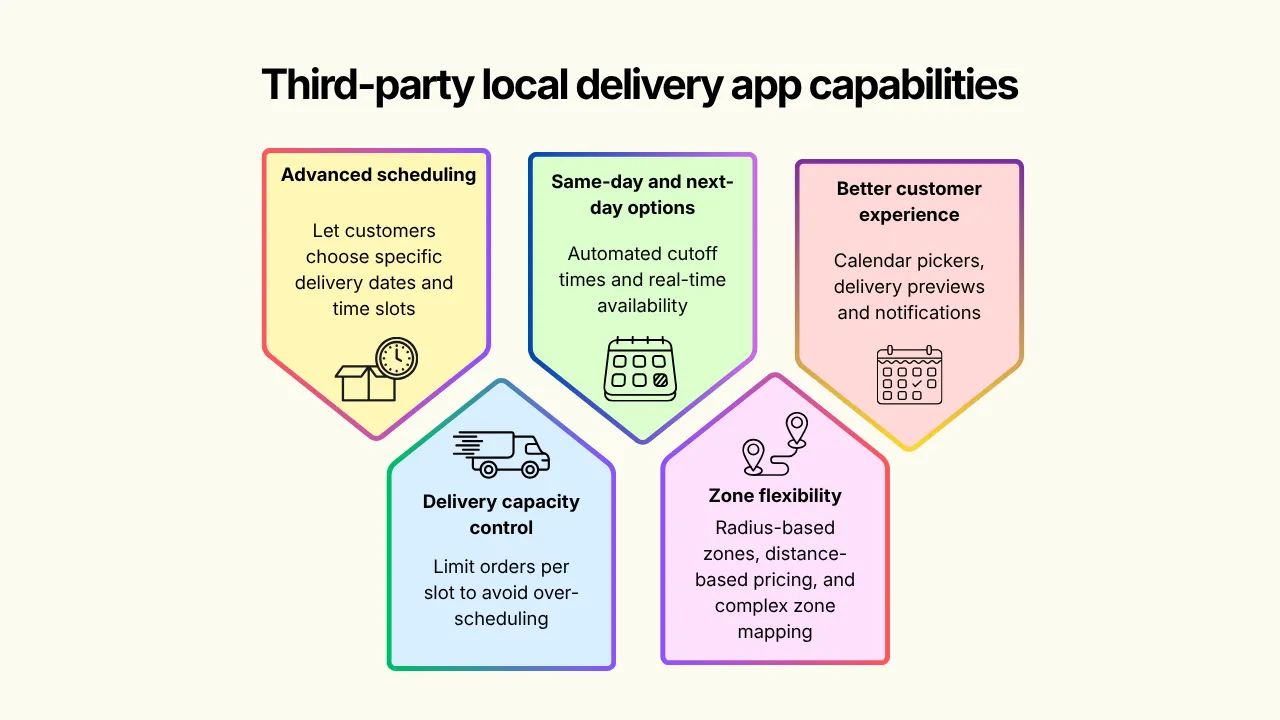
Third-party local delivery apps extend Shopify’s capabilities with:
- Advanced scheduling: Let customers choose specific delivery dates and time slots
- Delivery capacity control: Limit orders per lost to avoid over-scheduling
- Same-day and next-day options: Automated cutoff times and real-time availability
- Zone flexibility: Radius-based zones, distance-based pricing, and complex zone mapping
- Better customer experience: Calendar pickers, delivery previews, and notifications
From checkout to doorstep, make local delivery easier with Pickeasy.
How to choose the right Shopify local delivery app
When evaluating local delivery apps for your Shopify store, consider these essential factors:
Delivery zone control (zip code, radius, distance-based)
Look for apps that offer flexible zone configuration:
- Zip/postal code-based zones: Ideal for serving specific neighborhoods or regions
- Radius-based zones: Draw circular delivery areas around your store location(s)
- Distance-based pricing: Charge more for deliveries farther from your location
- Multi-location support: Manage different zones for each store or warehouse
Date & time scheduling with cut-off times
Robust scheduling features are essential:
- Calendar-based date selection: Let customers pick delivery dates weeks in advance
- Time slot options: Morning, afternoon, evening, or custom time windows
- Cut-off times: Automatically prevent same-day orders after a certain time
- Blackout date: Block holidays or days when you don’t deliver
- Lead time settings: Require order X hours/days in advance
Same-day and next-day delivery support
For competitive advantage, ensure your app supports:
- Same-day delivery with configurable cutoff times (e.g., “order by 2 PM for today”)
- Next-day delivery as default or optional
- Automatic date availability based on order time
Order limits per slot/delivery capacity
Prevent over-scheduling with capacity management:
- Set maximum orders per time slot
- Configure capacity by day or specific slots
- Real-time availability updates as slots fill up
- Waitlist or alternative slot suggestions
Free local delivery setup
Flexible free delivery options help drive conversions:
- Free delivery above a minimum cart value
- Free delivery for specific zip / postal codes or zones
- Free delivery for loyalty members or first-time customers
- Promotional free delivery periods
Pricing and free trial availability
Consider the total cost of ownership:
- Free plans: Good for testing or low-volume stores
- Usage-based pricing: Pay per order or delivery
- Fixed monthly rates: Predictable costs for high-volume stores
- Free trial period: Test features before committing
Customer reviews and support quality
Check user feedback for:
- Overall rating and number of reviews
- Common complaints or praise points
- Developer responsiveness to issues
- Documentation quality and availability
- Support channels (email, chat, call)
Make local delivery easy with Pickeasy.
Best Shopify Local Delivery Apps in 2026
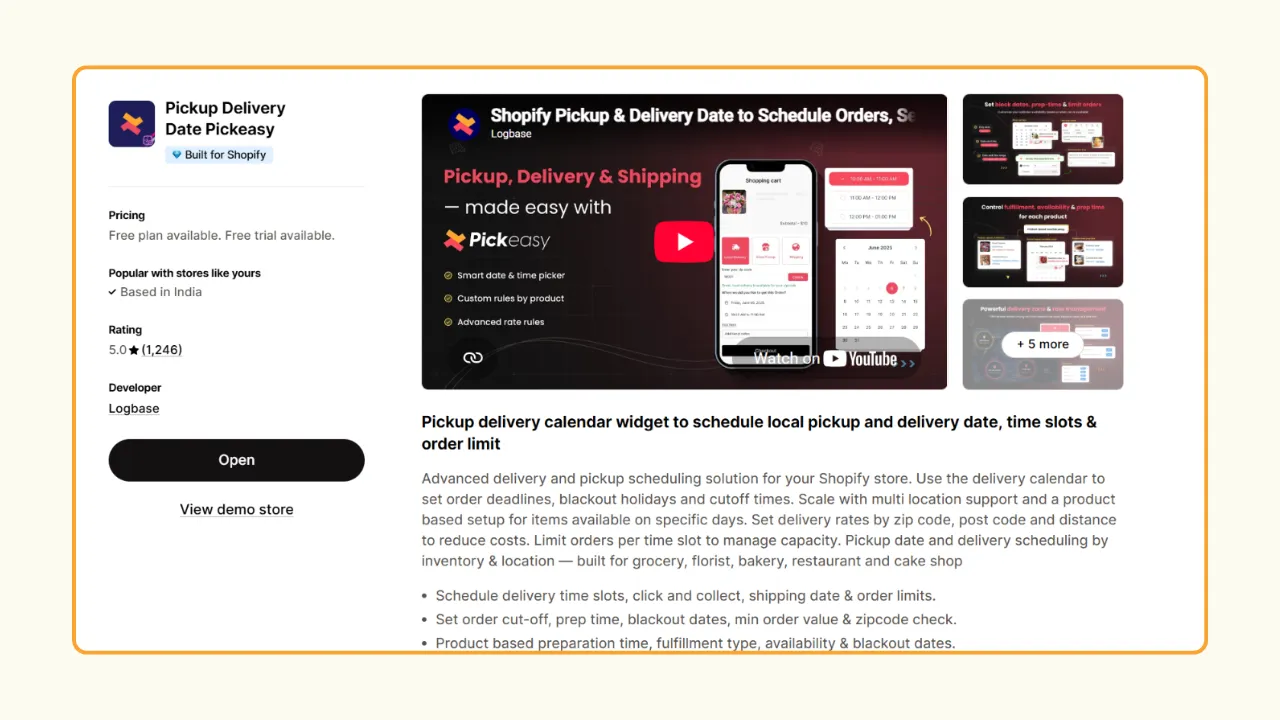
Pickup Delivery Date Pickeasy
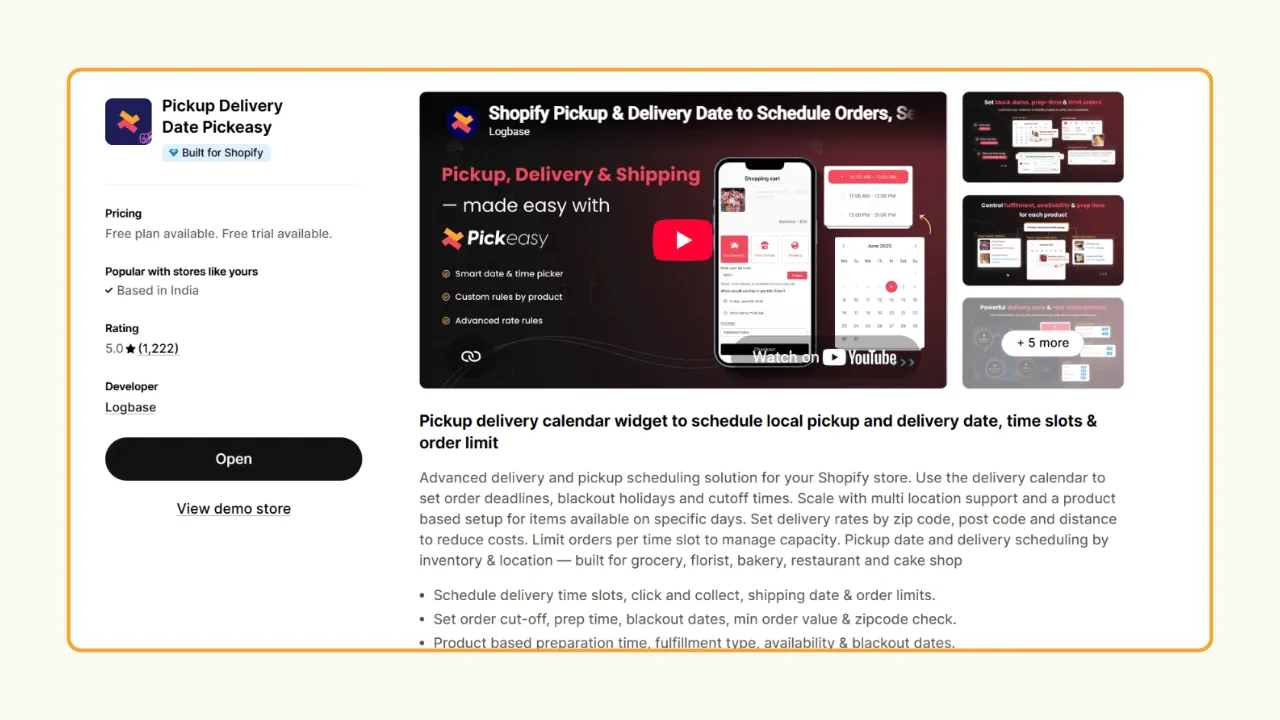
Pickeasy is specially built to handle local delivery the way fulfillment-based independent businesses need it. It offers dynamic control over when an order can be delivered, not just whether it can be delivered. It also supports Shopify POS, Google Calendar sync, and Shopify Flow.
Local delivery scheduling that fits your business
Pickeasy gives you full control over when customers can receive their orders. Set delivery availability by ZIP code, postcode, or distance from your store. You can layer it up with an added cut-off time so orders placed before a certain time qualify for same-day delivery, while later orders automatically move to the next available day. To paint it better, customers ordering at 1 PM see same-day delivery, while an order placed at 6 PM automatically rolls to the next day.
With Pickeasy, you can also prevent overbooking with delivery slot limits and block holidays or store closures using blackout dates. Order limits per time slot stop your team from getting buried during peak hours, and blackout dates keep holidays or closures off the calendar entirely.
Flexible delivery rates to avoid losses
Pickeasy lets you set rates based on zip/postal code, distance, product, weight, or cart value — so a bulky or far-zone order doesn't quietly eat your margin. Unlike many apps that only support zone- or distance-based pricing, Pickeasy lets you combine multiple pricing rules
Product-specific delivery settings
Not every product follows the same delivery schedule. With Pickeasy, you can:
- Make specific products available for local delivery only.
- Block delivery on specific days.
- Set custom preparation times for individual products.
This is especially useful for bakeries, florists, meal prep services, and other businesses with products that require different handling or preparation times. With each plan, Pickeasy delivers the best for different store needs and is one of the best fits for smaller as well as larger, multi-location operations.
Pricing
Customer Reviews
Zapiet - Pickup + Delivery
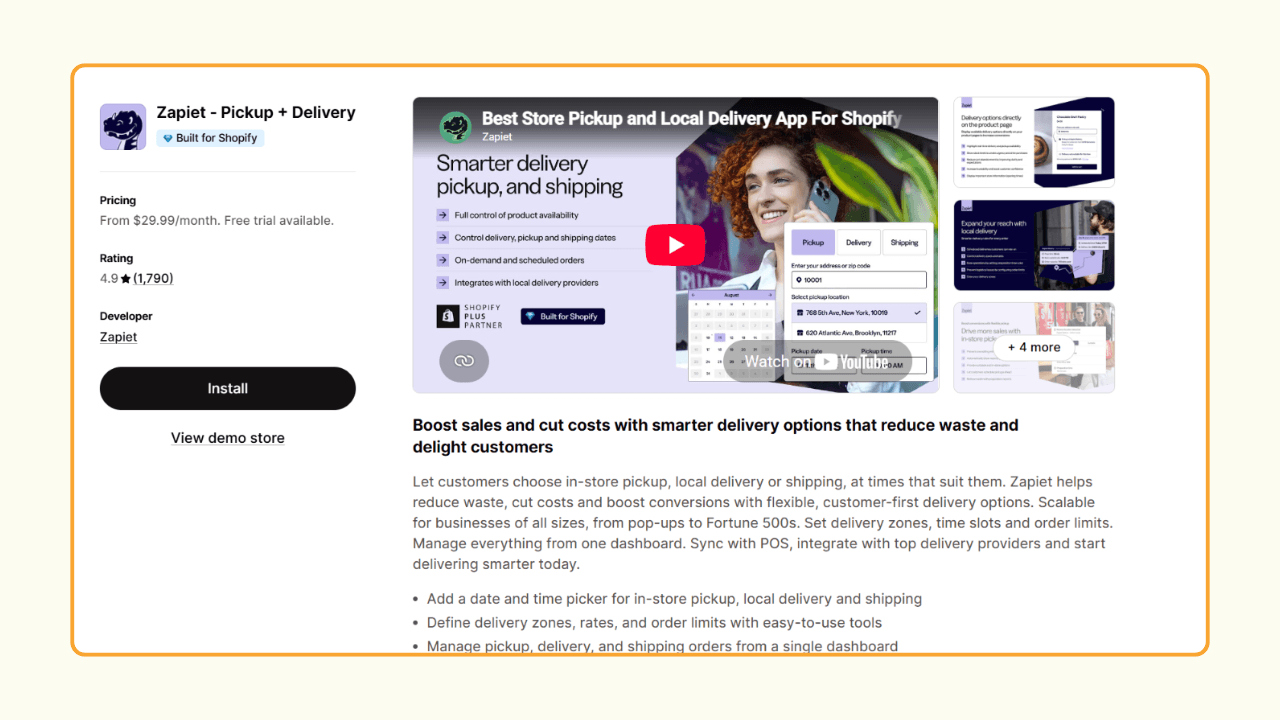
Zapiet supports local pickup, local delivery, and shipping from a single dashboard. It also integrates with popular tools like POS, Klaviyo, Zapier, Google Calendar, and delivery partners.
As your business grows, Zapiet can handle multiple store locations, order limits, product-specific delivery dates, and real-time inventory syncing is available at higher tiers. It can scale up to 100 locations and 2,500+ orders/month on its top plan, making it a fit for businesses with large and multi-location operations rather than single-store merchants.
If you only need basic features like delivery zones and a delivery date picker, the higher price may not offer the best value compared to simpler alternatives like Pickeasy or Bird. But one of the unique features that makes Zapiet stand out is its integration to connect directly to on-demand delivery networks. This enables merchants to dispatch orders to a real driver without running their own fleet.
Pricing
Customer Reviews
Delivery Date & Pickup Stellar
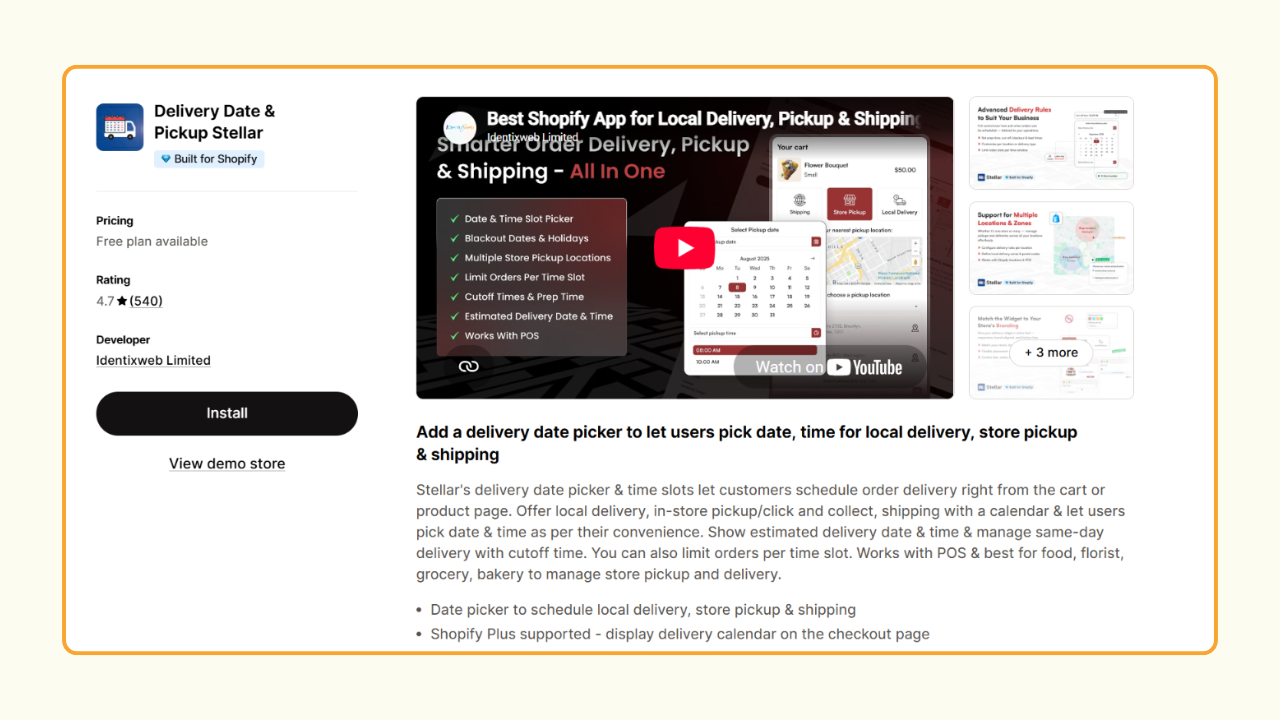
Stellar is a straightforward date-and-time picker that lets customers choose a delivery, pickup, or shipping date and time during checkout. It also includes a built-in route planner to help organize delivery stops, making it a good option for businesses that handle their own deliveries.
Stellar's free plan supports up to 3 locations and 100 orders per month, with access to all core features. This makes it a great choice for small businesses managing deliveries across multiple locations
Unlike most apps offering standard straight-line radius options, Stellar's delivery validator can check customers against actual driving distance, with a choice between the fastest or shortest route, and the option to avoid highways, tolls, and ferries.
Pricing
Customer Reviews
Bird Pickup Delivery Date
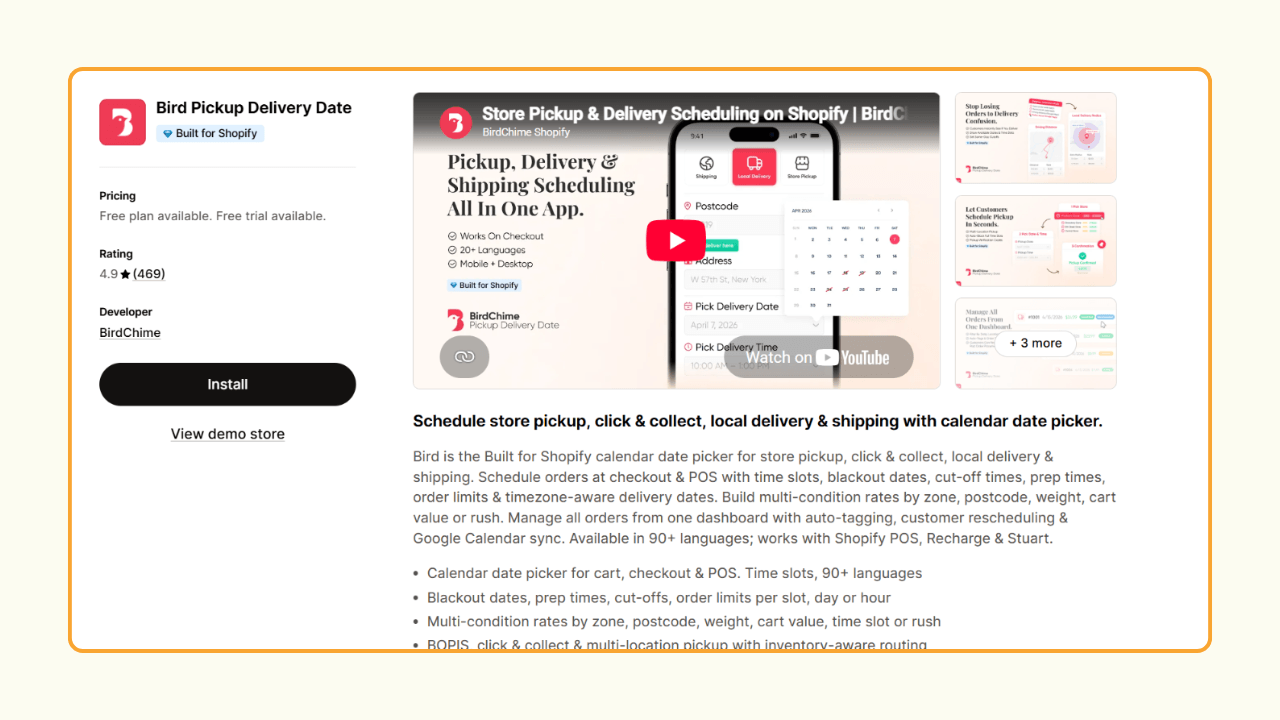
Bird combines delivery scheduling, flexible pricing, and order management into a single app, making it a good choice for growing Shopify stores.
Their abandoned cart and checkout validation feature ensures that the abandoned cart doesn't hold a slot hostage. Merchants can set a stale time limit, and once it's up, the slot will automatically clear up if payment is due.
The notification setting helps keep everyone informed with automatic emails for order confirmations, staff alerts, pickup notifications, dispatch updates, and delivery reminders. Delivery dates and times also appear on packing slips and invoices, so your warehouse staff and delivery team always have the same order information. This helps avoid unnecessary confusion and order miscommunication.
Pricing
Customer Reviews
ShipZip - Shipping & Delivery
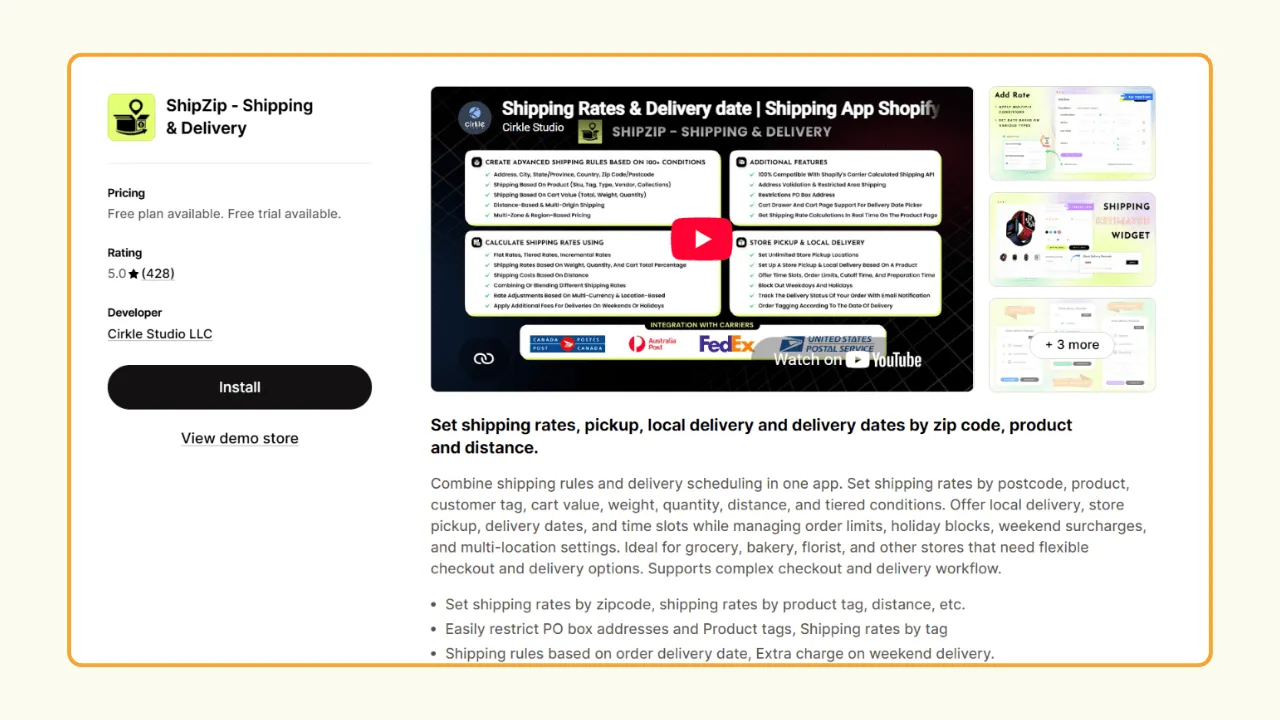
ShipZip is designed to give you more control over shipping and delivery rates rather than focusing on just advanced scheduling. Its strength lies in creating custom rates based on ZIP code, distance, products, or customer groups, while also supporting local delivery and store pickup.
It also supports live carrier rates from providers, which makes ShipZip a great choice for businesses with complex shipping requirements. Along with shipping rates, ShipZip supports local delivery and store pickup. Customers can choose a delivery date, and you can set cut-off times and even add extra charges for weekend or holiday deliveries.
Pricing
Customer Reviews
How to set up same-day or next-day delivery on Shopify
Prerequisites for same-day delivery
To successfully offer same-day delivery, you need:
- Clear cutoff times: Orders placed before X time get same-day delivery
- Operational capacity: Ability to pick, pack, and deliver quickly
- Limited delivery zones: Smaller areas ensure deliverability
- Real-time inventory: Prevent orders for out-of-stock items
- Customer communication: Clear messaging about cutoff times and delivery windows
How to configure same-day or next-day delivery slots in Pickeasy
1. Install the Pickeasy app from the Shopify App Store.
2. Go to Pickeasy Locations and add your store location(s).
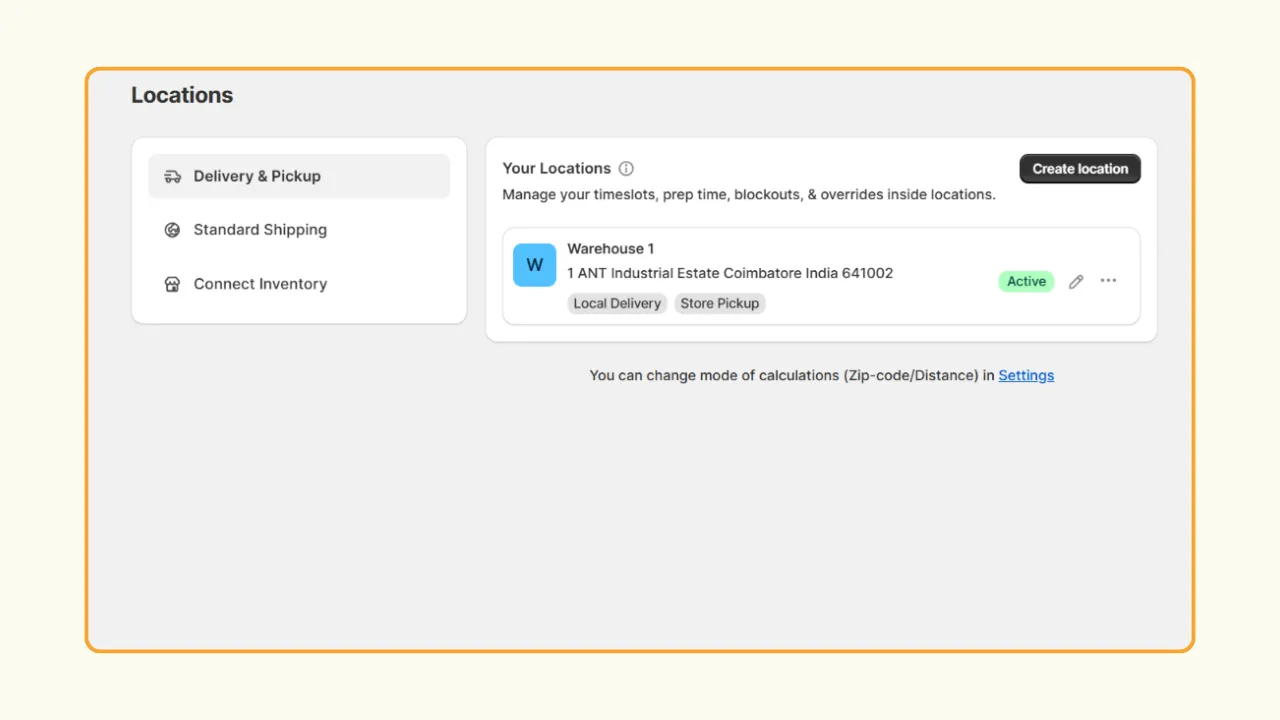
3. Set the fulfillment type as Local delivery.
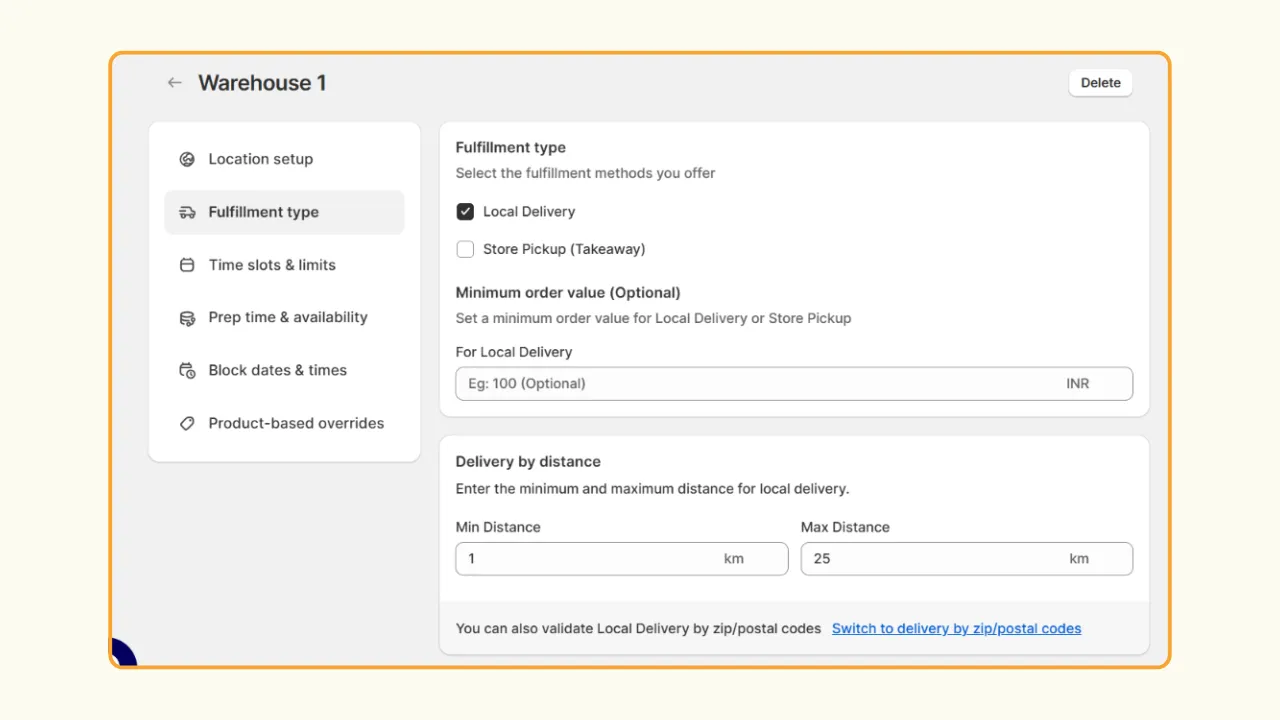
4. local delivery by zip code or distance.
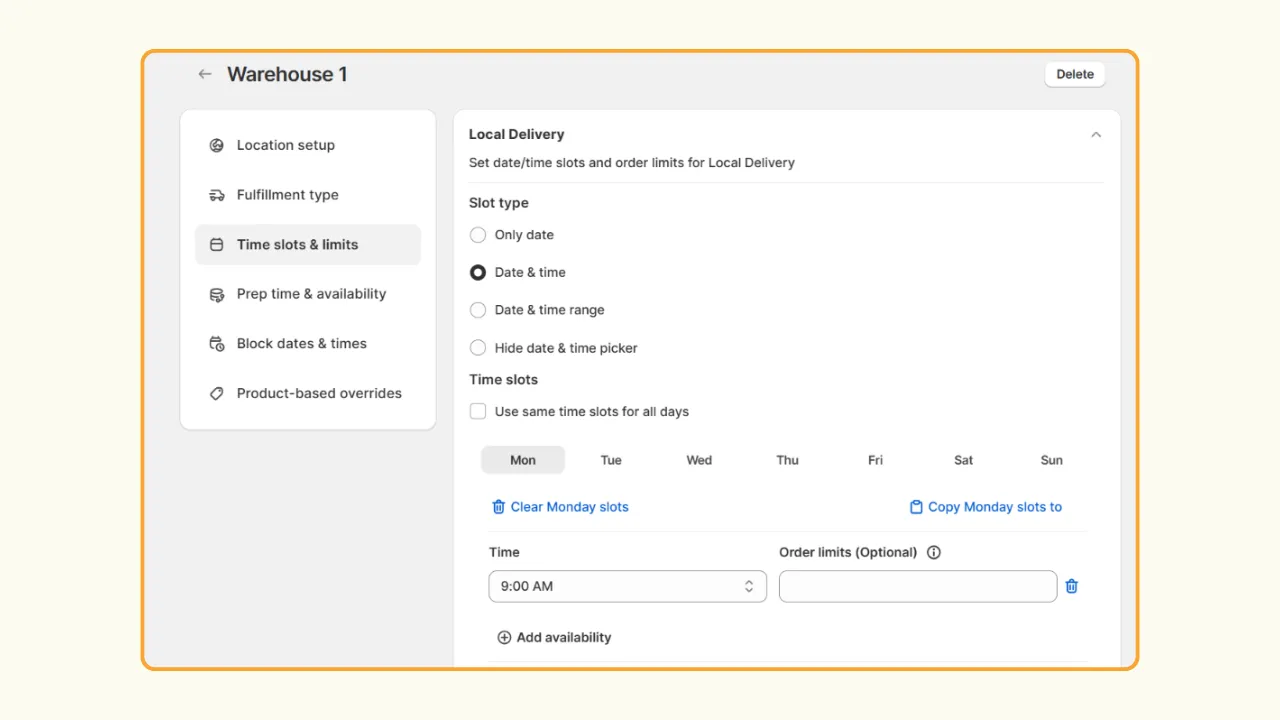
5. Next, set the slot type for your local delivery. You can also add order limits per slot.
6. Set the days your store is open to prepare orders.
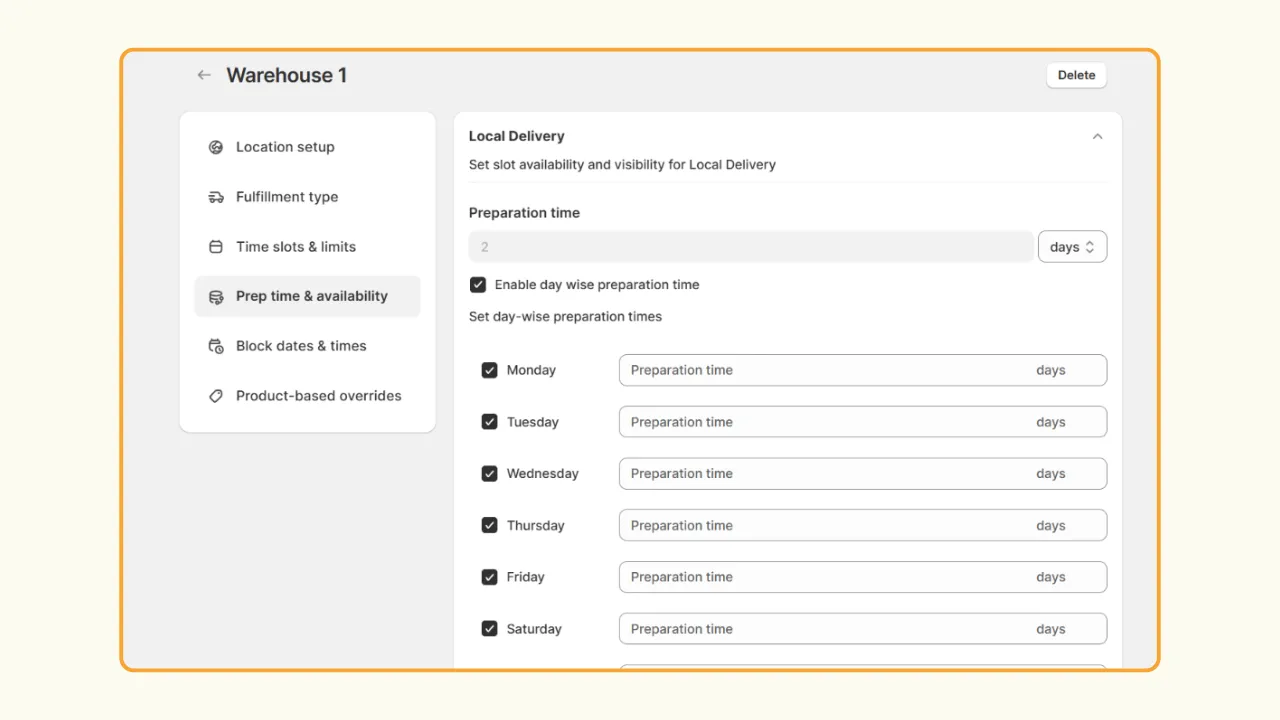
7. Set the preparation time for your order. Preparation time can be set in minutes, hours, or days.
Note: You can configure product-level same-day or next-day delivery using product overrides
8. Then, set the work start and end time and click Save.
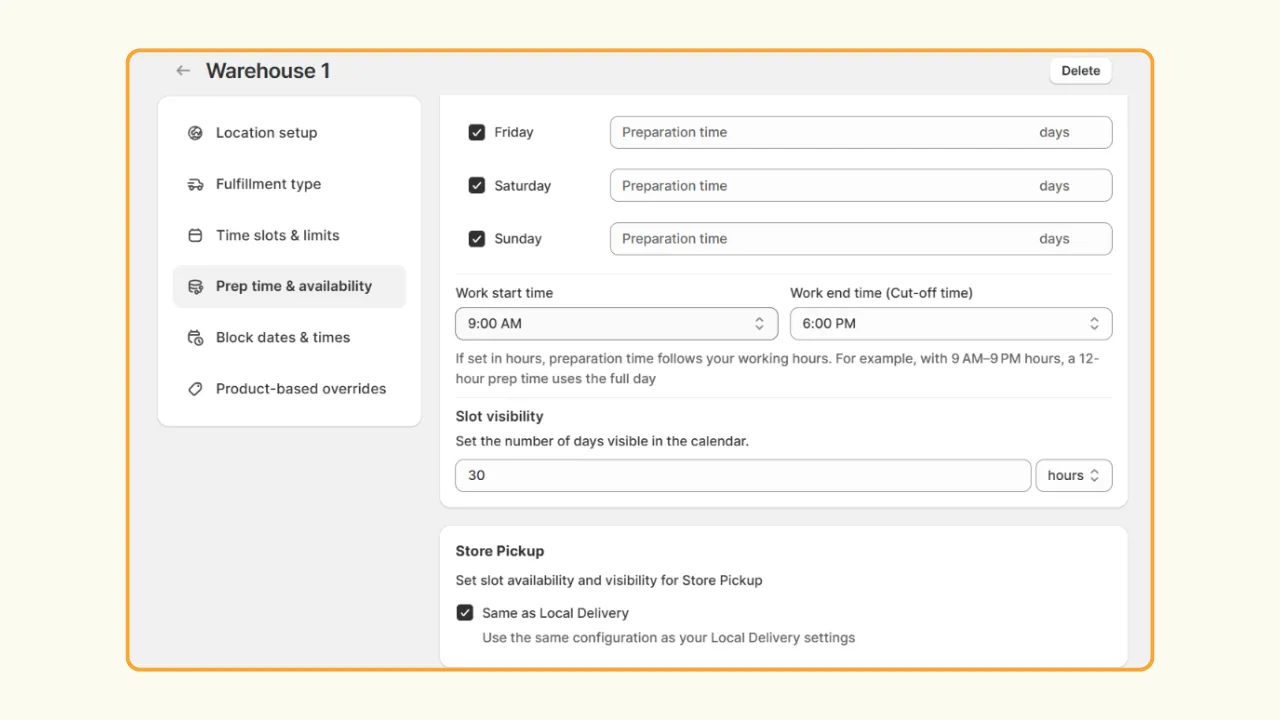
Here is how it works: let’s say you need 3 hours to prepare an order. Your work time starts at 10 in the morning and ends at 5 in the evening. Any orders placed before 12 in the afternoon will get the same-day delivery. Any orders placed after 12 will get next-day delivery.
Best practices for same-day or next-day delivery
For same-day delivery:
- Set realistic cutoff times (leave 4+ hours for fulfillment)
- Start with limited zones and expand gradually
- Use capacity limits to avoid overwhelming your team
- Clearly display cutoff times on product pages and in the cart
- Consider premium pricing to offset operational costs
For next-day delivery:
- Make it your default local delivery option for simplicity
- Allow orders until evening (e.g., 8 PM cutoff for next day)
- Offer wider delivery zones than same-day
- Use it as a free option while charging for same-day
- Batch orders efficiently for route optimization
General tips:
- Communicate delivery windows clearly (avoid “sometime tomorrow”)
- Send order confirmation with the exact delivery slot
- Provide delivery tracking or status updates
- Have a backup plan for capacity overflow
- Monitor performance and adjust slots/zone as needed
How to offer free local delivery on Shopify
Free local delivery is a powerful conversion tool. Here’s how to implement it effectively:
Setting a free delivery threshold by cart value
In Shopify native settings:
1. Go to Settings → Shipping and delivery.
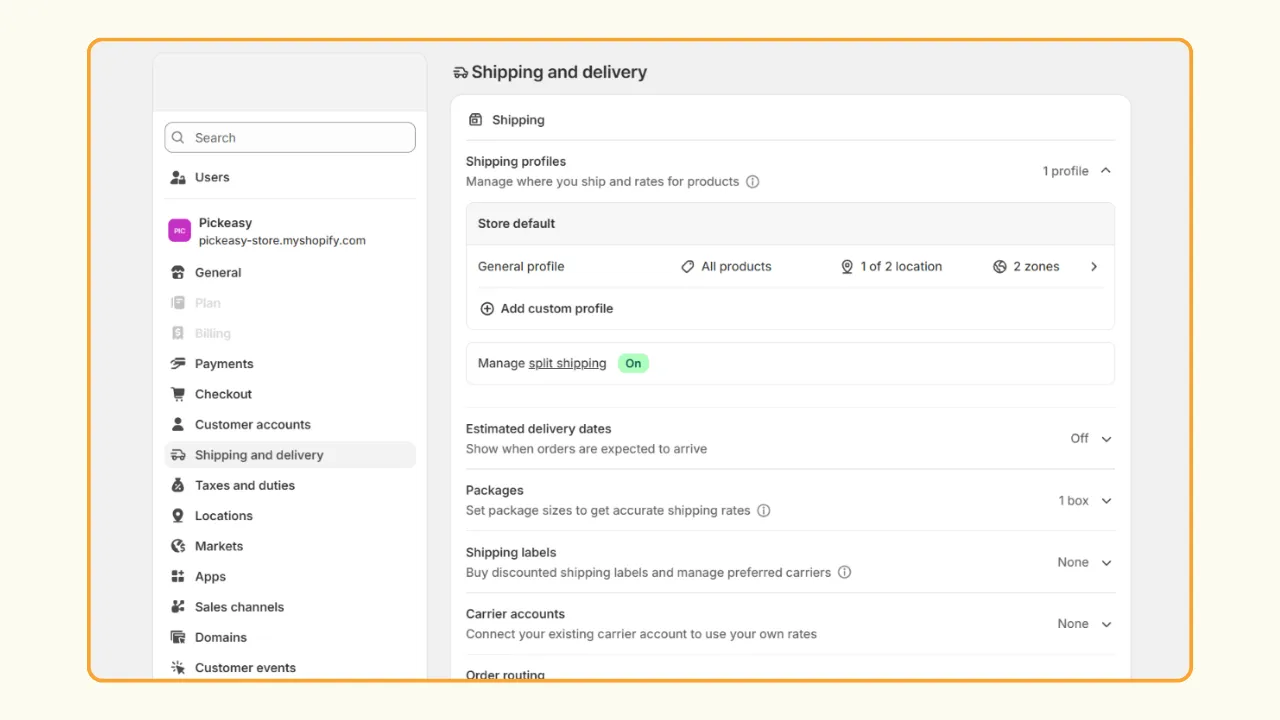
2. Under Additional delivery methods, select Local delivery.
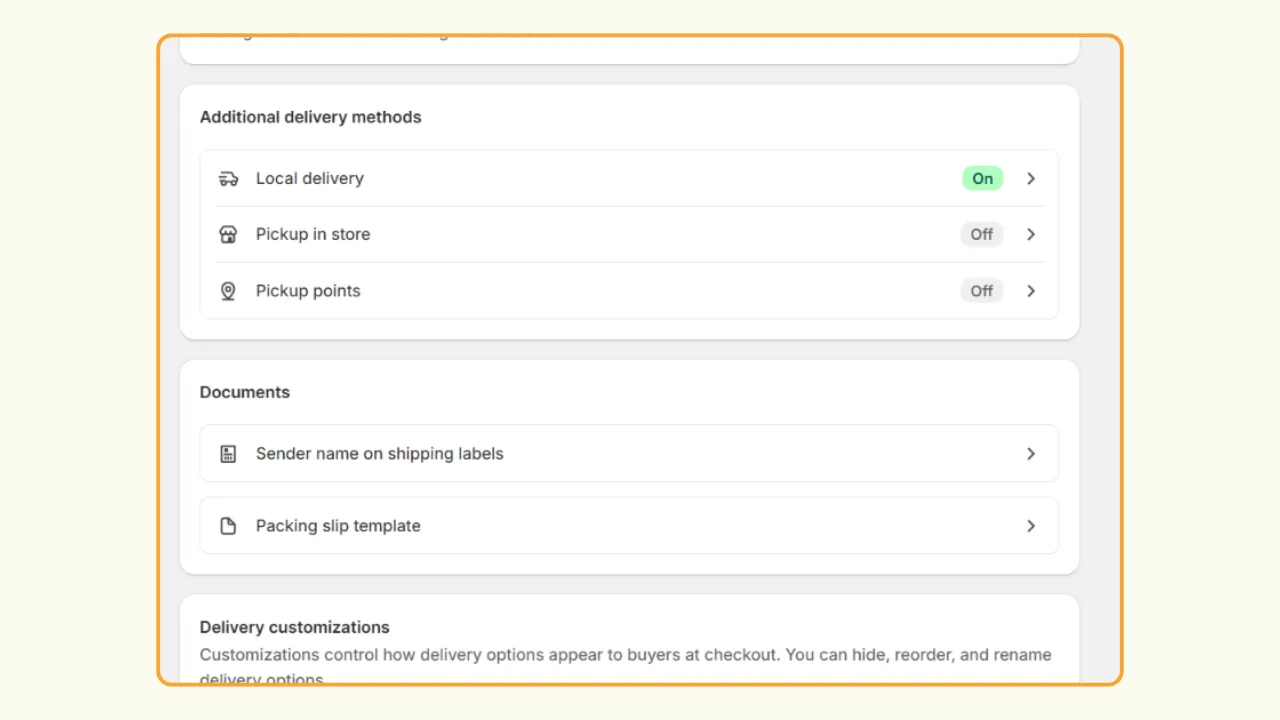
3. select your location.
4. Under delivery zones, select Use a PIN code or Set a delivery radius.
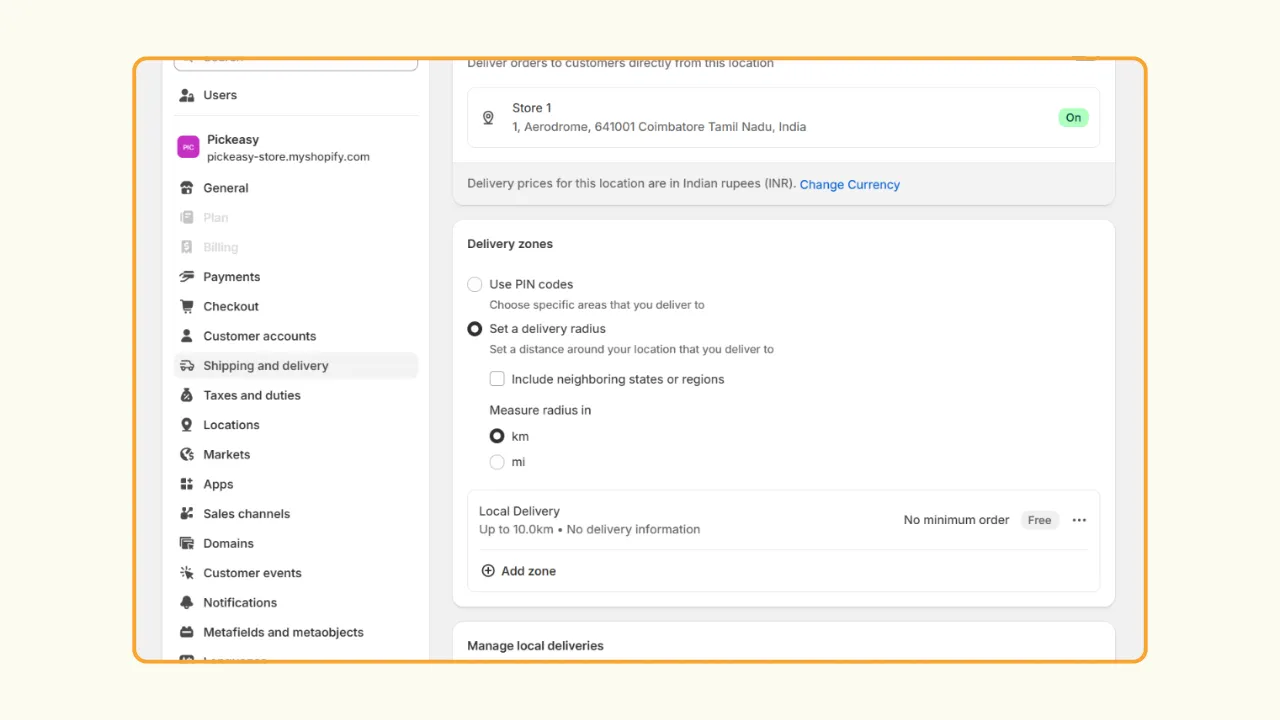
5. Click Add zone to create a new price.
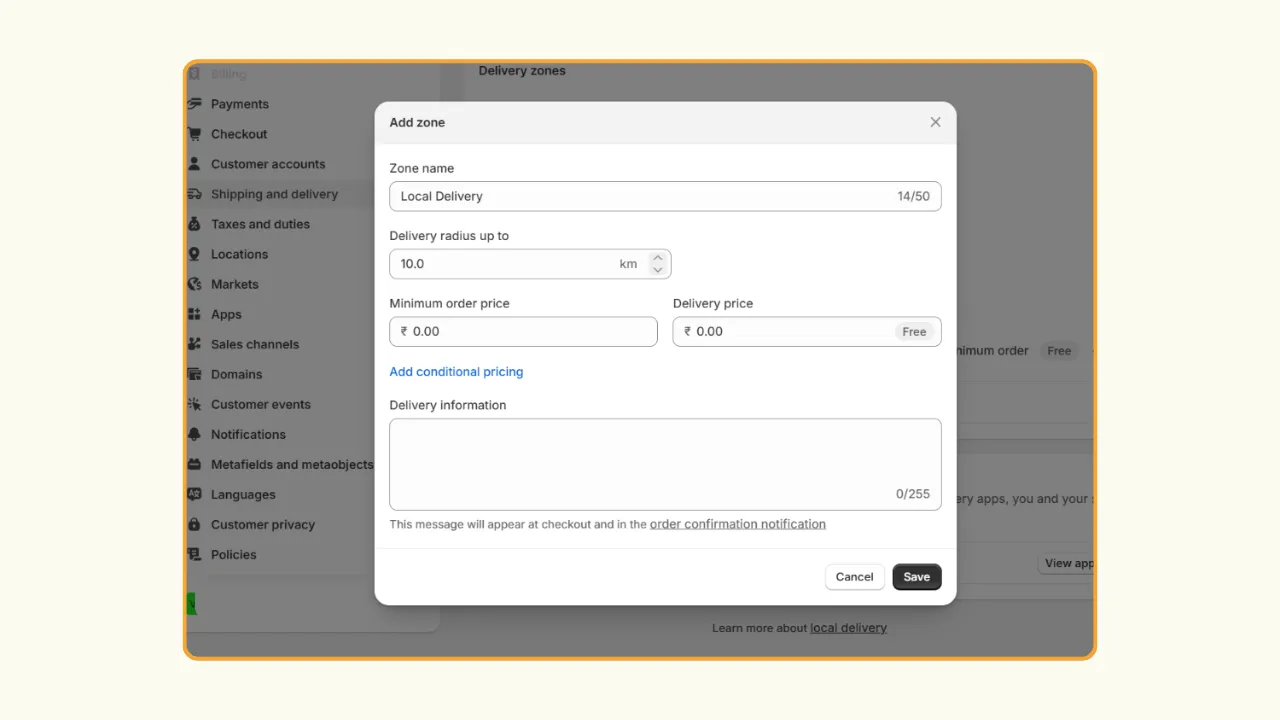
6. Enter the zone name and pin codes or delivery radius.
7. Set a minimum order value and set the delivery price to 0 for free. Click Save.
For example, if you want to set free delivery for orders over $50, set the minimum order value to $50.
In Pickeasy:
- Go to Pickeasy Locations and add your location.
- Select Local Delivery as the fulfillment type.
- Set delivery by zip/postal codes or by distance.
- Add the slots for your local delivery.
- Set the preparation time and availability.
- Optionally, set the block-out dates & time and product-based overrides. Click Save.
- Then, go to Pickeasy Rates.
- On the Local delivery tab, click Add zone.
- Set the zone name and sync your Pickeasy locations.
- Now, click Add rates by order value. You can also set shipping rates based on total weight, ZIP code, distance, time, day, and other parameters.
- Enter the rate name and set the delivery rate to 0 for free.
- Set the minimum and maximum order value and click Add and then Save.
Configuring free delivery by zip code
In Shopify native settings:
- Go to Settings → Shipping and delivery.
- Under Additional delivery methods, select Local delivery.
- Select your location.
- Under delivery zones, select Use PIN codes.
- Click Add zone.
- Enter a zone name and the PIN codes to which you want to offer free delivery.
- Set the delivery price to zero for free and click Save.
In Pickeasy:
- Go to Pickeasy Locations and add your location.
- Select Local Delivery as the fulfillment type.
- Set delivery based on zip codes and enter the zip codes.
- Add the slots for your local delivery.
- Set the preparation time and availability.
- Optionally, set the block-out dates & time and product-based overrides. Click Save.
- Go to Pickeasy Rates.
- On the Local delivery tab, click Add zone.
- Set the zone name and sync your Pickeasy locations.
- Click Add rate by order value.
- Enter the rate name and set the delivery rate to 0 for free.
- Set the minimum and maximum order value to 0 and click Add and then Save.
Shopify local delivery not showing / not working - common fixes
If customers can’t see local delivery as an option at checkout, try these troubleshooting steps:
Fix 1: Location not enabled for online fulfillment
Problem: Your store location isn’t set up to fulfill online orders.
Solution:
- Go to Shopify Settings → Locations
- Select a location
- Turn on local delivery
- Click Save
Fix 2: Delivery zone doesn’t include customer’s address
Problem: The customer’s address is outside your configured delivery zones.
Solution:
- Go to Shopify Settings → Shipping and delivery → Local delivery
- Review your delivery zones
- Ensure the customer's zip code/postal code is included
- If using radius, verify the distance calculation
- Test with the exact customer address
Fix 3: Product not marked as available at that location
Problem: Products aren’t assigned to your delivery location.
Solution:
- Go to Shopify Product → Select product
- Scroll to the Inventory section
- Ensure the product is tracked at your delivery location
- Check that the quantity is greater than 0
- Check if the product is marked as a physical product.
Fix 4: App conflicts with theme or checkout settings
Problem: Third-party apps or theme customizations interfere with delivery options.
Solution:
- Disable other delivery/shipping apps temporarily
- Switch to a default Shopify theme and test
- Clear your browser cache and cookies
- Check app settings for conflicts (especially checkout customizations)
- Contact app support with screenshots of your checkout
Fix 5: Minimum order value not met
Problem: Customer’s cart doesn’t meet minimum order requirements.
Solution:
- Review your delivery rate conditions
- Check if the minimum order value is set
- Verify cart subtotal calculation (before/after tax/discounts)
- Adjust the minimum or clearly communicate requirements
- Consider offering paid delivery as a fallback below the minimum
Additional troubleshooting:
- Ensure local delivery is enabled in Shopify settings
- Verify the customer address format matches the expected format
- Test with a different browser or incognito mode
- Review the Shopify status page for platform issues
Shopify local delivery vs store pickup - which should you offer?
When local delivery makes sense
Choose local delivery as your primary option when:
- Customers prefer convenience: Your target market values doorstep delivery
- Product considerations: Heavy, bulky, or temperature-sensitive items
- Competitive advantage: Competitors don’t offer delivery in your area
- Elderly or mobility-limited customers: Essential for accessibility
- Premium positioning: Delivery adds perceived value
- Higher margins: Your pricing supports delivery costs
Best for: Groceries, prepared food, flowers, furniture, appliances, pharmaceuticals
When store pickup is better
Prioritize store pickup when:
- Cost-sensitive market: Customers want to save on delivery fees
- Immediate need: Customers want products now, not scheduled later
- Small, lightweight products: Easy for customers to carry
- Foot traffic goals: Use pickup to drive in-store browsing and upsells
- Limited delivery capacity: Can’t handle delivery volume
- Urban locations: Customers are nearby, and parking is available
- Impulse purchases: “Buy online, pick up in 30 minutes”
Best for: Clothing, books, electronics, coffee, bakery items, prescriptions (if urgent)
When to offer both and how to manage it with one app
Offer both when:
- Different products suit different fulfillment types
- Customer preferences vary widely in your market
- You have operational capacity for both fulfillment methods
- You want to maximize order volume and customer satisfaction
Managing both with Pickeasy:
Pickeasy excels at handling both local delivery and store pickup as one unified solution:
Single installation: One app for both fulfillment methods
Unified scheduling: Same calendar interface for pickup and delivery slots
Shared capacity management: Allocate resources across both methods
Location-based logic: Show delivery or pickup based on customer address
Flexible pricing: Free pickup, paid delivery, or vice versa
Consistent customer experience: Seamless selection at the cart page
Setup strategy:
- Set pickup as free to encourage adoption
- Use delivery for larger orders or loyal customers
- Charge for delivery or offer free delivery above the threshold
- Use pickup to drive impulse purchases (“Ready in 1 hour”)
- Monitor data to see which customers prefer which method
Conclusion
Choosing the right local delivery app can significantly impact your customer satisfaction, operational efficiency, and bottom line. Whether you’re just starting with local delivery or looking to upgrade from Shopify’s native solution, apps like Pickeasy offer the advanced features and flexibility modern e-commerce businesses need. Pickeasy offers around-the-clock customer support, which can be easily accessed through live human chat, call, and even email.
Start with a free trial, test the customer experience, and monitor your delivery performance metrics. With the right app and configuration, local delivery can become a powerful competitive advantage for your Shopify store in 2026.
Ready to get started? Install Pickeasy today and offer your customers the fast, flexible local delivery they expect.
FAQ
1. What is the best Shopify local delivery app in 2026?
Pickeasy is the best overall local delivery app for Shopify in 2026. It offers the most comprehensive feature set, including advanced scheduling, flexible zone control, same-day delivery support, and capacity management with a free plan (50 orders/month). The paid plan starts at $9.99/month.
2. Can I offer local delivery only (without shipping) on Shopify?
Yes, you can offer local delivery without traditional shipping on Shopify by removing all shipping zones in Shopify settings. Once you remove the shipping zone, you can offer only local delivery on your Shopify store. However, if you want better control over your local delivery, install a local delivery app.
3. How do I set up delivery zones on Shopify?
To set delivery zones using native Shopify settings:
- Go to Shopify Settings → Shipping and delivery
- Select Local delivery → Select your location
- Choose Use postal codes or Set a delivery radius
- Click Add zone and enter the name, delivery radius, or postal codes.
- Set the minimum order price and delivery price
- Click Save
To set a delivery zone using an app:
- Install Pickeasy
- Add your store location(s)
- Set the fulfillment type as local delivery
- Enter the zip/postal codes you deliver to or set delivery eligibility based on distance
- Configure time slots, order limits, preparation time, and other local delivery settings
- Click Save
4. How do I offer free local delivery on Shopify?
To set free local delivery on Shopify:
- Go to Shopify Settings → Shipping and delivery
- Select Local delivery → Select your location
- Choose Use postal codes or Set a delivery radius
- Click Add zone and enter the name, delivery radius, or postal codes
- Set the delivery pricing to 0 to make the local delivery free
- Click Save
To set up free local delivery using an app:
- Install the Pickeasy app
- Configure local delivery for your store
- Go to the Rates page, create a zone for local delivery
- Here you can set free shipping based on advanced conditions
- Click Save to complete
5. How can I limit the number of local deliveries per day on Shopify?
Shopify’s native local delivery doesn’t include capacity limits. You need a third-party app like Pickeasy to limit the number of orders per day.
Here’s how to do it:
Go to Pickeasy > Locations > Select your location > Select Time slots & limits > Set the order limits for each slot > Click Save.
Benefits of order limits:
- Create urgency (limited slots available)
- Balance workload across days
- Prevent operation overload
- Ensure quality service
6. Why is my Shopify local delivery option not showing?
The most common reasons and fixes
- Location not enabled: Ensure that you have enabled local delivery for that location.
- Customer outside delivery zone: Verify customers zip code in your delivery zones.
- Product not available at location: Check product inventory settings
- Minimum order value not met: Review delivery rate conditions
- App conflict: Disable other shipping apps temporarily
- Theme issues: Test with a default Shopify theme
- Cache problems: Clear browser cache
If none of these work, contact your local delivery app’s support team.
.avif)
.webp)
.webp)
.webp)
.svg)
.svg)
.svg)


.svg)